



For molecular modelers, computing the Potential of Mean Force (PMF) is a critical step in understanding molecular interactions along reaction coordinates. However, managing simulations, ensuring proper input organization, and visualizing results can be daunting. The GROMACS Wizard in SAMSON simplifies this process with its intuitive tools and streamlined workflow. If you’re looking to optimize your PMF computations, here’s how the GROMACS Wizard can help.
Organizing Your Input for PMF Analysis
One of the common hurdles in PMF computation is ensuring your input data is correctly organized. In GROMACS Wizard, the WHAM Analysis tab takes the guesswork out of preparing your project. You can either manually set the project path or use the convenient auto-fill button ( ) if the project stems from previous steps such as Umbrella Sampling.
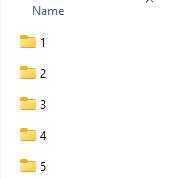
Your project folder should contain numbered subfolders, each housing simulation results for the same system and reaction coordinates. Proper folder organization ensures the tool can seamlessly integrate data on reaction coordinates, time, and temperature, setting the foundation for accurate WHAM analysis.
Effortless Computation and Visualization
Once the input data is loaded, choose your reaction coordinate from the list, adjust additional parameters like custom bounds or time if necessary, and click Compute. Within moments, GROMACS Wizard generates two essential graphs:
- PMF Plot: Displays the free energy profile along the reaction coordinate, helping you analyze energy barriers and stable states.
- Histogram: Highlights the coverage of the reaction coordinate space, pinpointing areas that might benefit from further computation.
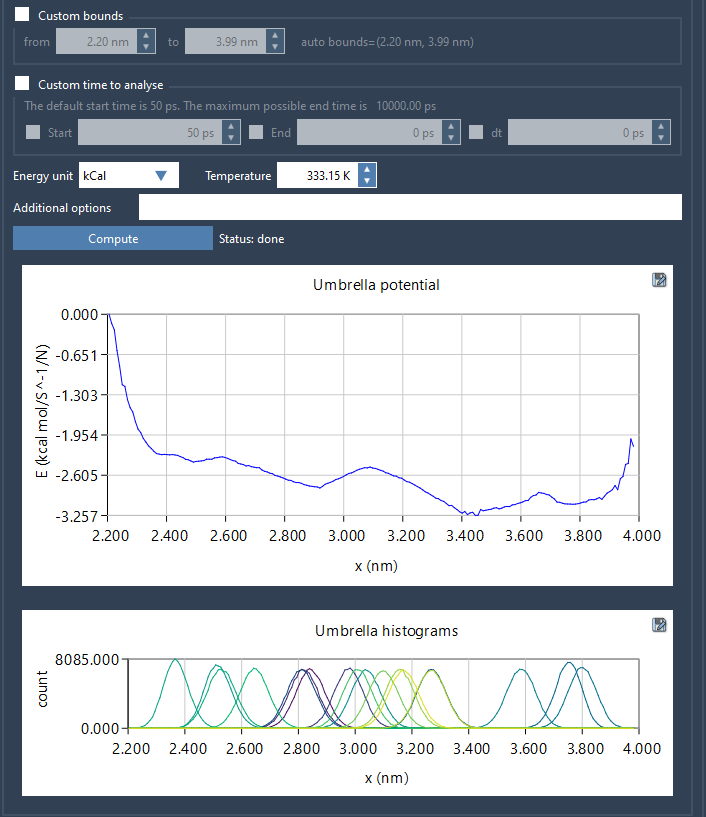
These visualizations not only offer valuable insights into your system but also make it easy to identify where additional data collection is needed.
Automatic Data Management
Another noteworthy feature is the automation of result management. Once a PMF computation is complete for a given set of parameters, GROMACS Wizard saves all profiles, histograms, and plots in the wham_results subfolder within your project directory. This functionality ensures you can effortlessly revisit and compare results when switching reaction coordinates or parameters without needing to repeat the computations.
Why Use GROMACS Wizard?
By leveraging the WHAM Analysis tools in GROMACS Wizard, you’ll save time on data organization, computation, and visualization. The intuitive interface and automated workflow empower molecular modelers to focus on interpreting results rather than battling technical hurdles. Whether you’re new to PMF computation or looking to refine your methods, GROMACS Wizard offers a user-friendly and efficient solution.
Ready to streamline your PMF analysis? Check out the full documentation at https://documentation.samson-connect.net/tutorials/gromacs-wizard/pmf-analysis/ to learn more.
SAMSON and all SAMSON Extensions are free for non-commercial use. Get SAMSON today at https://www.samson-connect.net.