



For molecular modelers designing complex materials, understanding polymer sequences can often feel daunting. Whether it’s building synthetic biopolymers or molecular brushes, managing sequence patterns efficiently can save time and elevate the quality of your design. Let’s take a deep dive into how the Polymer Builder extension in SAMSON makes this process approachable and powerful.
Why Do Polymer Sequences Matter?
Polymer sequences are the heart of custom molecular design—they dictate the structural and functional properties of your materials. Imagine needing a sequence with specific repeating patterns or unique bond types between components; handling such structures manually can be error-prone and tedious. The Polymer Builder brings automation and precision to this process.
Step-by-Step: How to Register Polymer Sequences in SAMSON
Here’s an actionable guide to registering polymer sequences:
- Add a New Sequence: Start by clicking
Add new sequencein the Polymer Builder toolbar. - Enter Your Sequence: Use the identifiers for pre-registered monomers to build your pattern. For instance, type
ABBAfor a simple alternating sequence. - Include Bond Types: Define bond types directly within your sequence. Use
=for double bonds or#for triple bonds. For example:A=B: Monomer A connected by a double bond to Monomer B.A#B: Monomer A connected by a triple bond to Monomer B.
- Validate Your Sequence: The status property will indicate whether your sequence is valid or if there’s an error to fix.
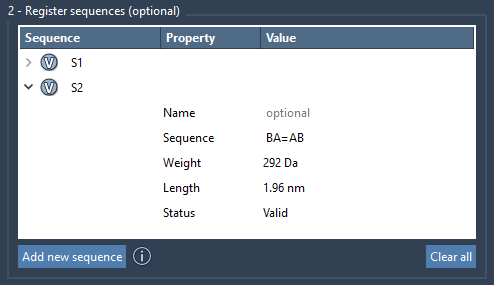
Once your sequence is registered, it is automatically assigned a unique identifier (S1, S2, etc.) and its properties like molecular weight and length are displayed for reference.
Efficient Sequence Modifications
Flexibility is key in molecular modeling. With SAMSON’s Polymer Builder, you can easily tweak pre-registered sequences:
- Edit names and patterns directly in the provided table.
- Highlight used monomers by clicking the associated V button.
- Manage existing sequences by right-clicking to delete them or using the Clear all option to reset the table.
Correct errors on the fly, add custom names for better organization, and keep track of your polymer’s predicted properties—all without hassle.
Pro Tip: Combine Sequences in Your Polymer
SAMSON allows you to create expressive polymers by combining sequences and monomers. For instance, you can enter a sequence expression like:
|
1 |
S1 + 2*S2 + A=B + AB#BA |
Here you’re mixing sequences, repeating patterns, and bond types in a single step to construct a tailored polymer. Enhance this further by naming the parent structural group—helpful for larger projects.
Visualizing the Results
The Polymer Builder generates polymers based on your defined sequences and calculates expected molecular weights and lengths. This feature allows you to visualize the results and iterate quickly for optimal design.
Conclusion
From defining intricate repeating patterns to managing complex bond connections, registering polymer sequences in SAMSON’s Polymer Builder is an intuitive process that significantly streamlines your workflow. For more details and advanced options, explore the full documentation at https://documentation.samson-connect.net/tutorials/polymer-builder/polymer-builder/.
Note: SAMSON and all SAMSON Extensions are free for non-commercial use. You can download SAMSON at https://www.samson-connect.net.