



For molecular modelers, achieving stable and realistic structures is a fundamental requirement. However, geometry optimization can often become a bottleneck, particularly for systems with large-scale molecular motions. If you’ve ever found yourself frustrated by slow convergence or struggled to prepare structures for simulations, the FIRE Minimizer offers an efficient solution tailored to your needs.
What is the FIRE Minimizer?
The Fast Inertial Relaxation Engine (FIRE) Minimizer is an advanced algorithm implemented in the SAMSON molecular design platform. Designed for efficiency, it outperforms traditional steepest descent methods, especially when dealing with collective motions within a system. This makes it an excellent choice for pre-simulation cleanup or general structural relaxation workflows.
Why Should You Use FIRE?
Unlike the steepest descent algorithm, the FIRE Minimizer achieves significantly faster convergence, which can save you time—especially with larger or more complex systems. Some key benefits include:
- Speed: Faster optimization compared to steepest descent, particularly for systems undergoing large-scale changes.
- Compatibility: The algorithm works seamlessly with any SAMSON interaction model, ensuring broad applicability to different types of simulations.
- Simplicity: Ideal for cleaning up molecular geometries before running detailed simulations.
Quick Start: Using FIRE Minimizer in SAMSON
Incorporating the FIRE Minimizer into your workflow is easy. Here’s a quick guide to getting started:
Step 1: Load Your Molecular System
The first step is to load a molecular structure. The SAMSON platform supports standard formats like PDB and MOL2. For a detailed guide, check out the Loading Molecules Guide.
Step 2: Add a Simulator
Next, add a simulator to your system within SAMSON. Follow these steps:
- Go to Edit > Add Simulator in the toolbar.
- Select the interaction model best suited to your system.
- In the State Updaters list, choose FIRE.
That’s it—you’re ready to begin optimizing your structure!
Fine-Tuning the FIRE Settings
To customize the optimization process, you can modify the following FIRE Minimizer parameters:
| Setting | Description |
|---|---|
| Step size | Initial integration step for the optimization process. |
| Steps | The number of FIRE steps between updates in the viewport, which affects the visualization frequency. |
| Fixed | Optionally forces the step size to remain constant during optimization. |
FIRE vs. Steepest Descent: A Comparison
One of the standout features of the FIRE Minimizer is its efficiency compared to steepest descent. In cases where potential energy changes might be small, but geometries still evolve significantly, FIRE excels by reducing the time required for convergence. The following visual examples demonstrate the differences:

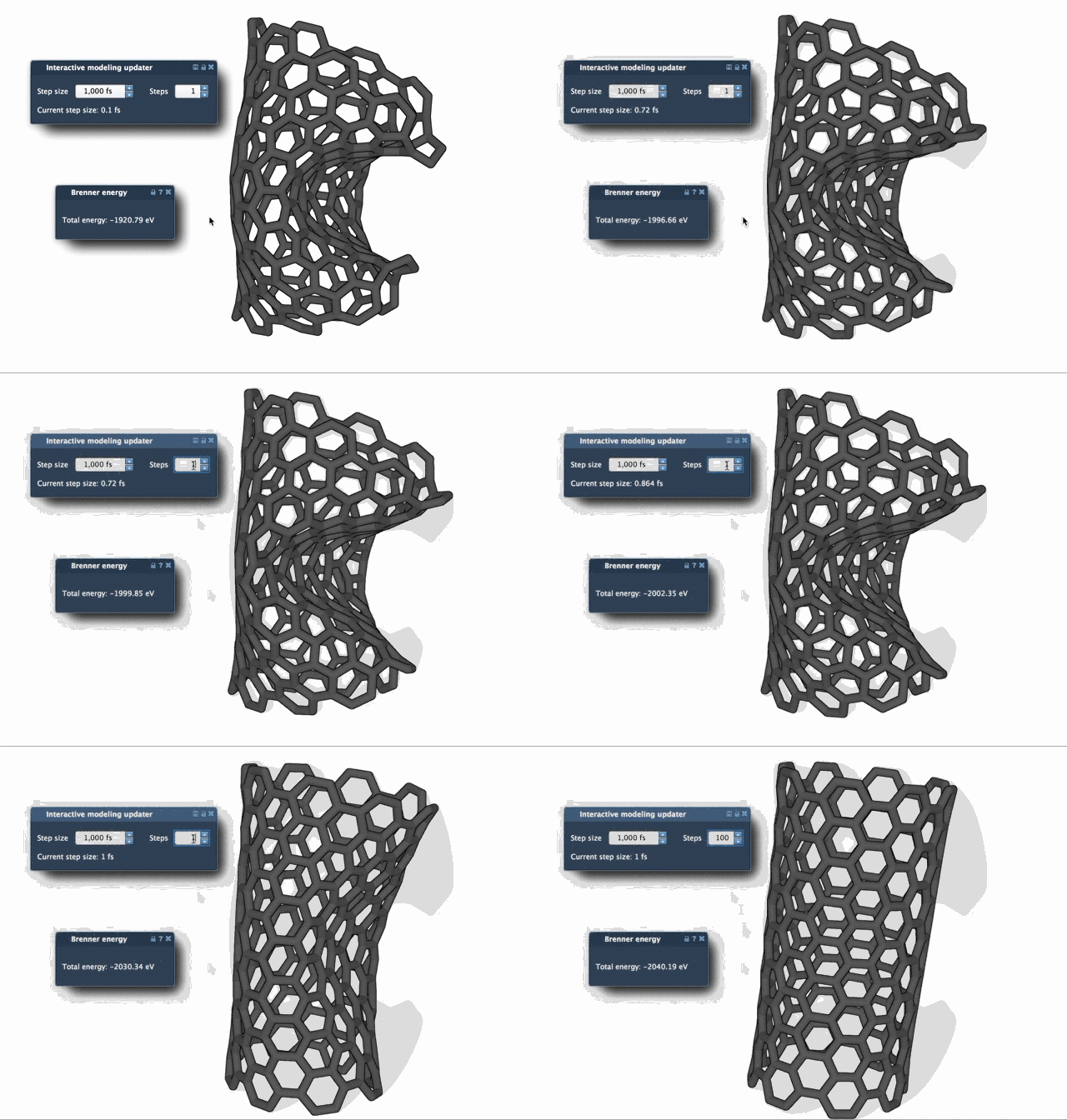
As shown, the FIRE Minimizer smooths transitions more quickly, making it a valuable tool for those needing time-efficient structural cleanup.
Ready to Optimize?
If you’re looking to streamline your molecular design workflows, the FIRE Minimizer is worth exploring. Accessible as a SAMSON extension, it integrates smoothly with your existing processes.
You can find the full tutorial and additional resources at the official documentation page.
SAMSON and all SAMSON Extensions are free for non-commercial use! Get SAMSON today at https://www.samson-connect.net.