



For molecular modelers, symmetry in biological assemblies isn’t just a fascinating feature—it’s a key tool for enhancing quality and efficiency in computational workflows. Whether you’re working with protein complexes, viral capsids, or engineered nanomaterials, symmetry analysis can provide critical insights. This blog post dives into why detecting symmetry matters and how to validate structural assumptions using SAMSON’s Symmetry Detection extension.
Why Does Symmetry Matter?
Understanding symmetry in molecular models serves multiple purposes, including:
- Identifying functional interfaces: Insights into repeated patterns across symmetric copies can help pinpoint biologically significant areas.
- Validation of experimental data: Checking symmetry elements against expected patterns is a way to validate structures obtained from experiments like X-ray crystallography or cryo-EM.
- Optimizing simulations: Symmetry allows researchers to focus on the unique asymmetric unit, reducing computational cost significantly for large systems.
- Better molecular designs: Symmetry can guide the creation of symmetric nanostructures, protein assemblies, or engineered mutations.
For example, in protein design or drug discovery, knowing that a target molecule exhibits cyclic or dihedral symmetry can be crucial for understanding binding mechanisms or designing biologics that fit multiple interaction sites.
How SAMSON Helps Validate Symmetry
Using SAMSON’s Symmetry Detection extension, researchers can easily identify and visualize axes of symmetry in their systems. Here’s how you can use it to validate symmetry:
- Ensure that the Symmetry Detection extension is added to SAMSON.
- Load your molecular assembly, ensuring it contains a complete biological structure (e.g., consider PDB files such as
1CHP,1B4B, or3NQ4). - In SAMSON, launch the extension via Home > Apps > Biology > Symmetry Detection.
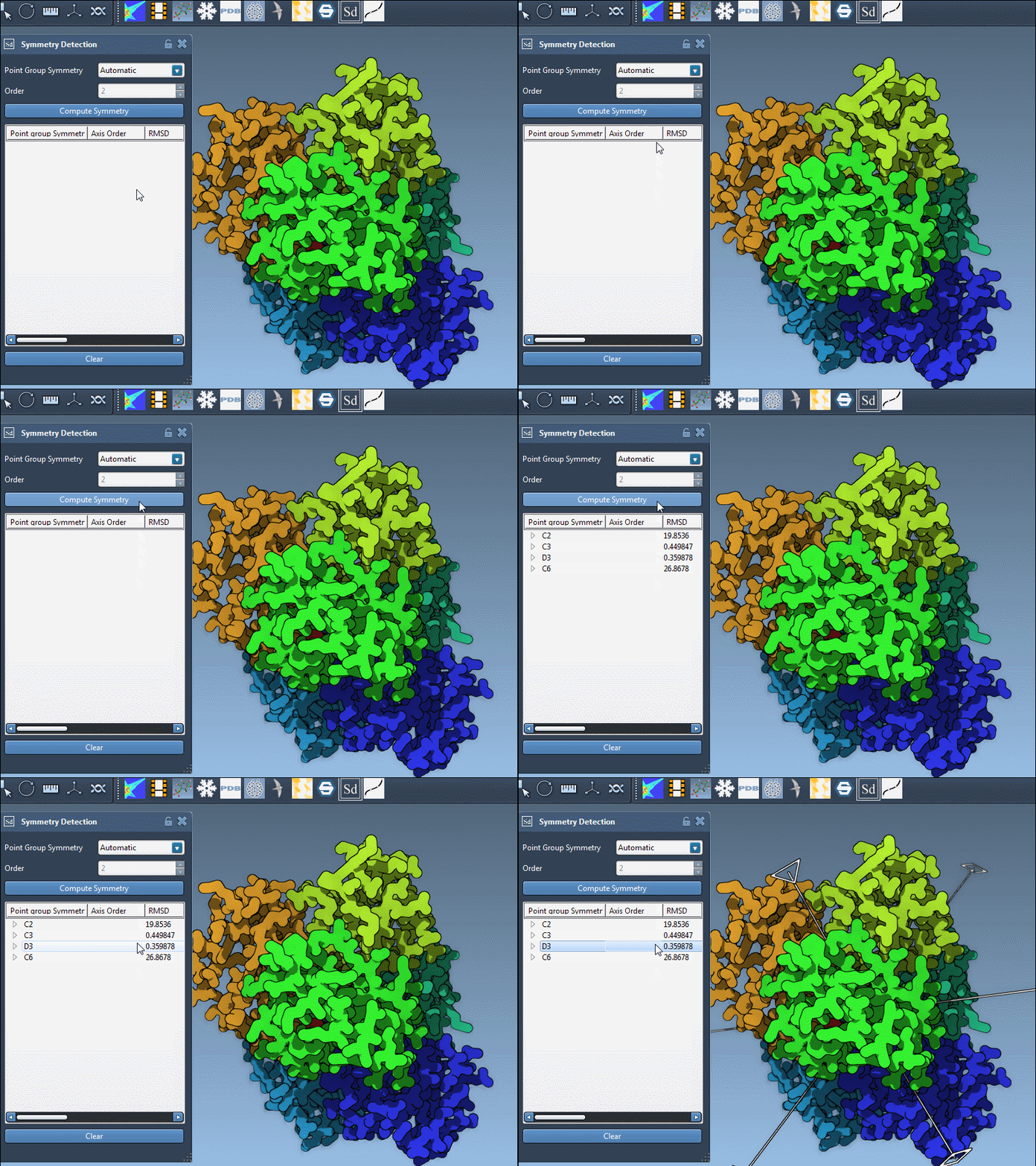
- Click Compute Symmetry. The extension will analyze the structure and propose symmetry groups and axes.
Key Features for Better Validation
Once symmetry is detected, SAMSON enables deeper exploration to ensure structural assumptions are correct:
- Explore individual axes and RMSD: The tool lists detected axes along with their associated RMSD values. Low RMSD indicates higher confidence in the symmetry detection.
- Highlight axes visually in the viewport: Single-click on an axis to emphasize it in bold or double-click to align the camera with the axis for detailed inspection.
For example, in a dihedral symmetry structure like 1B4B, you may want to confirm and visualize the D3 symmetry elements to validate its functional interfaces. The extension provides an intuitive way to navigate these elements.
Why Every Modeler Should Validate Symmetry
A scenario every modeler dreads is spending computational time only to find errors in the input structure’s symmetry. Avoiding this pitfall requires robust validation tools, and SAMSON’s Symmetry Detection makes this process accessible and efficient.
Detecting symmetry doesn’t just help validate data—it provides a pathway to more advanced workflows such as designing mutations or extracting asymmetric units for more targeted simulations. This foundational step saves time and increases confidence in downstream results.
Learn More
For a detailed walkthrough of all features and example use cases, visit the official documentation page.
SAMSON and all SAMSON Extensions are free for non-commercial use. You can download SAMSON at www.samson-connect.net.