



Molecular modelers often face challenges when preparing atomic trajectory data for advanced simulations like reaction coordinate studies or free energy calculations. Accurate extraction of atomic coordinates along defined paths is crucial for various tasks, but managing this process can be time-consuming and error-prone.
If this sounds familiar, SAMSON’s Export Along Paths extension is designed to simplify your workflow. By allowing users to export atomic coordinates—whether for all or selected atoms—along specified paths, this tool ensures greater efficiency and accuracy for projects requiring detailed trajectory data.
Getting Started with Atom Path Export
To use the Export Along Paths extension, follow these simple steps:
- Log into SAMSON Connect and add the Export Along Paths extension to your platform.
- Restart SAMSON to make the extension ready for use.
- Open the Export Along Paths app via Home > Apps > All > Export Along Paths. Alternatively, use the shortcut Shift + E.
How to Export Atom Trajectories
The extension provides two versatile modes for exporting atom trajectories:
Option 1: Export All Atoms
- Select one or multiple paths in the Document view.
- Choose an export format: all frames in a single PDB file, or each frame as a separate PDB file.
- Click Export atoms along paths to PDB files.
- Select a destination folder and file prefix for the exported data.
For additional control, expand the Advanced section to adjust the frame export interval.
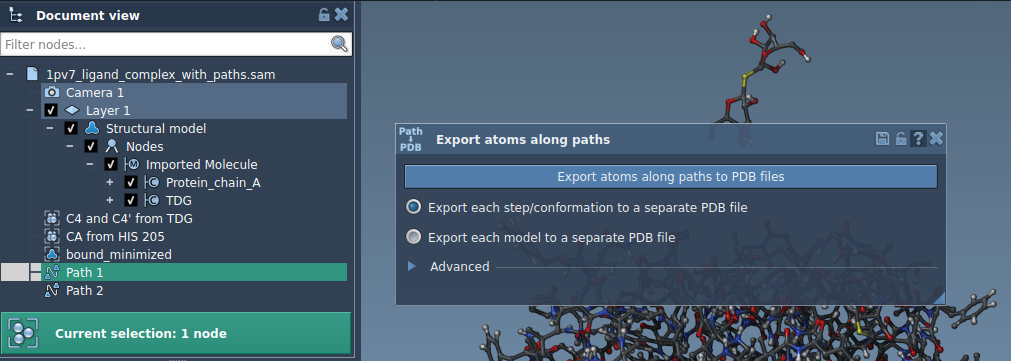
Option 2: Export a Subset of Atoms
If you only need trajectories for specific atoms, such as a ligand, follow these steps:
- Expand the Advanced panel in the app interface.
- Select a subset of atoms (e.g., the ligand, TDG) in the Document view.
- Click Add to define this selection as a model for export.
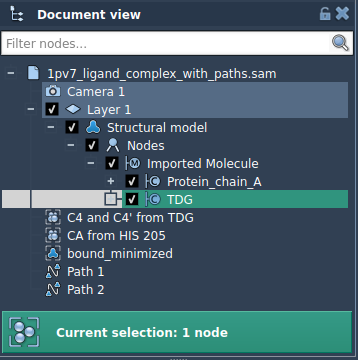
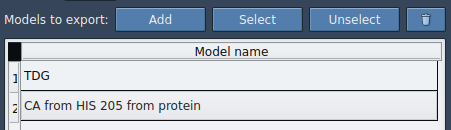
Once added, the model will appear in the app’s table, where you can:
- Rename the model for clarity.
- Add multiple sets of atoms if needed.
- Highlight atoms through the Select or Unselect option.
Finally, choose an export format and click Export atoms along paths to PDB files while selecting the relevant paths. Specify a destination folder for the output.
Why This Matters
Using this app streamlines tasks critical to molecular modeling, including generating precise reaction coordinate files and tracking specific substructures along paths. Whether for free energy profiling or detailed simulations, the Export Along Paths extension equips you with the tools needed for efficient trajectory management.
To explore this feature in more detail, visit the official documentation at SAMSON Documentation.
SAMSON and all SAMSON Extensions are free for non-commercial use. Download it now at SAMSON Connect.