



Generating custom polymers for advanced molecular design can be a challenging task, especially for researchers and modelers who want precision and flexibility in their structures. But worry no more! With the Polymer Builder extension in SAMSON, you can now efficiently construct polymers with tailor-made structures to suit your individual needs.
In this blog post, we will walk you through the process of combining monomers and sequences to generate a custom polymer from scratch. Whether you’re working on synthetic chains, biopolymers, or exploring custom molecular scaffolds, this guide is designed to make your workflow easier and faster.
Ready? Begin with a Custom Sequence Expression
The secret to generating polymers lies in creating a sequence expression—a user-defined combination of monomers and sequences. This allows you to define the structure of your molecule while specifying the type of bonds between the components. For instance:
S1 + 2*S2 + 3*ABtranslates to two repeats of sequence S2 appended to the single instance of sequence S1 followed by three repeats of the monomer pair AB.- Want specific chemical bonds? You can use:
AB=BA(double bond) orAB#BA(triple bond).
Detailed example: Suppose you want your polymer backbone to look like this: a single sequence S1, followed by two repeats of sequence S2, and finally, alternating AB pairs. You simply input: S1 + 2*S2 + ABAB. This input straightforwardly converts your conceptual design into a practical model.
Get Real-time Predictions
As you build your polymer, the Polymer Builder provides real-time predictions for:
- Molecular weight of the polymer, giving you an idea of the mass of your molecule.
- Polymer length, which is ideal when building macromolecules with specific size requirements.
Here’s a visual preview of predicted outputs:

Generate Your Polymer
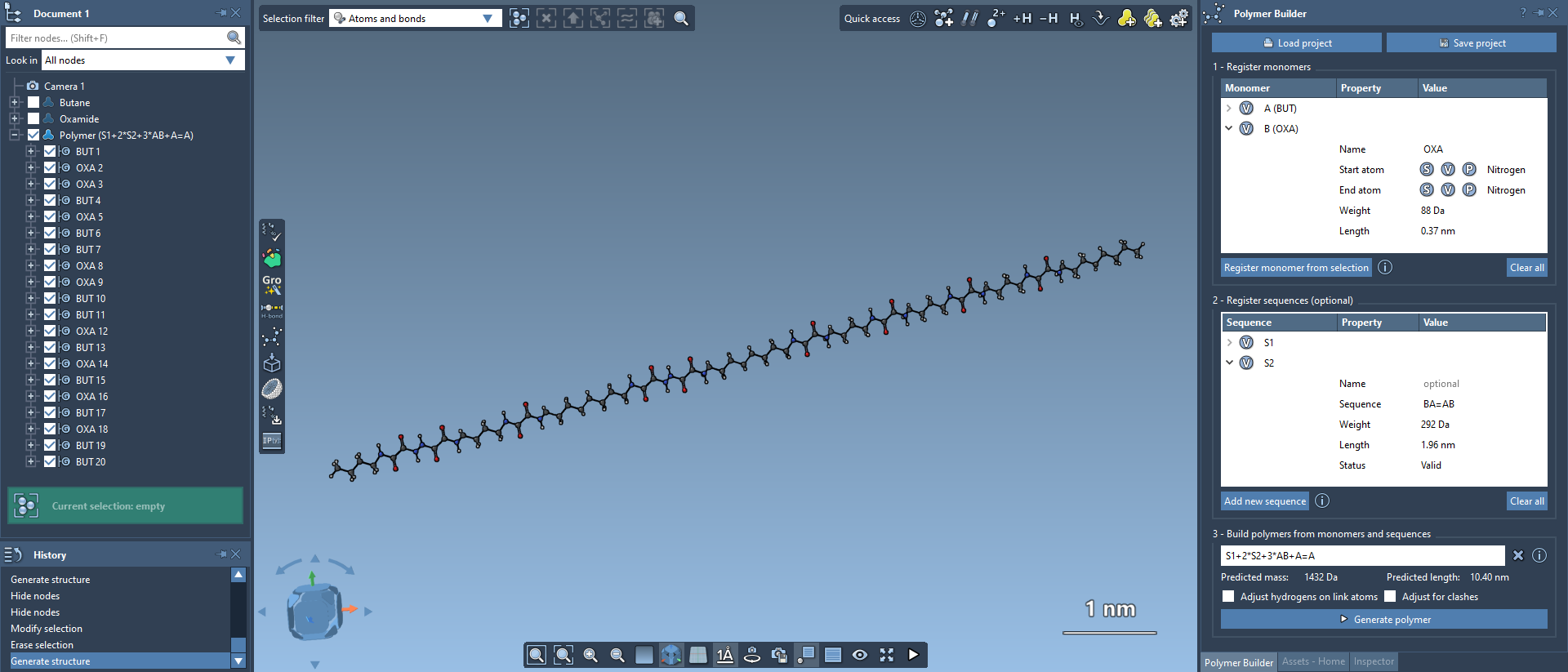
The moment of truth: Once your sequence expression is ready, simply hit the Generate polymer button. Instantly, your custom polymer is constructed based on the direction of connections between the start and end atoms of the selected monomers or sequences. Additionally, hydrogens at the connection sites are adjusted automatically to maintain valence accuracy.
Here’s an example of a beautiful structure generated in Polymer Builder:
Advanced Options to Perfect Your Polymer
SAMSON’s Polymer Builder also includes advanced modifiers that fine-tune your polymer generation process. For instance:
- Adjust hydrogens on connection atoms: Let SAMSON automatically adjust hydrogen placement based on each connection atom’s valence.
- Adjust for clashes: Avoid steric overlaps by enabling automatic adjustments during connections. This feature ensures that generated chains show no structural inconsistencies!
These options are particularly useful when working with complex sequences or large-scale polymer models.
Why It Matters
With tools like Polymer Builder, researchers can efficiently create molecular systems optimized for simulation engines or experiments. From drug-polymer conjugates to designing polymers for advanced materials, the flexibility of this extension ensures you’re never limited by tooling.
For those requiring further insight or additional workflows for advanced polymer design, we recommend heading to the official Polymer Builder documentation for a comprehensive overview: https://documentation.samson-connect.net/tutorials/polymer-builder/polymer-builder/
Note: SAMSON and all SAMSON Extensions are free for non-commercial use. Download SAMSON today at https://www.samson-connect.net.