



One of the most time-consuming challenges in molecular modeling is managing the complexity of large biological assemblies. Protein complexes, viral capsids, and multimeric assemblies often exhibit some degree of symmetry, but identifying and leveraging these symmetries can be difficult without the right tools. SAMSON’s Symmetry Detection extension simplifies this process by detecting and visualizing symmetry axes, saving both time and computational resources.
Why Symmetry Matters in Molecular Design
Symmetry is not just an aesthetic property — it is a powerful tool in molecular modeling. Detecting symmetry in biological assemblies can:
- Identify functional interfaces: Symmetry often reveals recurring structural patterns that help pinpoint biologically active sites.
- Validate structural data: Experimental structures can be evaluated by comparing detected symmetry elements against expected ones.
- Reduce computational costs: By focusing on unique asymmetric units, you can cut down on simulation times.
- Facilitate molecular design: Symmetry guides the design of nanomaterials and targeted mutations, which are crucial for next-gen therapeutic and diagnostic solutions.
How to Get Started with Symmetry Detection
Working with the Symmetry Detection extension is intuitive. Here’s a quick overview of how you can detect and leverage symmetries in your workflows:
- Add the extension: Install the Symmetry Detection extension from the SAMSON Extension Manager.
- Load your biological assembly: Open a biological assembly or multimeric structure in SAMSON. For instance, assemblies such as PDB entries
3NQ4(icosahedral capsid) or1B4B(dihedral symmetry) work well for exploration. - Start the app: Go to
Home > Apps > Biology > Symmetry Detection. Launch the tool and simply click Compute symmetry. - Analyze results: The detected symmetry axes will be displayed, and you can interactively select the groups and axes most relevant to your objectives.
An Example: Exploring the Icosahedral Capsid (3NQ4)
SAMSON truly shines when analyzing the symmetry of complex systems like the icosahedral viral capsid in PDB entry 3NQ4. The Symmetry Detection extension can identify its full icosahedral symmetry and visualize all 2-, 3-, and 5-fold axes:
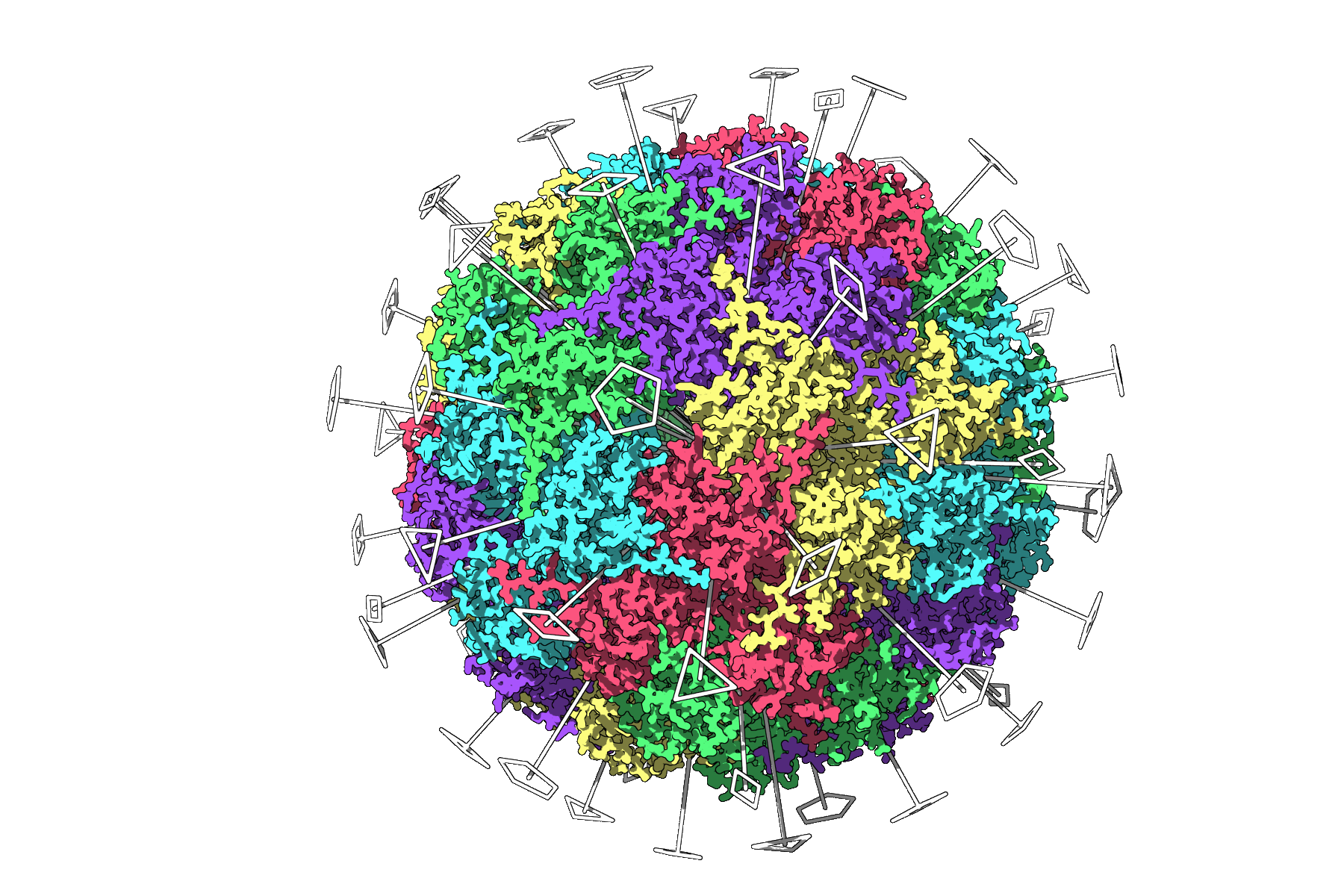
Such a detailed visualization allows users to define asymmetric units prior to running simulations, minimizing computational overhead for these heavy systems.
Tips for Enhanced Visualization
For best results when working with symmetry axes in SAMSON, consider the following tips:
- Overlay symmetry axes with structural visualization styles (e.g., ribbons or surface models) for clear context.
- Apply different colors to asymmetric units (e.g., based on protein chains) to emphasize repeating elements.
- Use SAMSON’s viewport snapshot feature to create polished figures for presentations or publications.
Next Steps
Once you’ve detected symmetries, you can:
- Export asymmetric units for targeted simulations.
- Design molecules or mutations tailored to exploit detected symmetries.
- Use similar workflows for analyzing nanoparticles or symmetric materials.
The Symmetry Detection extension is a powerful tool that simplifies symmetry-aware modeling at every step. Learn more in the comprehensive documentation!
Note: SAMSON and all SAMSON Extensions are free for non-commercial use. You can download SAMSON here.