



Molecular modelers often face the challenge of converting 2D molecular representations into 3D-ready structures for simulations, docking, and analysis. This process can be time-consuming, particularly when handling extensive SMILES datasets. Fortunately, SAMSON’s SMILES Manager, powered by RDKit, offers a streamlined and intuitive solution for generating 3D molecular structures directly from SMILES strings.
Why Convert SMILES to 3D?
SMILES (Simplified Molecular Input Line Entry System) is an essential format for representing molecules in a simple line notation. However, for most computational chemistry tasks such as docking, molecular dynamics, or property analysis, 3D structures are required. Generating these structures manually can be tedious, even more so when working with large datasets. That’s where the SMILES Manager in SAMSON comes in: it automates and simplifies the generation of 3D structures while offering flexibility and precision.
How to Generate 3D Structures with the SMILES Manager
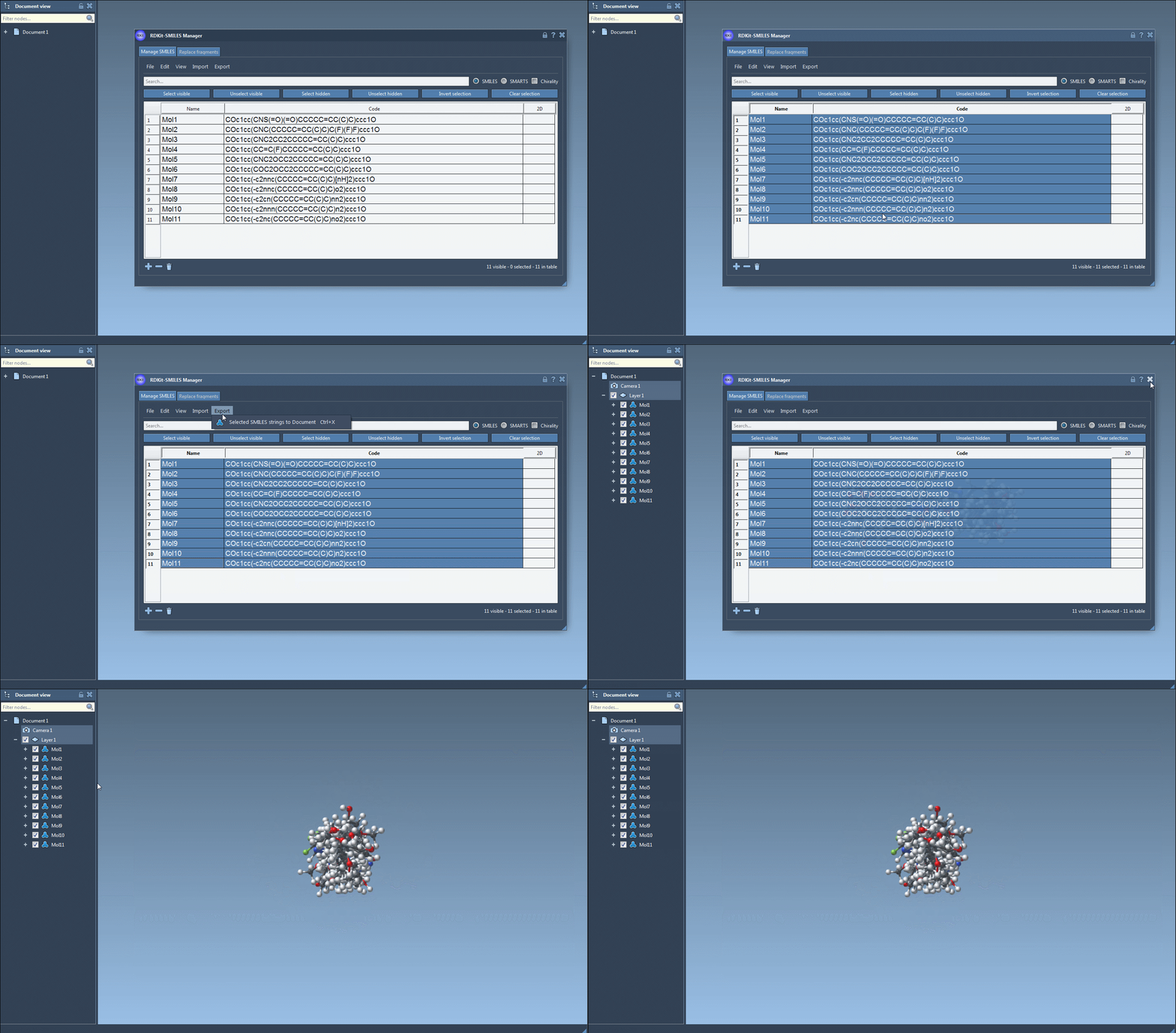
With the SMILES Manager, generating 3D structures is a straightforward process. Here’s how it works:
- Load Your SMILES Dataset: Import your SMILES strings into the manager. You can either use RDKit-style
.smior.txtfiles, or directly add entries manually within the tool. - Select Entries: Choose the molecules you wish to convert into 3D structures. You can work with a subset of molecules or the entire table.
- Generate Structurally Accurate Models: Click on the Selected SMILES string to Document option in the Export drop-down menu. The 3D structures will be generated and automatically added to your SAMSON document.
The manager also provides options to generate a 3D structure for a single molecule. Right-click on a SMILES entry and select Generate 3D structure, or use the dedicated button in the large structure view. The generated structures retain names to ensure traceability and efficient organization.
Preview and Save Your 3D Work
Once generated, you can visually interact with your 3D models directly in SAMSON. Whether it’s navigating through the structures, zooming into large molecular conformations, or comparing multiple models in different windows, the SMILES Manager offers tools to enhance productivity. Moreover, you can seamlessly save these structures for further processing or share them with your team.
Why Choose SAMSON’s SMILES Manager?
The SMILES Manager’s integration with RDKit ensures accuracy and reliability in transforming SMILES into 3D models. It’s particularly useful for researchers working with large datasets, as the batch processing capabilities save significant amounts of time. Moreover, the ability to visually confirm and modify structures on the go makes it an indispensable tool for molecular modelers.
Start Streamlining Your Workflow
Generating 3D structures can now be one of the most painless steps in your molecular modeling workflow. To fully explore the features of the SMILES Manager, including advanced options like replacing fragments or performing substructure searches, visit the SMILES Manager documentation page.
SAMSON and all SAMSON Extensions are free for non-commercial use. Discover the powerful SAMSON platform by downloading it today from SAMSON Connect.