



Understanding and leveraging symmetry in molecular assemblies is one of the keys to efficient molecular modeling and design. Whether you’re working on protein complexes, viral capsids, or other large biomolecular systems, symmetry detection provides an important shortcut to deeper insights and more streamlined simulations. If you’ve ever spent hours analyzing repeating structures, manually identifying functional interfaces, or fine-tuning computational setups for large assemblies, SAMSON’s Symmetry Detection Extension could make your life much easier.
Why Detect Symmetry?
Symmetry is more than just aesthetic; it carries functional and computational value in molecular modeling. By using symmetry detection, you can:
- Identify functional interfaces: Understand repeating patterns and relationships across symmetric units.
- Validate experimental structures: Check whether symmetry conforms to expected patterns, ensuring confidence in data accuracy.
- Reduce computational costs: Focus on the unique asymmetric unit for simulations, which often leads to time and resource savings.
- Guide molecular design: Accurately design symmetric nanomaterials, mutations, or binding sites by leveraging symmetry-aware workflows.
How to Detect Symmetry in SAMSON
SAMSON makes symmetry detection straightforward and intuitive. Here’s a step-by-step guide to get started:
- Open SAMSON and load your molecular assembly. You can fetch structures like PDB
3NQ4or1CHPfor exploration directly through SAMSON’s interface. - Navigate to Home > Apps > Biology > Symmetry Detection to launch the Symmetry Detection Extension.
- Click Compute symmetry to let SAMSON analyze and propose symmetry axes. The app identifies various types of symmetry, including cyclic (Cn), dihedral (Dn), and cubic symmetries such as tetrahedral, octahedral, and icosahedral.
- Review the detected symmetry groups. You can select and visualize the symmetries interactively. In the case of complex assemblies, multiple possible symmetries might be detected simultaneously—SAMSON ensures you can explore and refine these intuitively.
Exploring an Example: 3NQ4 – Icosahedral Capsid
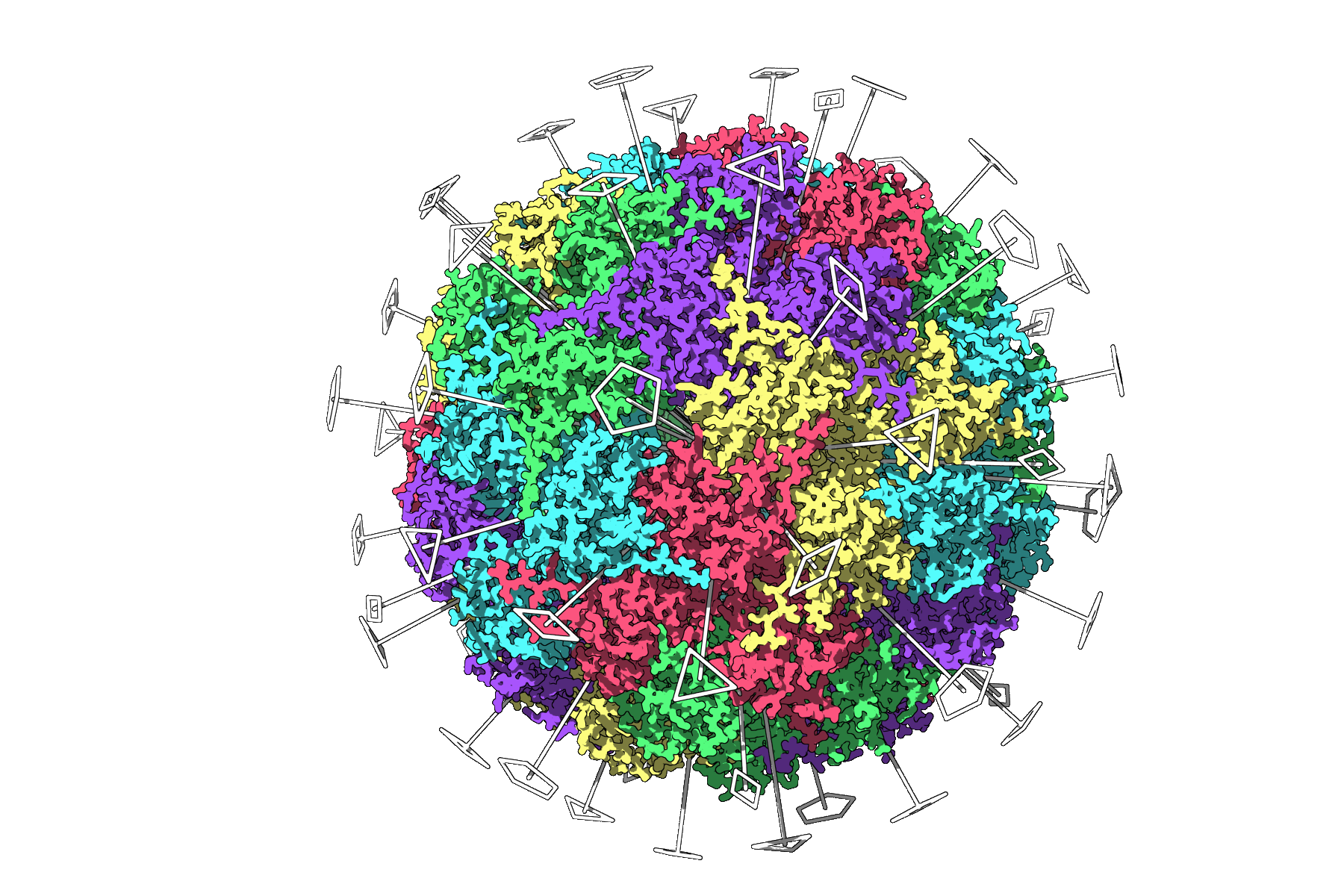
One showcase where symmetry detection truly shines is the identification of icosahedral symmetry in viral capsids, such as 3NQ4. SAMSON automatically identifies the full icosahedral symmetry, including all 2-, 3-, and 5-fold axes. Using this visualization:
- You can focus on selecting only the unique asymmetric unit for computationally heavy tasks, like simulations or energy calculations.
- You gain an immediate overview of the symmetry layout, enabling better molecular design decisions.
Tips for Better Visualization
To make symmetry axes more interpretable, SAMSON enables you to combine them with other visualization options. For example:
- Use ribbons or surface visualizations for a clearer context around the axes.
- Color-code asymmetric units differently to emphasize repeats (e.g., coloring chains individually).
- Take advantage of SAMSON’s viewport snapshot feature to create publication-ready figures.
Conclusion
Symmetry detection is an indispensable tool in the molecular modeler’s toolkit. It simplifies workflows, maximizes computational efficiency, and unlocks deeper insights into the structures of large biomolecular systems. With SAMSON’s Symmetry Detection Extension, these tasks become intuitive and interactive, empowering you to focus on design and discovery. To learn more, visit the official documentation page at this documentation link.
Note: SAMSON and all SAMSON Extensions are free for non-commercial use. You can download SAMSON at https://www.samson-connect.net.