



For molecular modelers, creating custom polymers using specific chemical compositions can often feel like a daunting task. In particular, managing monomer units, ensuring proper connections, and avoiding structural clashes tend to be challenging aspects of the workflow. SAMSON’s Polymer Builder offers a solution, allowing users to easily register new monomers and incorporate them into complex polymer structures in just a few steps. Here’s how you can start building your polymer chains with precision and efficiency.
What Makes Monomer Registration Useful?
Monomer registration is a key feature of SAMSON’s Polymer Builder tool. It enables users to:
- Define unique monomer units for customization.
- Automatically assign start and end atoms to ensure proper connectivity.
- Effortlessly manage bond types and avoid structural clashes.
- Reuse previously registered monomer units in different projects for greater efficiency.
By breaking down the polymer design process this way, scientists save time while maintaining molecular accuracy.
Step-by-Step: Registering New Monomers
Here’s a straightforward guide to registering your monomers in SAMSON:
- Select the Monomer Fragment: Use SAMSON’s selection tools in the Document view or the 3D Viewport to highlight a molecule that will act as your monomer unit.
- Register the Monomer: Click on “Register monomer from selection” to add this unit as a monomer. The Polymer Builder will intelligently identify start and end atoms on opposite sides of the structure.
- Adjust Start and End Atoms: If needed, override the automatically assigned connection sites using these convenient options:
- S: Set atom from current selection (select a single atom before assigning).
- P: Choose atoms from a displayed list.
- V: Highlight and verify structures or atoms visually.
- Ensure Uniqueness: Each monomer is assigned a unique letter ID (e.g.,
A,B,C) to avoid confusion as you build sequences or polymers.
Using this method ensures a streamlined, reusable system for composing your synthetic designs.
Quick Management of Monomers
If you need to modify or manage your registered monomers, SAMSON makes it easy:
- Edit entries directly within the Monomer Table, where details like molecular weight and atom distance are displayed.
- Right-click on a monomer to delete it, or use “Clear all” to reset your Monomer Table.
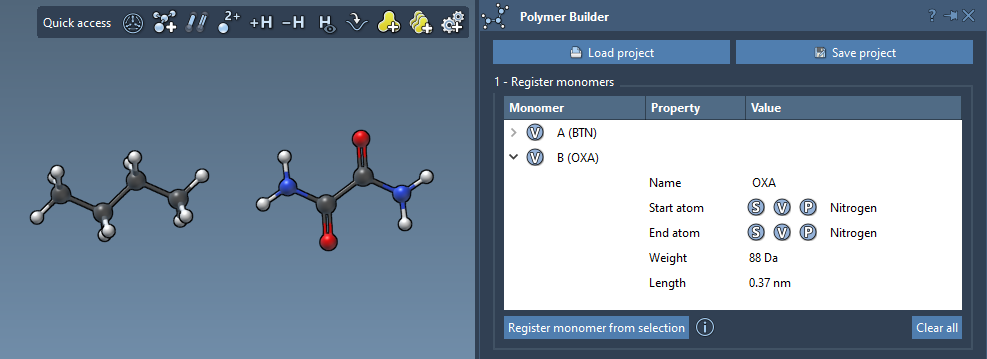
Keep in mind that if you modify the structure of a monomer in SAMSON (e.g., adding or removing atoms), it will be automatically deregistered from the table to ensure data consistency.
Why This Matters
With the ability to quickly register custom monomers and define connection points, SAMSON’s Polymer Builder reduces the manual labor involved in assembling complex chains. Whether you’re modeling materials for property prediction or generating biopolymers for scientific simulations, this feature allows you to bring focus back to your research rather than the technical details.
Want to dive deeper? Check out the full tutorial on SAMSON’s Polymer Builder: https://documentation.samson-connect.net/tutorials/polymer-builder/polymer-builder/.
Note: SAMSON and all SAMSON Extensions are free for non-commercial use. Get SAMSON today at https://www.samson-connect.net.