



Protein modeling often requires understanding how a molecule transitions between two states. Whether you’re studying conformational changes, building realistic reaction coordinates for free energy simulations, or analyzing transition states, crafting a continuous, biologically meaningful path can be a daunting task. This is where the ARAP Interpolator in SAMSON simplifies the process, delivering results in seconds.
What is ARAP Interpolation?
ARAP stands for As-Rigid-As-Possible. By using this principle, ARAP Interpolation generates a smooth, realistic transition path between two protein conformations. This tool works under a biologically meaningful geometric model and is perfectly suited for fast conformational analysis, umbrella sampling setup, or simply exporting intermediate configurations for further analysis.
Getting Started
Before you start, make sure you’ve logged into SAMSON Connect, added the ARAP Interpolator extension, and restarted SAMSON to initialize it. For demonstration, we’ll generate a transition path between two conformations of the Diphtheria Toxin.
For detailed installation instructions and system setup, refer to the official documentation linked at the end of this post.
Key Steps in ARAP Interpolation
Preparing Your Structures
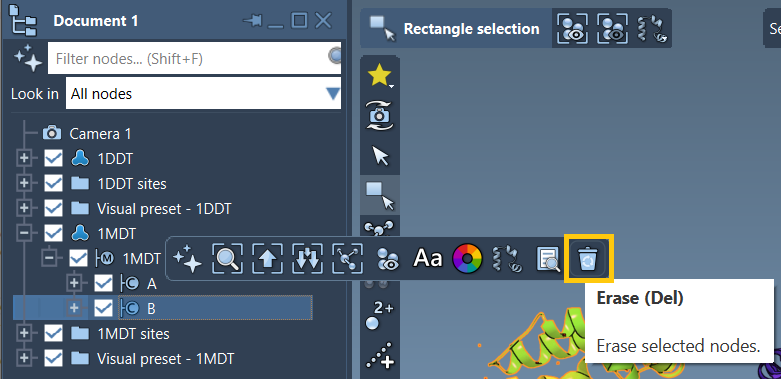
The first step is fetching and cleaning your protein structures. For example, you could load 1DDT and 1MDT, representing two different conformations. Eliminate chain B and other unnecessary components (e.g., water, ligands, ions) that could interfere with the interpolation process. Use Home > Prepare to clean up the structures efficiently.
Creating Conformations
In SAMSON, clean structures are transformed into conformations, which act as the interpolation’s start and end points. For 1DDT, perform Edit > Conformation and name it 1DDT A. Do the same for 1MDT, naming its conformation 1MDT A.
These conformations now define the end points of your transition path.
Running ARAP Interpolation
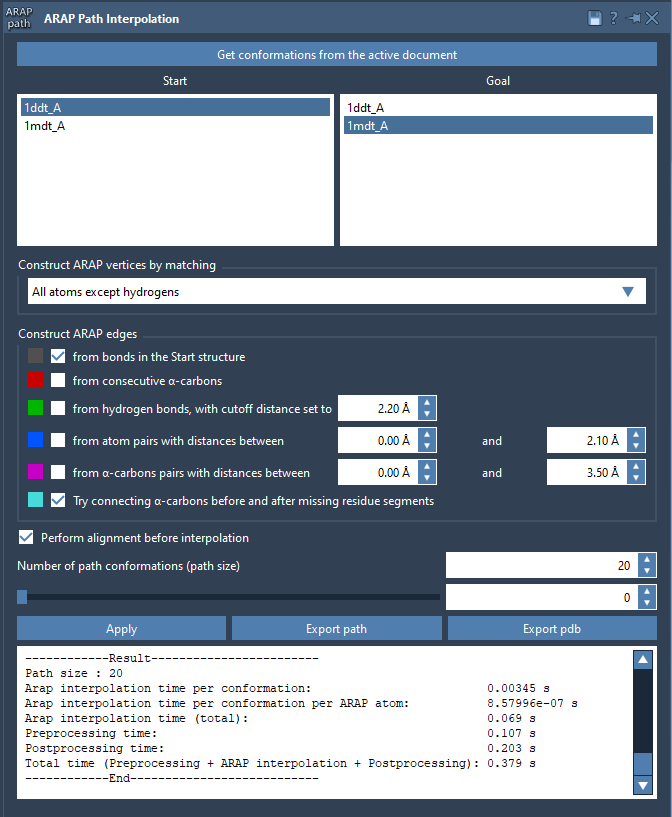
To compute the transition path, open the app via Home > Apps > Biology > ARAP Path Interpolation. Select your conformations (1DDT A and 1MDT A) as the Start and Goal, respectively.
Adjust key settings, such as:
- Matching Atoms: Choose “All except hydrogens” for matching between conformations.
- Constructing ARAP Edges: Ensure you check “from bonds in the Start structure” and “Try connecting α-carbons before and after missing residue segments.”
- Alignment: Enable “Perform alignment before interpolation” for precise results.
- Path Conformations: Set the number of desired path conformations, e.g., 20.
Click Run to begin computation. In seconds, the interpolation path is generated, and you can scrub through it using the app’s slider.
Why ARAP Interpolation is Valuable
ARAP Interpolation is not just about creating a visual trajectory. Its precise geometric modeling ensures that transitions remain realistic, aligning with biological principles:
- Export Results: Save the generated path as a trajectory for use in simulation setups such as umbrella sampling.
- Refine the Path: Use tools like P-NEB to enhance and optimize the ARAP-generated path.
- Understand Molecular Mechanisms: Study structural intermediates between conformations of interest.
Learn More
To dive deeper into ARAP Interpolation and explore advanced applications of this powerful tool, visit the official ARAP Interpolation documentation.
Note: SAMSON and all SAMSON Extensions are free for non-commercial use. You can get SAMSON at https://www.samson-connect.net.