



Understanding transitions between molecular states, such as conformational changes or ligand unbinding, is crucial in molecular modeling. However, finding a physically meaningful path between two states can be challenging, especially when dealing with complex energy landscapes. That’s where the Parallel Nudged Elastic Band (P-NEB) method comes in. If you already have a candidate path or set of molecular conformations, the P-NEB app in SAMSON is a practical tool to refine that path and make it more accurate.
The Problem: Inefficient Transition Predictions
Whether you’re working on protein-ligand interactions, studying conformational dynamics, or exploring energy landscapes, generating meaningful transition paths is often fraught with inaccuracies and inefficiencies. Rough paths or poorly distributed intermediate states can hinder your ability to analyze molecular mechanisms effectively. The P-NEB method addresses this by systematically improving intermediate states while ensuring a smooth distribution along the transition path using spring forces.
Introducing the P-NEB App
The P-NEB app uses the Parallel Nudged Elastic Band method, an optimized version of the traditional Nudged Elastic Band (NEB) method. Its purpose is to refine transition paths by balancing energy minimization of intermediate states with spring forces to maintain an even distribution. This makes it particularly effective for studying processes like ligand unbinding or protein conformational changes. The app even incorporates advanced functionalities like the climbing image strategy, which helps in locating saddle points along the path.
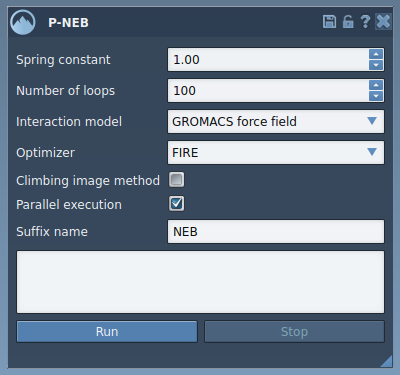
The above image shows the intuitive interface of the P-NEB app where users can configure their parameters. Here are some key settings to consider:
- Spring constant: Controls the strength of the interactions between images on the path.
- Number of loops: The number of optimization iterations.
- Interaction model: Choose the force field, such as Universal Force Field (UFF), for energy calculations.
- Optimizer: Select an optimization algorithm like FIRE (Fast Inertial Relaxation Engine).
- Parallel execution: Run on multiple threads for faster computation.
Applying P-NEB to a Path
Optimizing a transition path in SAMSON with P-NEB is simple and efficient:
- Load a sample path or trajectory, such as a ligand unbinding pathway. Here is an example of such data ready for use.
- Open the P-NEB app via
Home > Apps > All > P-NEB. - Select a path node in the Document view.
- Fine-tune the settings, or use default ones for a quick start.
- Click Run, and watch as the app optimizes your path while keeping you updated through a progress bar.
Once completed, the optimized path will appear in the Document view. You can inspect the results, animate the path, or proceed with further simulations.

The image above shows a new refined path after running the P-NEB app.
Additional Features
If you prefer working with conformations rather than a defined path, P-NEB allows optimization of a set of conformations as well. However, as a best practice, combine conformations into a path for better performance by selecting them and using the Conformation > Create path from conformations option in the context menu.
Why P-NEB?
The P-NEB tool is indispensable for molecular modelers looking to transition seamlessly from rough approximations to high-quality molecular pathways. Whether you’re refining ligand unbinding trajectories or analyzing protein dynamics, this app provides the simplicity and efficiency needed for accurate results.
To learn more about how to optimize transition paths with the Parallel Nudged Elastic Band method, visit the official documentation.
Note: SAMSON and all SAMSON Extensions are free for non-commercial use. You can get SAMSON at SAMSON Connect.