



Molecular modelers often face the challenge of finding specific nodes—atoms, residues, or structural groups—that meet particular spatial criteria within large and complex molecular structures. This task can be time-consuming and error-prone. Fortunately, SAMSON’s Node Specification Language (NSL) offers a powerful set of tools to simplify this process through proximity operators.
What Are Proximity Operators?
Proximity operators enable users to select nodes based on distances to other nodes. For example, you might want to find all carbon atoms within 5 angstroms of a specific residue or identify residues beyond a certain distance from a ligand. These operations are especially helpful for tasks like analyzing binding sites, studying interatomic interactions, or visualizing specific structural elements in complex biomolecular systems.
How to Use Proximity Operators in NSL
To use proximity operators, you simply specify the distance criteria and the nodes of interest. NSL offers two main proximity operators:
within {distance} of: Matches nodes within the specified distance of other nodes. Short equivalent:w {distance} of.beyond {distance} of: Matches nodes beyond the specified distance of other nodes. Short equivalent:b {distance} of.
For example:
C within 5A of "GLN 2"(short:C w 5A of "GLN 2"): Selects all carbon atoms within 5 angstroms of residue “GLN 2”.node.type atom beyond 5A of "2AZ8-IA"(short:n.t a b 5A of "2AZ8-IA"): Selects all atom nodes beyond 5 angstroms of “2AZ8-IA”.
Pro Tip: Tweaking Your Queries
Without the right query scope, proximity searches may return unexpected results. For example, querying * within 5A of "GLN 2" might return the entire document node because some atoms in the document meet the proximity criterion. Instead, refine your query to focus only on the desired node type, such as n.t a within 5A of "GLN 2". Similarly, if you want to exclude nodes belonging to “GLN 2,” you can modify your query to n.t a within 5A of "GLN 2" out of "GLN 2".
Why It Matters
Proximity operators streamline workflows by automating otherwise tedious and complex node-selection tasks. They allow researchers to efficiently analyze interactions, filter structural elements, and focus on relevant parts of a molecular model—saving both time and effort.
To see this in action, here’s an example of a proximity operation visually illustrated in SAMSON:
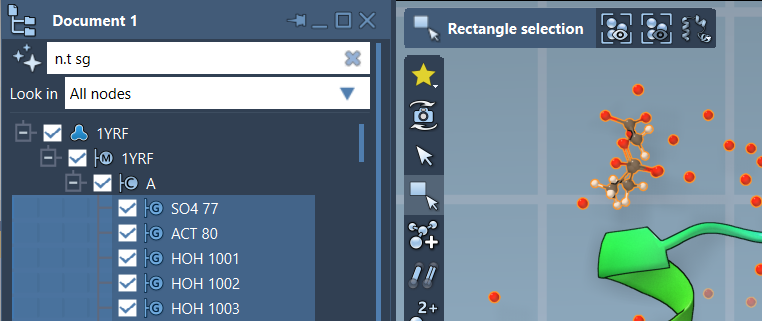
This image demonstrates how proximity operators can be applied in the Document view filter box to select and analyze specific structural features interactively.
Where to Learn More
To dive deeper into proximity operators and other powerful features of NSL, visit the full documentation at https://documentation.samson-connect.net/users/latest/nsl/.
Note: SAMSON and all SAMSON Extensions are free for non-commercial use. Get SAMSON today at https://www.samson-connect.net.