



Geometry optimization is an essential step in molecular modeling. Achieving stable and realistic molecular structures at energy minima is critical for accurate simulations and design workflows. However, traditional methods, like steepest descent, can be slow when handling large-scale molecular motions. For molecular modelers grappling with time constraints or working on systems with significant structural changes, SAMSON offers a faster alternative: the FIRE Minimizer.
Why Should You Consider the FIRE Minimizer?
The FIRE Minimizer, developed from the method introduced by Bitzek et al. (Physical Review Letters, 97, 170201 (2006)), offers a fast and efficient approach to geometry optimization. It’s particularly suitable for:
- Handling collective motions more quickly than steepest descent.
- Pre-simulation structural cleanup.
- Integration with any SAMSON interaction model.
If you’ve ever been frustrated by long waiting times or ineffective optimizations in your molecular workflows, FIRE can enhance your modeling experience, especially for large or complex simulations.
How to Get Started with FIRE in SAMSON
Getting started is easy, and you can integrate the FIRE minimizer into your workflow in a few steps:
- Make sure you’ve logged into SAMSON Connect.
- Visit the FIRE Minimizer extension page and click Add.
- Restart SAMSON to activate the extension.
- Load a molecular structure, such as one from a PDB or MOL2 file (see supported formats).
Setting Up the FIRE Minimizer
Once you’re ready to optimize, you can set up the FIRE minimizer as a state updater in a simulator:
- Go to Edit > Add Simulator.
- Choose the interaction model you prefer.
- Select FIRE as the state updater from the list.
Adjust key settings like the step size, number of steps, or whether to fix the step size based on your specific optimization goals. For example, increasing the “Steps” value will reduce the frequency of viewport updates, providing a clearer visualization of structural progress.
Why Choose FIRE Over Steepest Descent?
A visualization comparison between the two is striking:

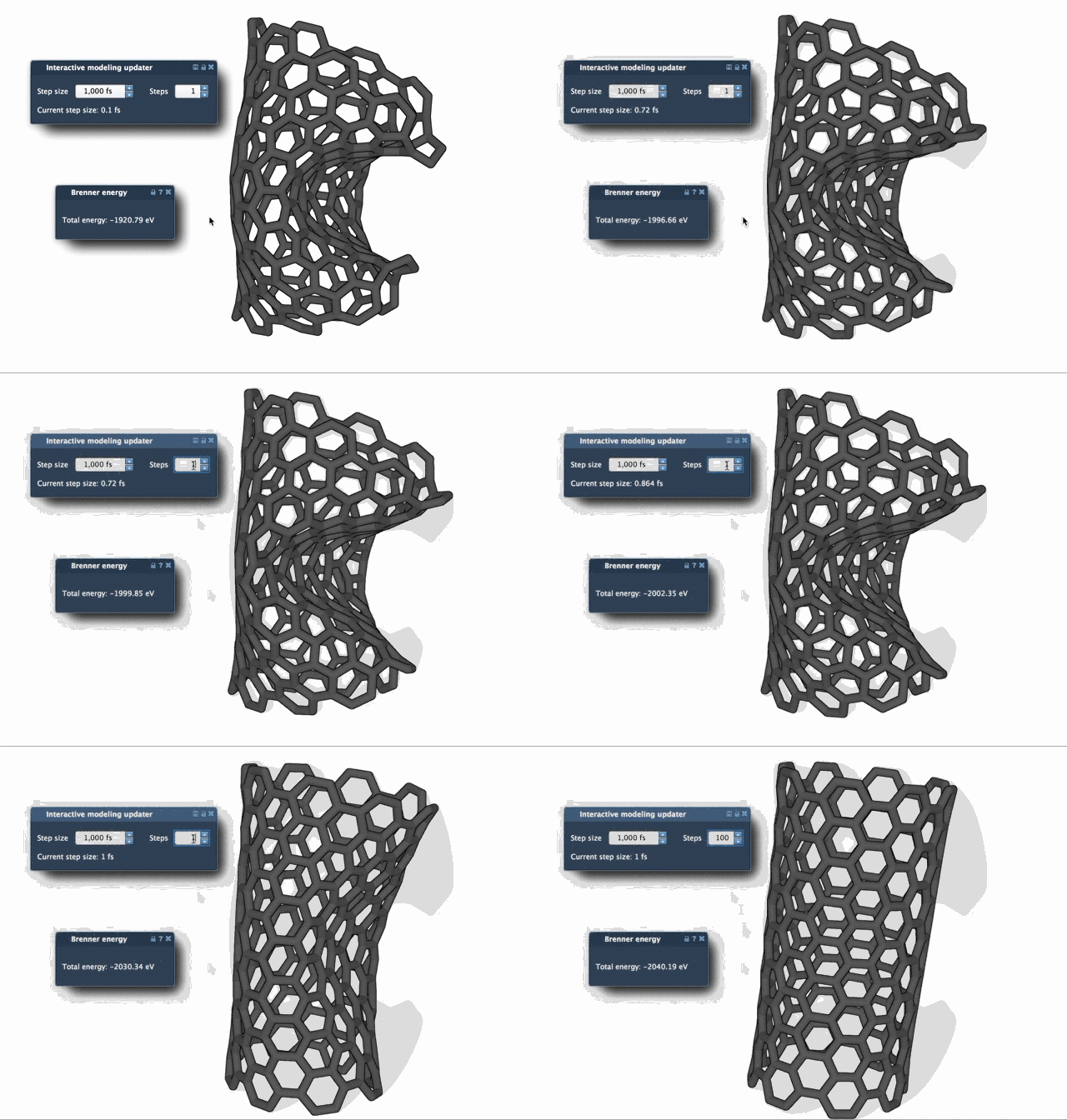
The FIRE minimizer’s convergence is significantly faster, especially in cases where energy changes are minimal but geometry evolves through large-scale motions. This speed not only saves time but also makes FIRE an excellent choice for iterating rapidly over large datasets or running multiple simulations.
Conclusion
Whether you’re cleaning up a molecular structure before a simulation or optimizing a complex system, the FIRE minimizer provides an efficient and reliable solution. Its integration into the SAMSON platform makes it highly accessible and versatile for various molecular design workflows. To dive deeper into this tool and its full set of features, visit the original documentation page.
Note: SAMSON and all SAMSON Extensions are free for non-commercial use. You can download SAMSON at SAMSON Connect.