



For molecular modelers, understanding symmetry in biological assemblies like protein complexes or viral capsids is more than just a theoretical exercise—it is essential for tasks such as validating experimental structures, designing symmetric nanomaterials, or optimizing simulations. Yet, detecting and visualizing symmetry axes within such structures can often feel daunting. That’s where SAMSON’s Symmetry Detection extension comes in.
What Is Symmetry Detection and Why Is It Important?
Molecular symmetry refers to structural repetitions within biological assemblies, often signifying functional importance or efficiency in molecular design. Detecting symmetry can help with:
- Identifying functional interfaces: repeated regions across symmetric copies can provide insights into key biological interactions.
- Validating experimental data: symmetry groups can confirm the appropriateness of laboratory-generated structural models.
- Optimizing computations: instead of simulating a whole structure, representing just the unique asymmetric unit can reduce computational cost significantly.
- Guiding nanomaterial design: symmetric blueprints often guide the development of nanostructures or targeted mutagenesis.
How Does the Symmetry Detection Workflow Work?
The process to detect symmetry within SAMSON is remarkably streamlined:
- Open SAMSON and load your biological assembly, such as a protein from a Protein Data Bank file (e.g.,
3NQ4,1CHP, or1B4B). - Launch the Symmetry Detection extension (Home > Apps > Biology > Symmetry Detection).
- Simply click Compute symmetry.
- Review the detected symmetry groups and axes, which appear superimposed on your structure.
Through this process, SAMSON visualizes not only the main axes but also multiple symmetry groups, providing a set of options to evaluate, expand, or refine your symmetry analysis.
Example: Discovering Icosahedral Symmetry in Viral Capsids
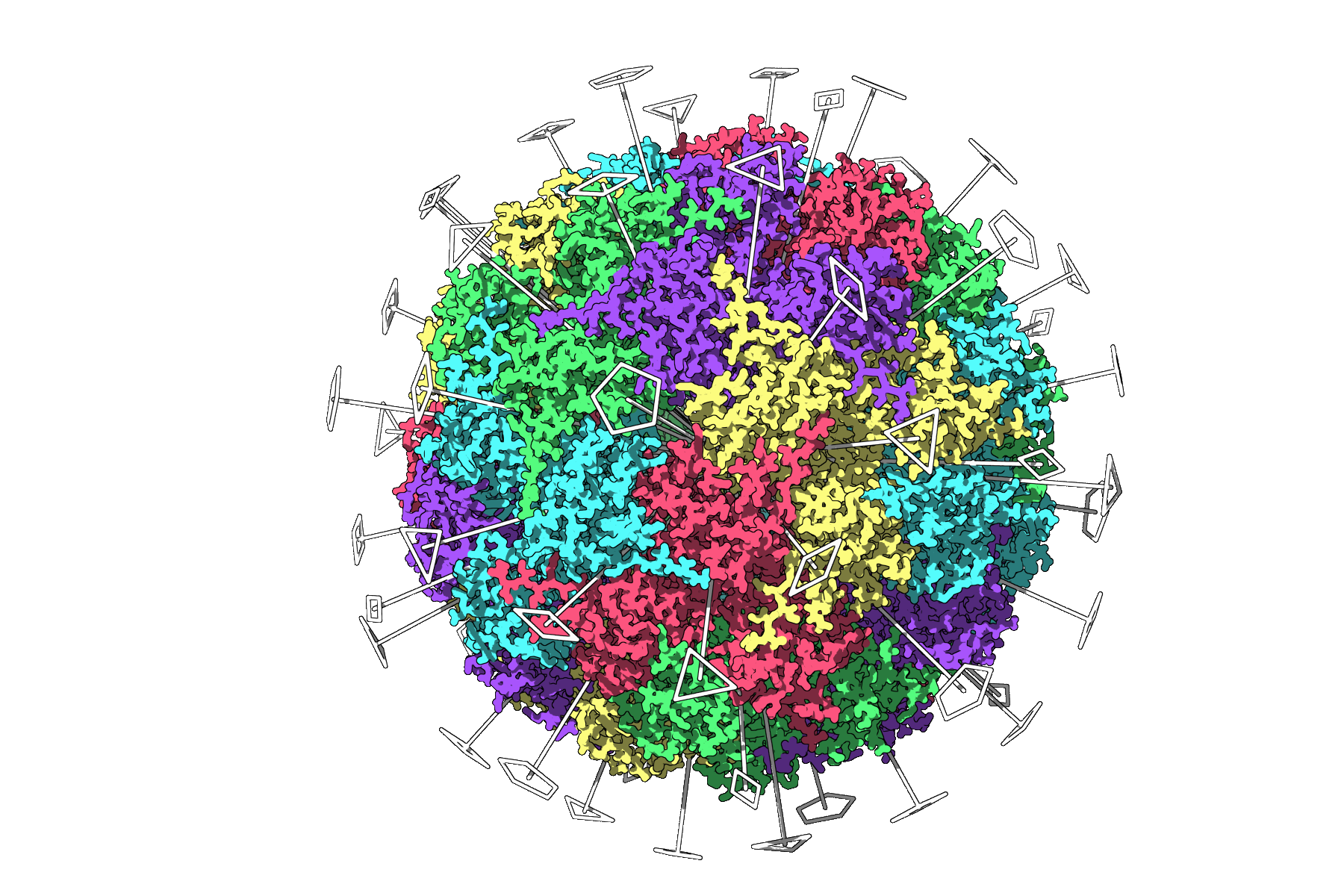
Consider the example of the viral capsid structure 3NQ4. By applying the Symmetry Detection extension, SAMSON identifies full icosahedral symmetry, graphically displaying all 2-, 3-, and 5-fold axes. This visualization helps molecular modelers quickly locate a unique asymmetric unit for efficient simulations or dive deeper into symmetry-related questions.
Working with Multiple Symmetries
Larger biological assemblies, such as 1B4B, may exhibit more than one possible symmetry group. Here’s how SAMSON assists in refining choices:
- Choosing the best group: Using criteria like RMSD (Root-Mean-Square Deviation), you can prioritize the group with the smallest RMSD for higher accuracy.
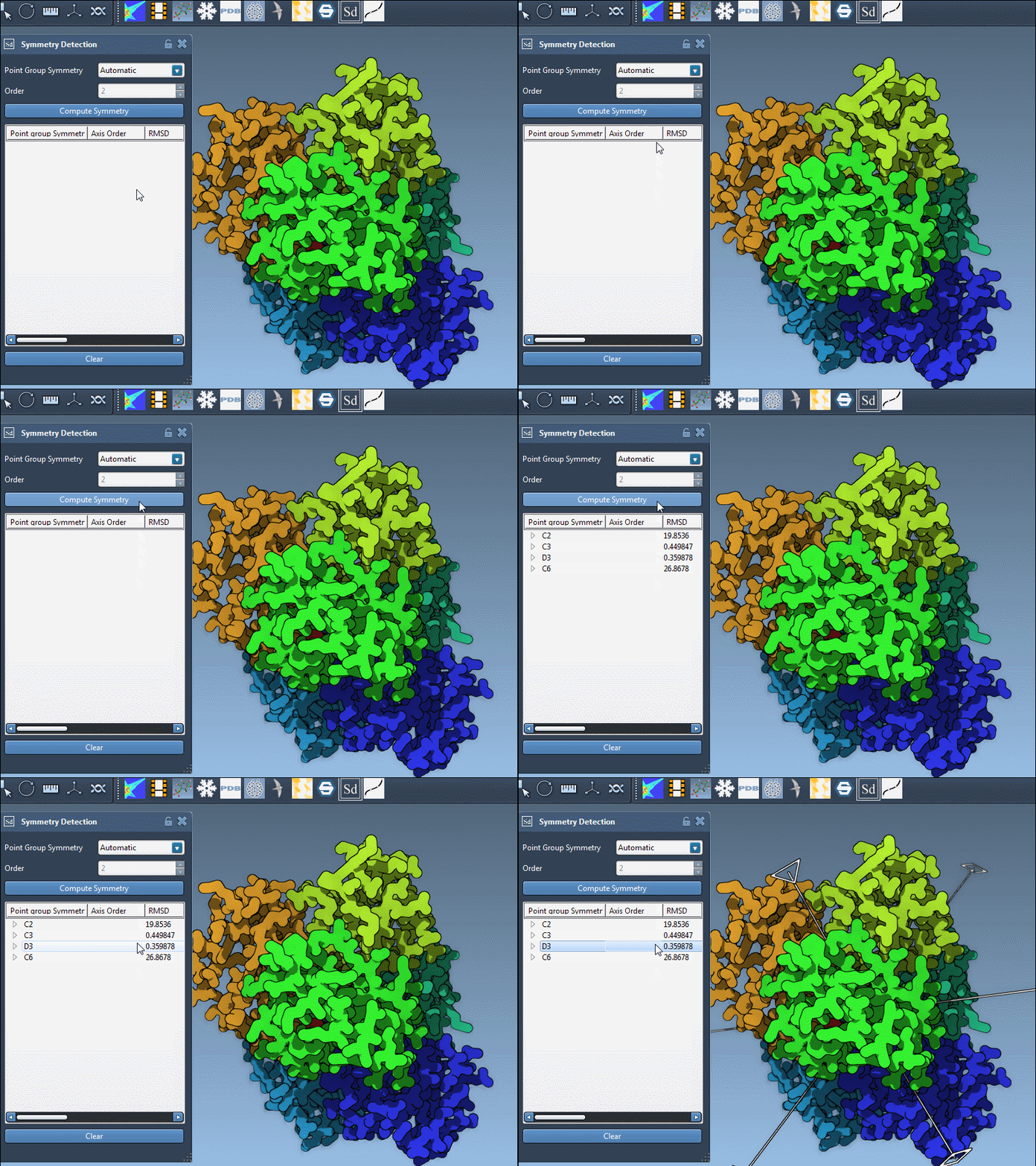
- Exploring axes: Expand the symmetry group to see individual axes and their RMSD values. Single-clicking highlights the axis, while double-clicking aligns the camera to view it straight-on.
An example of refining a dihedral symmetry group for 1B4B is shown below:
Tips for Better Visualization and Next Steps
Make the most of your symmetry detection efforts by employing a few visualization tricks:
- Use color-coding to highlight asymmetric units or repeated chains.
- Visualize symmetry axes alongside ribbon or surface models for better spatial context.
- Save distinct angles or configurations using SAMSON’s viewport snapshot feature—ideal for sharing results in publications or presentations.
Once symmetry is identified, you can export asymmetric units for dedicated simulations, design symmetric mutations, or apply findings to other molecular design problems such as nanostructures or ligand optimization. The full workflow helps streamline your molecular design projects and fosters symmetry-aware strategies.
To dive even deeper into detecting and leveraging symmetry in SAMSON, visit the original documentation at this link.
Note: SAMSON and all SAMSON Extensions are free for non-commercial use. Download the platform today to explore a world of molecular design possibilities!