



For molecular modelers, navigating large and complex structures can be a daunting task. Efficiently selecting and filtering nodes like atoms, residues, or ligands often consumes valuable time and energy. This is where SAMSON’s Node Specification Language (NSL) proves invaluable. With a simple, yet powerful syntax, NSL empowers users to specify, filter, and select nodes based on their properties seamlessly.
The Pain: Precision in Large Molecular Structures
Imagine working on a massive biomolecular structure with thousands of atoms and residues. You want to focus only on all hydrogens bonded to oxygen atoms or select residues within a specific range of IDs. Manually identifying these structures is not just time consuming but prone to errors. NSL eliminates this inefficiency by providing a robust query language that simplifies complex selections.
NSL Quick Start: A Practical Guide
NSL’s user-friendly syntax allows you to compose queries to find exactly what you need. Whether you are new to NSL or an experienced user, you can start utilizing this language immediately with these example commands:
node.type residue: Selects all residue nodes.C or H: Quickly identifies all carbon or hydrogen atoms."CA" within 5A of S: Finds all nodes named “CA” within 5 angstroms of sulfur atoms (quotes are essential for names with spaces).node.category ligand, receptor: Filters nodes classified as ligands and receptors.
Proximity Operators: A Game-Changer
One of the most exciting aspects of NSL is its ability to filter nodes based on proximity. You can use commands like:
C within 5A of "GLN 2": Finds carbon atoms within 5 angstroms of “GLN 2”.node.type atom beyond 5A of "Chain A": Selects atoms that lie farther than 5 angstroms from “Chain A”.
These operators save significant time when focusing on areas of interest in dense molecular data.
Going Beyond Basics: Logical and Topological Operations
NSL offers logical operators (and, or, not, and xor) to form more advanced queries. For example:
node.type residue and not residue.type ALA: Selects all residues except alanine residues.sg.id 1000:1040 and sg.nat < 4: Matches structural groups with IDs between 1000 and 1040 that have less than 4 atoms.
Topological proximity operators further refine selections by assessing the maximum number of bonds between nodes. For example, a.s C wb 3 of a.s S selects all carbon atoms within 3 or fewer bonds of sulfur atoms.
Working Smarter with NSL in Document View
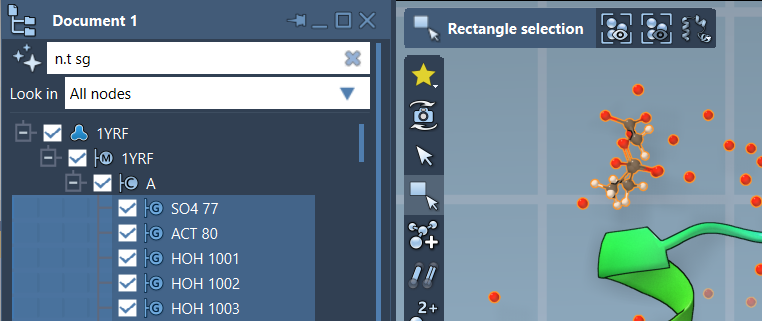
In addition to using the Find command, you can integrate NSL expressions directly within SAMSON’s Document View for interactive filtering. Simply enter your NSL query in the filter box. For example:
n.t sg filters structural groups, while pressing Enter allows you to select the matched nodes, making it an interactive and intuitive process.
Expand Your Knowledge
NSL is a comprehensive tool with a treasure chest of features, from the use of glob patterns to regular expressions for name filtering, as well as operations on element symbols, masses, and dimensions. Whether you’re sifting through residues, identifying side chains, or focusing on molecule topology, NSL adapts to your needs, providing unmatched precision.
For a deeper exploration, visit the official NSL documentation. It includes advanced examples and detailed reference pages on syntax, attribute spaces, and operators.
SAMSON and all SAMSON Extensions are free for non-commercial use. You can download SAMSON at www.samson-connect.net.