



For molecular modelers, refining and understanding bond structures during simulations can be a challenging task. Whether you’re optimizing molecular geometries, exploring chemical reactivity, or examining material properties, the way bonds are updated can significantly affect your insights. This blog post dives into how the Bond Update Mode in the UMA Force Field interaction model provides you with flexible control over bond graph adjustments during your simulations in SAMSON.
Why is Bond Handling Important?
In many simulations, the dynamic representation of bonds—how they are added, updated, or interpreted—is key to understanding your system’s chemistry. Modelers often need to balance computational efficiency with accuracy. The UMA Force Field offers different modes of bond updating, so you can tailor the process to your specific goals, whether that’s quick exploration or precise analysis.
Exploring the Bond Update Options
In the UMA Properties window, you can access the Bond update list and choose among the following modes:
- Covalent: This mode automatically recomputes covalent bonds based on the current structure. It’s ideal for ensuring structural consistency as your simulation progresses.
- Wiberg bond order (estimated): Using a deep-learning model, this mode estimates Wiberg bond orders, providing a quick representation of bonding characteristics. It’s perfect for exploring the reactive possibilities of your system.
- Mayer bond order (estimated): Similar to Wiberg, but estimating Mayer bond orders instead. This is another helpful approach for reactivity analysis, offering insights from a different perspective.
- Off: Select this option when you want to keep the existing bond graph unchanged. This mode ensures that your input structure remains unaltered, which can be crucial for certain types of experiments.
When to Use Each Mode
Each mode is designed for specific tasks:
- Use Covalent when working with geometry optimizations or structural refinement to ensure bond assignments are consistent with spatial changes.
- Choose Wiberg or Mayer bond order for studying chemical reactivity and gaining qualitative insights into bond strengths.
- Select Off for maintaining complete control over the bonding setup, especially if you need the input structure to remain static for comparison purposes.
Tips for Effective Bond Analysis
The Wiberg and Mayer modes provide visualized, estimated bond orders that can be invaluable during interactive exploration of your system. However, it’s important to remember the following:
Note
These bond-order visualizations are estimates. While they’re ideal for rapid analysis, it’s advisable to confirm any critical findings with validated reference methods for high accuracy.
Starting with the default Covalent mode and switching to estimated bond orders when needed ensures a balanced approach to speed and accuracy.
Visualizing and Adjusting Bonds
The UMA Properties window in SAMSON makes it easy to modify and visualize bond update options. Here’s a quick look at the interface:
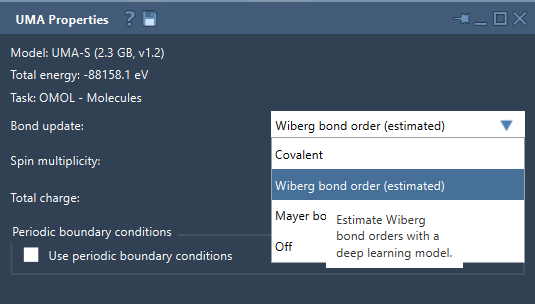
This intuitive interface ensures that you can focus on your scientific goals without being bogged down by technical complexities.
Getting Started with UMA Force Field
Take control of your bond graph handling by integrating the UMA Force Field into your workflow. Explore different update modes, adjust settings as needed, and achieve insights tailored to your specific application. To learn more, visit the original documentation page.
SAMSON and all SAMSON Extensions are free for non-commercial use. You can access and download SAMSON at samson-connect.net.