



Symmetry is a fascinating property of biological systems, from the arrangement of subunits in a viral capsid to protein complexes in molecular assemblies. But beyond its beauty, symmetry can simplify many molecular modeling tasks, such as reducing computational effort or identifying functional interfaces. If you’re a molecular modeler, understanding and leveraging symmetry in your assemblies may significantly accelerate your workflows.
In this blog post, we highlight a powerful solution for detecting and visualizing symmetry in biological assemblies using the Symmetry Detection extension for SAMSON. Whether you’re validating experimental structures, preparing simulations, or designing symmetric nanomaterials, this tool streamlines the process while offering exceptional insights. Let’s dive deeper into how you can harness this feature for your modeling work.
Streamline Your Work with Symmetry Detection
The Symmetry Detection extension in SAMSON automatically finds and highlights axes of symmetry in biological assemblies like proteins or viral capsids. It supports multiple types of symmetry: cyclic (Cn), dihedral (Dn), and cubic symmetries, including tetrahedral, octahedral, and icosahedral geometries.
Why should this matter? Identifying symmetry offers numerous advantages:
- Reduce computational cost: Work with just the unique asymmetric unit instead of the entire assembly.
- Validate your data: Confirm expected symmetry elements in experimental structures.
- Simplify workflows: Symmetry detection provides insights that make designing symmetric molecules or mutations more efficient.
- Identify functional interfaces: Symmetry reveals repeating patterns across subunits, which can hint at functional interactions.
How It Works: A Quick Walkthrough
Getting started with the Symmetry Detection extension is simple. Here’s how:
- Open SAMSON and load your biological assembly. For example, you can fetch PDB entries like
3NQ4,1CHP, or1B4B. - Launch the extension via Home > Apps > Biology > Symmetry Detection.
- Click Compute symmetry to detect possible symmetry axes.
- Review the results and select the axis or symmetry group of interest. You can explore the detected axes and their alignment errors (RMSD).
For example, detecting icosahedral symmetry in the viral capsid 3NQ4 allows you to visualize 2-, 3-, and 5-fold axes, as shown below:
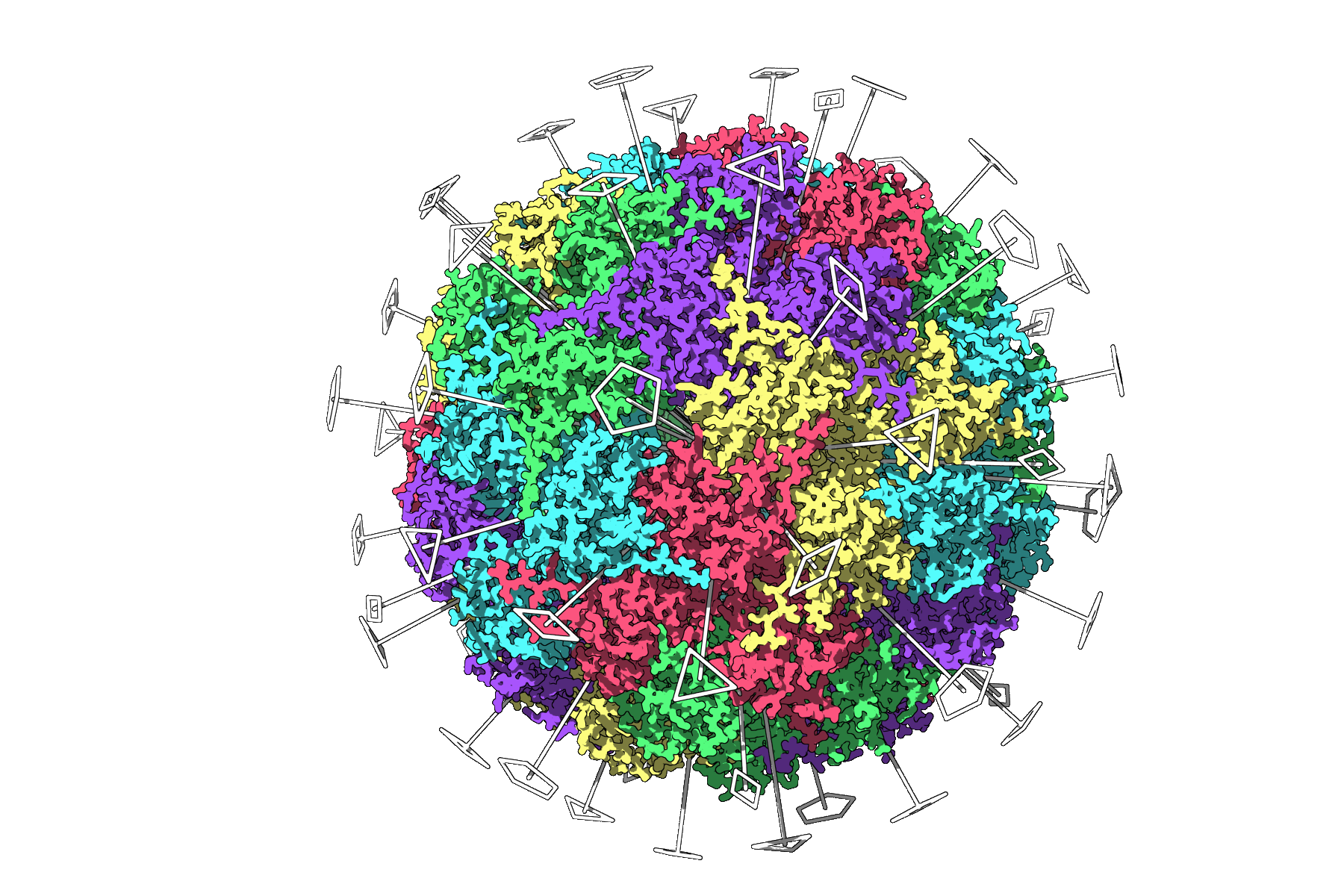
This visualization helps you isolate a unique asymmetric unit and focus your simulations on less data, saving computational resources.
Pro Tips for Exploring Symmetries
Here are a few tips to help you get the most out of your symmetry detection tasks in SAMSON:
- Use primary axes effectively: Highlight detected axes to better understand the structural organization.
- Sort by RMSD: Focus on symmetry groups with lower RMSD values to maximize accuracy.
- Customize symmetry views: Combine axes visualizations with models like ribbons or surfaces to add clear structure context. You can even color asymmetric units differently to emphasize symmetry visually.
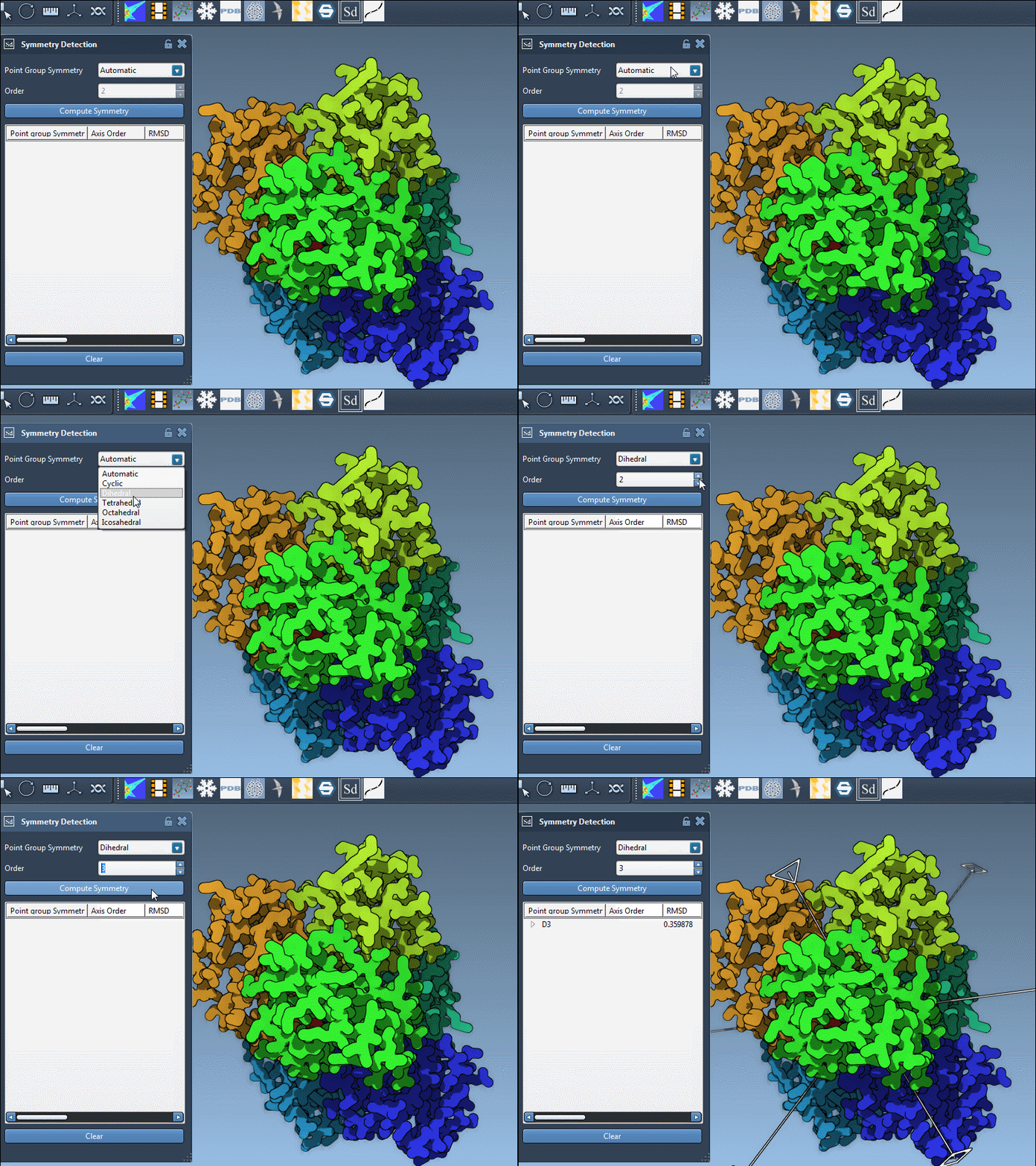
You can also manually specify symmetry group expectations. For example, for 1B4B, you can select a dihedral symmetry of order 3 (D3), as seen here:
Next Steps
Once you’ve detected and explored symmetry in your assembly, you can take several actions to enhance your modeling tasks:
- Export the unique asymmetric unit for focused simulations.
- Design symmetric molecular systems using detected patterns.
- Explore this approach for new applications like nanoparticle design or molecular assemblies.
To learn more, visit the full Symmetry Detection tutorial page.
Note: SAMSON and all SAMSON Extensions are free for non-commercial use. To get SAMSON, visit SAMSON Connect.