



Molecular simulations often involve complex motions, such as ligand unbinding or macromolecular conformational changes. Analyzing these motions can be challenging, especially for molecular modelers who need clarity and precision in monitoring structural dynamics.
If you’ve been looking for a way to intuitively visualize the motion of groups of atoms within your molecular system, SAMSON’s Pathlines extension offers a practical solution. By leveraging this visual model, you can display the center-of-mass (COM) trajectory of selected atoms along a path, providing insights into intricate systems and interactions.
How Pathlines Help You
The Pathlines feature is tailored for use cases such as:
- Tracking the motion of ligands or atom groups over time.
- Visualizing center-of-mass displacements in complex systems.
- Analyzing processes like ligand unbinding, diffusion, or large-scale domain motions in proteins.
These capabilities are incredibly beneficial for understanding dynamic events in simulations, allowing you to pinpoint key interactions or transitions of interest.
Getting Started with Pathlines
To start using Pathlines in SAMSON, you need to follow these three initial steps:
- Log into SAMSON Connect and go to the Pathlines Extension page. Click Add to install the extension.
- Restart SAMSON to activate the extension.
- Load a sample system for testing by downloading the provided tutorial document here. The sample contains a structural model of Lactose permease (
1PV7) with its ligand Thiodigalactosid (TDG) and unbinding paths.

Once you’ve loaded the document, you’re ready to visualize motion with center-of-mass pathlines.
Creating Your Pathline Visual Model
To create a visual representation of COM trajectories, follow these steps:
- Select the atoms or ligands you want to study from the Document view. Include one or more paths from the system. If no atoms are selected, the entire system is considered; if no paths are selected, all paths in the document are used.
- Navigate to Visualization > Visual model > More… (shortcut: Ctrl/Cmd + Shift+V).
- In the dialog box, choose “Pathline of the center of mass” and click OK.
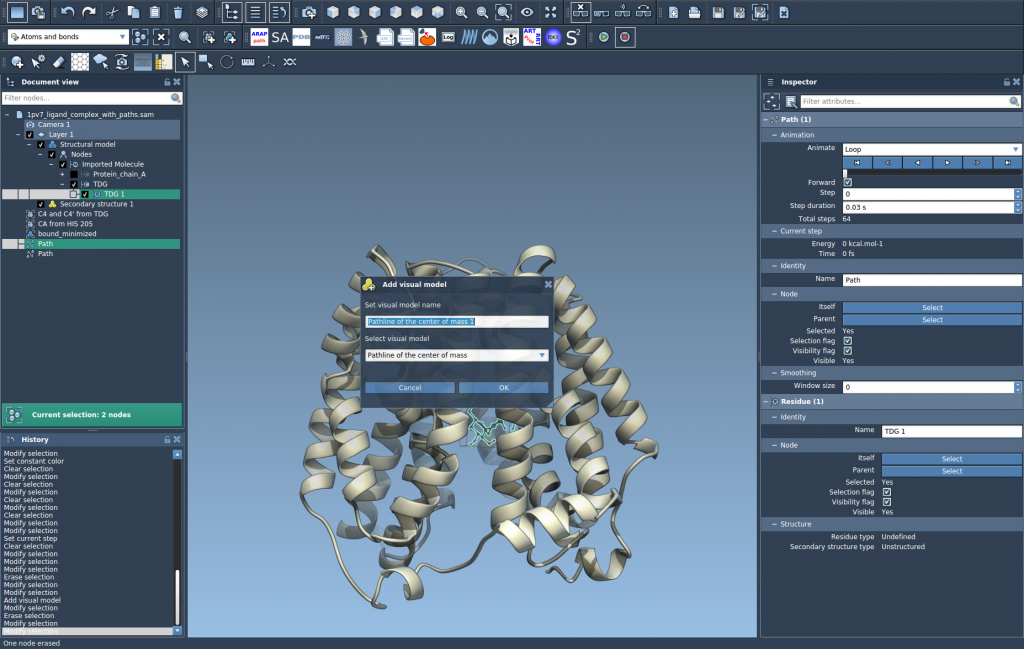
This will generate a visually distinctive pathline showing the center-of-mass motion of your selected atoms along the chosen path(s).
Customizing and Exploring Pathlines
The Pathlines functionality doesn’t stop at visualization. You can further explore and modify your pathlines to suit your preferences or research needs:
- Double-click a path in the Document view to start or stop rendering the pathline.
- Access path controllers by selecting a path and opening the Inspector (shortcut: Ctrl/Cmd + 2).
- Adjust the pathline’s visual properties, such as color or thickness, in the Inspector.
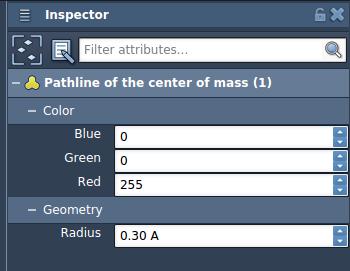
These options enable a deeper exploration into your system’s dynamics, enhancing your analysis and reproducibility of the results.
Conclusion
Pathlines help molecular modelers simplify the process of visualizing center-of-mass trajectories, enabling a better understanding of complex systems in research or simulation workflows. To dive deeper and explore additional use cases, visit the Pathlines documentation page.
Note: SAMSON and all SAMSON Extensions are free for non-commercial use. Get SAMSON here to start exploring Pathlines and much more.