



Designing custom polymers can be a daunting task for molecular modelers, especially when dealing with complex sequence patterns and specific bonding requirements. SAMSON eases this process with the Polymer Builder. This tool allows researchers to craft tailored polymers with precision, offering flexible options like integrating custom sequences. In this post, we’ll take a closer look at how to streamline sequence design using Polymer Builder.
Why Polymer Sequences Are Crucial
Polymer sequences are at the heart of polymer functionality, defining both structure and behavior. In SAMSON, you can register repeating sequence patterns, helping you achieve streamlined workflows and avoid redundant tasks. Here’s how you can advance your polymer modeling game by learning to assemble and fine-tune these sequences within the platform.
How to Register Polymer Sequences
To get started, ensure you’ve already registered the monomers you want to use. Then follow these steps:
- Click Add new sequence.
- Input the sequence using registered monomer IDs (e.g.,
ABBA).
Each registered sequence gets a unique identifier like S1, S2, etc. You can simply reuse them in future designs. Plus, SAMSON offers advanced customization by allowing bond types—single by default, but you can specify double (=) or triple bonds (#) within the sequence definition. Example:
A=BmeansAis connected toBwith a double bond.A#BmeansAis joined toBby a triple bond.
This ensures better control over both polymer structure and its rigid or flexible characteristics.
Visual Guidance and Validation
The Polymer Builder provides visual feedback on your sequences. Click the associated V button next to a sequence entry to highlight the selected monomers in your structure. This visual cue ensures that what you’ve specified matches the intended sequence configuration.
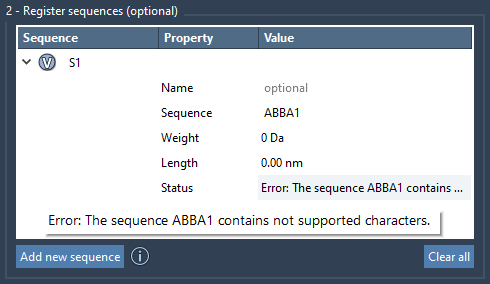
If there’s an error (e.g., an invalid monomer combination or sequence format), it will be flagged under the Status column, preventing unnoticed mistakes. Once validated, you’ll see “Valid” displayed instead. Here’s an example:
Predicting and Optimizing Sequence Outcomes
The Polymer Builder isn’t just about stringing monomers together. It helps predict the molecular weight and length of your polymer sequence in real time. This predictive capability is essential for tailoring polymers to specific experiments, whether for biopolymer modeling or synthetic applications. Each sequence can also be grouped into common structural groups by assigning a name, further simplifying further design iterations.
Editing and Managing Sequences
Need to revise or remove a sequence? SAMSON allows you to:
- Modify names and sequence patterns directly within the sequence table.
- Inspect approximate molecular details like weight and length.
- Right-click on a sequence to Delete it or use Clear all for multiple deletions at once.
These features are designed to facilitate trial and error, allowing molecular modelers to quickly iterate and refine polymer configurations.
Next Steps
Once your sequences are registered, you can combine them with other monomers or sequences to assemble the final polymer structure. The sequence design process complements other capabilities of the Polymer Builder, such as attaching monomers or adjusting bonding preferences on generated polymers.
To explore more about the Polymer Builder’s sequence features and its broader functionalities, visit the detailed tutorial here.
Note: SAMSON and all SAMSON Extensions are free for non-commercial use. Get SAMSON here.