



For molecular modelers engaged in umbrella sampling workflows, creating a Potential of Mean Force (PMF) profile is a crucial step in understanding free energy along a reaction coordinate. However, transitioning from raw simulation data to actionable insights can feel daunting. This is where GROMACS Wizard in SAMSON comes to the rescue with its Weighted Histogram Analysis Method (WHAM) tool, streamlining PMF analysis into an intuitive process.
Why PMF Analysis Matters
PMF profiles provide a detailed understanding of the free energy landscape of a molecular system along a defined reaction coordinate. This information is invaluable for predicting system behavior and identifying energetically favorable pathways. But generating these profiles from umbrella sampling data can often be complex and error-prone due to the intricate configuration steps involved. With GROMACS Wizard, the process is both simplified and automated.
Streamlined Workflow for Computing the PMF
Here’s how you can use GROMACS Wizard’s WHAM Analysis tool to compute the PMF:
- First, ensure you’ve completed an umbrella sampling workflow. Your input folder must contain matching subprojects, organized by numbered subfolders for the same system and reaction-coordinate definitions.
- Switch to the WHAM Analysis tab in GROMACS Wizard. The tool automatically loads parameters like reaction-coordinate information, time range, and system temperature.
- Select the reaction coordinate from the available list, ensuring it aligns with your umbrella sampling setup. Adjust optional settings such as bounds or time range if necessary.
- Click Compute. GROMACS Wizard will process the data and generate results.
Visualizing the Output
After the computation, GROMACS Wizard delivers two key visual outputs:
- The PMF profile: This provides the free energy landscape along the chosen reaction coordinate.
- The histogram of coordinate space coverage: Useful for identifying areas that may need additional sampling.
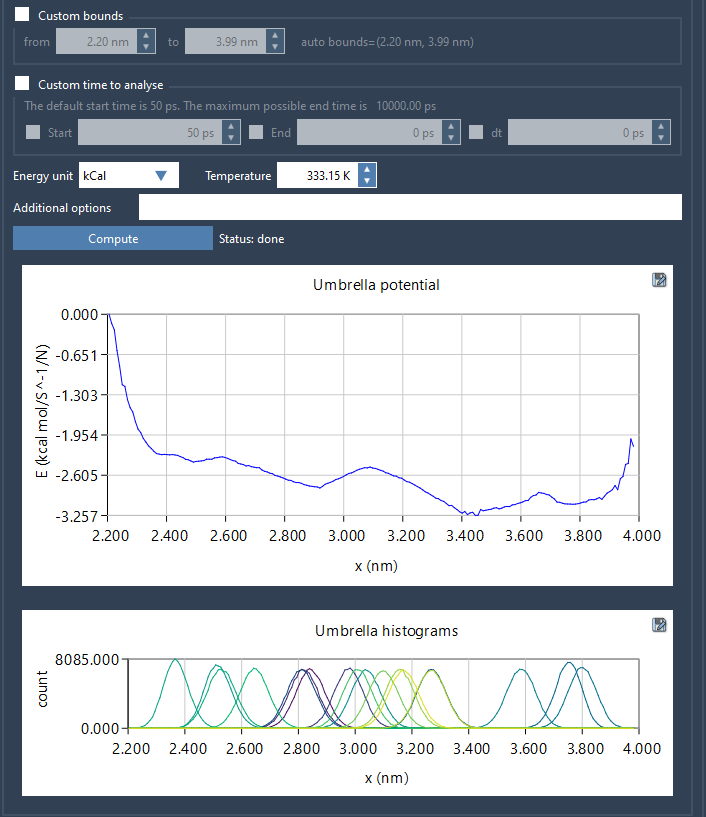
The tool saves all generated plots and data in a wham_results subfolder. Additionally, if you decide to switch reaction coordinates later, GROMACS Wizard retains previously computed data for consistent parameter setups, saving even more time.
Addressing Insufficient Sampling
The histogram output is especially helpful in identifying areas of insufficient sampling along the reaction coordinate. If there are gaps or low-coverage regions, you can revisit your umbrella sampling workflow to add or extend simulations in those specific windows. This iterative approach ensures you capture a comprehensive energy profile.
Conclusion
With GROMACS Wizard, generating a Potential of Mean Force profile is no longer a cumbersome task. Its automation and intuitive interface allow you to confidently analyze umbrella sampling data and uncover deeper insights into your molecular systems. For step-by-step details, refer to the official documentation page.
SAMSON and all SAMSON Extensions are free for non-commercial use. Get SAMSON today at https://www.samson-connect.net.