



For many molecular modelers, efficiently locating specific molecular structures within extensive datasets is a time-consuming challenge. The updated SMILES Manager in SAMSON offers a solution through its enhanced substructure search feature, enabling you to refine searches and streamline your workflows.
Substructure searching allows you to identify molecules containing specific atomic configurations or functional groups. This feature is especially valuable when working with large libraries, simplifying the task of filtering relevant molecules to focus on subsets that matter most to your research.
How Does Substructure Search Work?
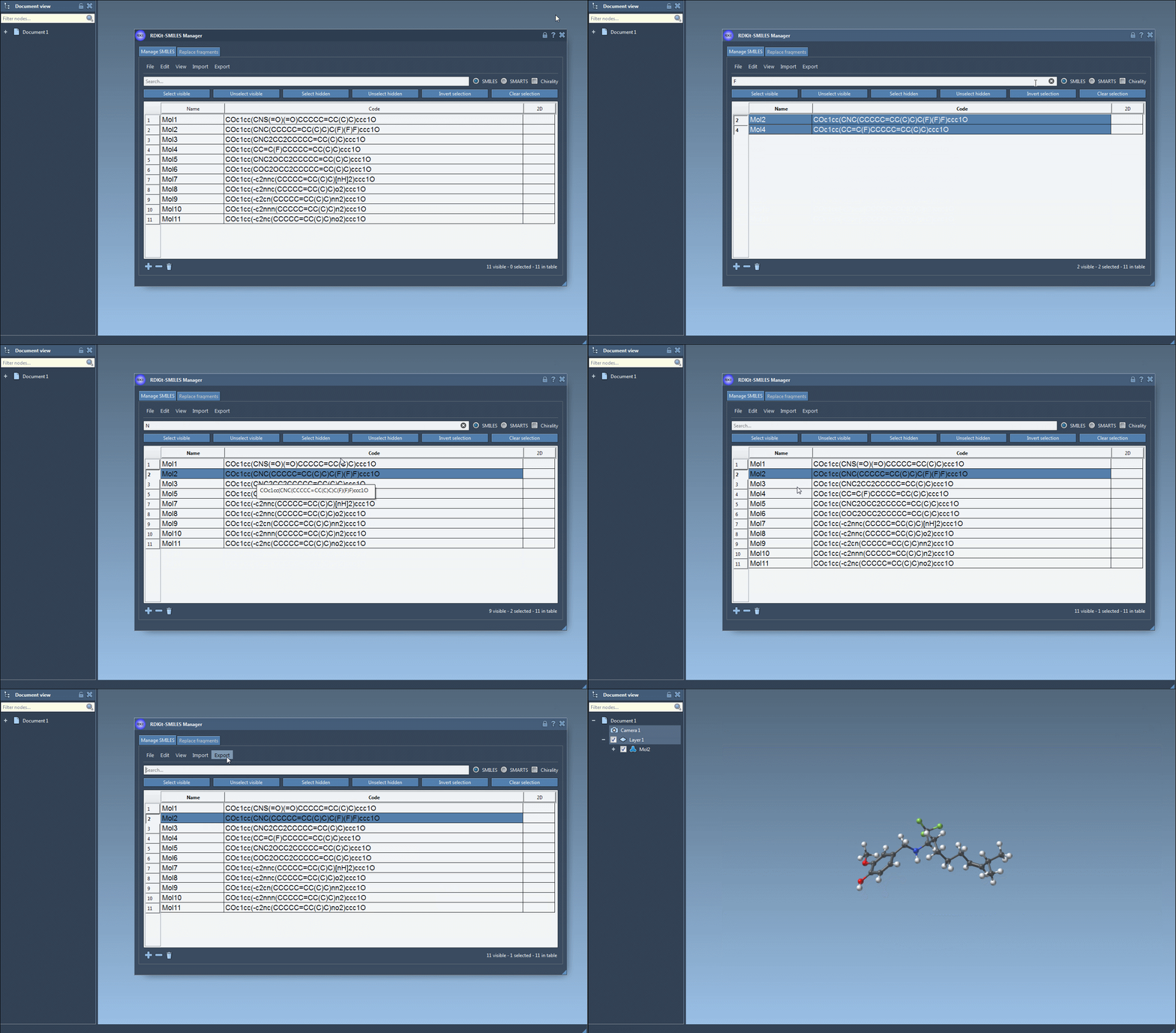
The substructure search functionality in the SMILES Manager provides an intuitive way to perform targeted searches within your dataset. For instance, imagine you are interested in identifying molecules containing both fluorine and nitrogen atoms. Here’s how you can perform this search:
- Start by entering
Fin the Search bar to locate all molecules featuring a fluorine atom. Use the Select visible button to highlight these molecules. - Clear the search bar. Note that your original selection remains preserved even after clearing.
- Enter the query
Nin the search bar to filter for molecules with nitrogen atoms. You will now see a refined list containing only the selected fluorine-containing molecules that also meet the nitrogen criterion. - To finalize, press Unselect hidden to exclude any molecules that do not meet the nitrogen filter from your selection.
This step-by-step process showcases a powerful workflow for narrowing down your dataset using logical combinations of criteria, without losing prior selections. Moreover, the search mechanism allows you to manage your selected set dynamically, giving you full control over the filtering process.
Key Features of Substructure Search
The substructure search in SMILES Manager includes capabilities that further enhance its usability:
- Dynamic filtering: You can iteratively modify your queries, adding or removing criteria while maintaining previous selections.
- Chirality options: By default, RDKit does not consider stereochemistry in its substructure searches, but this can be enabled if chirality in your dataset is of interest.
- Error handling: If any SMILES strings are invalid, they are automatically flagged for correction.
With these features, substructure search allows you to not only locate relevant molecules but also ensure the integrity of your dataset before moving further in your workflow.
Why It’s a Game-Changer
The ability to refine searches with specific substructures saves significant time, especially in exploratory research or when generating subsets for experiments. Instead of manually verifying molecules one by one, the process becomes automated and efficient. This creates opportunities for higher productivity and faster decision-making in molecular design and drug discovery projects.
Interested in learning more about these tools? Visit the original documentation page here.
Note: SAMSON and all SAMSON Extensions are free for non-commercial use. Download SAMSON today at SAMSON Connect.