



Understanding protein conformations and their transitions is a crucial task for molecular modelers tackling various challenges like free energy simulations, conformational analysis, or studying complex systems such as the SARS-CoV-2 spike protein. Smoothly modeling these transitions can be tedious and time-consuming. However, with the As-Rigid-As-Possible (ARAP) Interpolator in SAMSON, you can quickly generate realistic transition paths between two protein structures. Here’s how it works and why it matters.
Why Transition Paths Are Useful
When studying molecular systems, it’s often necessary to move from point A to point B—whether it’s two conformations of a protein or two states in a reaction pathway. But how do you model this intermediate transition realistically in seconds?
The ARAP Interpolation extension offers a unique solution by aligning the protein conformations and generating a smooth path between them. The result? Highly realistic reaction coordinates, which enhance downstream workflows like umbrella sampling or visualization of reaction mechanisms.
Setting Up Transition Paths with ARAP
Here’s a step-by-step guide to generate smooth transition paths:
1. Loading Protein Structures
Fetch your protein examples directly in SAMSON:
- Navigate to Home > Fetch and input
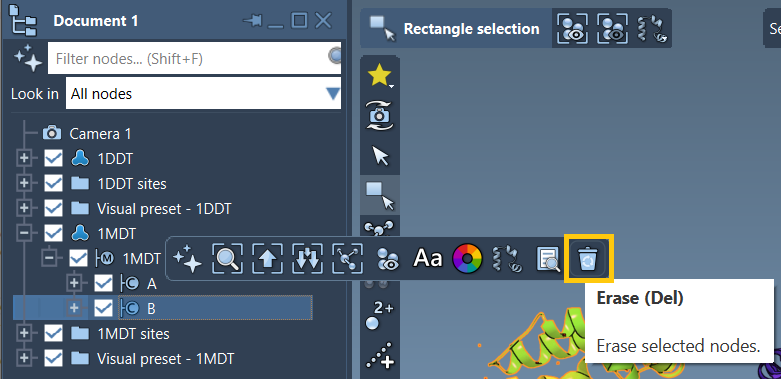
1DDT 1MDTin the PDB fetcher. - Remove unnecessary components like water, ligands, or ions using Home > Prepare. For example, delete chain B of
1MDT.
These steps ensure a clean start, focusing exclusively on the desired structures (e.g., chain A).
2. Create Conformations
Define the start and goal for the interpolation path:
- Select
1DDTin the Document view, navigate to Edit > Conformation, and name it1DDT A. - Follow the same step for
1MDT, naming the conformation1MDT A.
By naming these conformations, you can directly use them in the interpolation setup.
3. Run ARAP Interpolation
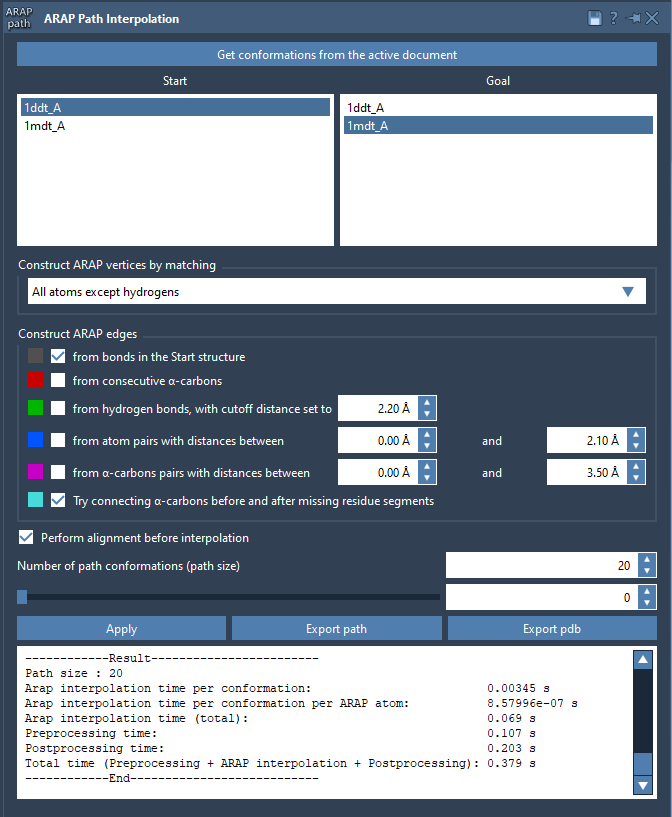
After creating conformations, open Home > Apps > Biology > ARAP Path Interpolation. In this interface:
- Select your start and goal conformations (
1DDT Aand1MDT A). - Choose options for atom matching (e.g., exclude hydrogens for efficiency).
- Check preprocessing options like alignment, ensuring your structures are ready for interpolation.
- Adjust the number of path conformations, typically set to 20 for a comprehensive view of intermediate steps.
Click “Run,” and within seconds, you’ll have a smooth transition model! Below is an example of results visualized in SAMSON:
Exporting Results for Further Use
Once the transition path has been computed:
- Use the slider to review intermediates within SAMSON.
- Export results as a trajectory file or in PDB format for further simulations or analysis.
These exported paths unlock numerous downstream opportunities like steered MD simulations or preparing umbrella sampling setups in GROMACS.
Conclusion
The ARAP Interpolation extension in SAMSON transforms what could be a challenging modeling process into an intuitive, quick, and precise workflow. Ready to explore ARAP Interpolation? Dive deeper into the official documentation.
SAMSON and all SAMSON Extensions are free for non-commercial use. Download SAMSON today from SAMSON Connect!