



Analyzing molecular shapes along trajectories is an essential task for molecular modelers, especially when identifying subtle shape changes in systems such as protein folding or supramolecular assemblies. However, relying solely on common indicators like the radius of gyration can sometimes fail to fully capture how the shape evolves. Enter Asphericity: a tool that provides a more nuanced view of anisotropy in molecular structures.
Asphericity measures how far a selected group of atoms deviates from a perfectly spherical shape while progressing along a defined path or trajectory. This offers a compact and meaningful way to assess shape anisotropy, helping to bridge the gap between simple distance-based descriptors and complex modeling efforts.
How to Add Asphericity Plots in SAMSON
Getting started with Asphericity analysis in SAMSON’s Path Analyzer is straightforward. Here’s a step-by-step guide:
- Open the Path Analyzer in SAMSON.
- Under the Observable menu, select Asphericity.
- Choose your desired Path.
- Define the Group of atoms whose shape you want to analyze.
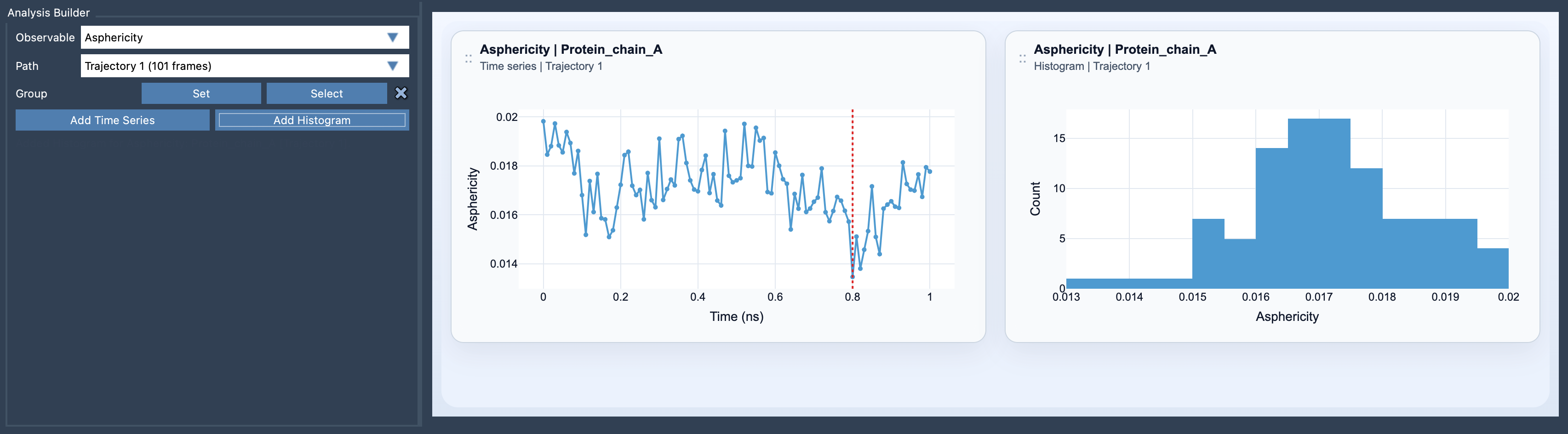
- Click Add Time Series (to track changes over time) or Add Histogram (to visualize the range of values sampled).
What You’ll Need
To calculate Asphericity, you need a group of atoms to analyze. Simply create a selection containing these atoms, and you’re ready to extract meaningful shape descriptors.
Visualizing Shape Changes
You can explore Asphericity data in two ways in SAMSON:
- Time Series: This helps you follow the evolution of shape anisotropy along a trajectory. It’s ideal for dynamic monitoring, such as tracking changes during a molecular simulation.
- Histogram: This allows you to delve into the distribution of asphericity values, providing insights into the range of sampled shapes.
A Practical Tip for Molecular Modelers
Asphericity is particularly useful when the traditional radius of gyration descriptor feels too simple for the task at hand. By pairing it with the Radius of Gyration and Shape Parameter, you can gain a more comprehensive understanding of global shape changes. This combination ensures both coarse and detailed perspectives on molecular geometry are accounted for.
To see an example of how Asphericity works, here is a preview:
For more details about this feature and to access additional resources, visit the official documentation page at this link.
Note: SAMSON and all SAMSON Extensions are free for non-commercial use. You can download SAMSON at https://www.samson-connect.net.