



Protein-ligand docking is a crucial task for molecular modelers aiming to predict the optimal binding between drug candidates and target proteins. One of the key steps to achieving accurate results is the proper setup of the search domain. Why? Because a well-defined search domain not only identifies the most relevant binding site but also reduces computational time by focusing on the right region. Let’s delve into how you can achieve this efficiently with AutoDock Vina Extended on the SAMSON platform.
Why the Search Domain Matters
A search domain is essentially a 3D box that defines the area where the receptor-ligand docking occurs. An oversized box includes unnecessary regions, demanding more computational resources and time. Conversely, a box that’s too small might exclude potential binding sites. Striking the right balance is essential for reliable results.
Fortunately, SAMSON’s AutoDock Vina Extended extension offers intuitive tools to fine-tune the search domain according to your specific needs.
How to Set Up the Search Domain in SAMSON
Here’s a step-by-step guide to optimize your docking workflow:
1. Default Search Domain
By default, the search domain is automatically configured to encompass the entire receptor when you set it up. This is great for a quick start but might be too broad for effective docking results if you already know the binding site.
2. Refining Based on Binding Site
If you have a bound ligand or know the binding pocket, you can narrow down the search domain. Here’s how:
- Select the bound ligand. In the Document view, highlight the ligand previously identified as bound.
- Define the binding site. Go to Select > Biology > Binding sites and customize the parameters in the dialog box (e.g., define a radius to capture surrounding residues).
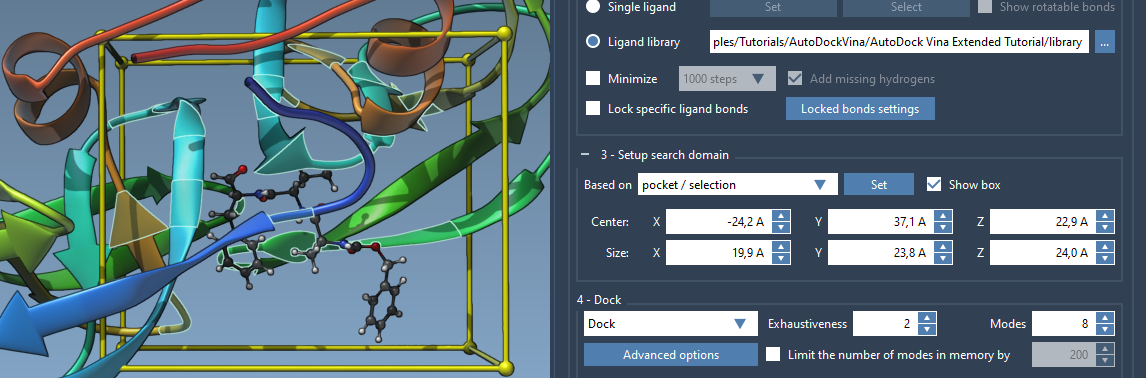
- Adjust the domain to fit the selection. From the search domain interface, choose the Based on pocket/selection option and click Set.
As a result, the yellow wireframe box representing your search domain will be limited to the binding site, improving efficiency and relevance.

3. Manual Adjustments in the Viewport
The yellow search box in the Viewport is fully adjustable. Use the following techniques:
- Drag the spheres at the corners of the search domain box to resize it visually.
- If desired, manually enter values for the center coordinates and box dimensions in the interface for precise control.
4. Advanced Alignment
For better orientation of the search domain in global XYZ coordinates, consider aligning or rotating the receptor and ligand using SAMSON’s Move editors. This ensures the domain aligns optimally with your areas of interest.
Practical Tips for a Better Workflow
- Toggle Visibility: You can hide or display the search domain box in the Viewport by toggling the Show box option.
- Fine-Tune the Parameters: If you’re confident about the binding site, reducing the size of the search domain will significantly decrease docking time without compromising accuracy.
- If you’re dealing with a flexible ligand or receptor, ensure that the search domain covers all potential configurations that might emerge during the docking simulation.
Conclusion
Meticulous setup of the search domain is a small effort that pays huge dividends in the accuracy and efficiency of protein-ligand docking simulations. Using the steps outlined above, you’ll make the most out of the capabilities of AutoDock Vina Extended in SAMSON.
To delve deeper into this topic and learn about other advanced features, visit the official documentation page.
Note: SAMSON and all SAMSON Extensions are free for non-commercial use. You can get SAMSON here.