



Handling molecular data can often feel overwhelming, especially when it comes to transitioning from plain SMILES strings to something more tangible like visual 2D depictions. If you’ve ever found yourself struggling during the visualization stage of molecular modeling, the SMILES Manager in SAMSON offers a streamlined solution for transforming SMILES strings into clear, detailed 2D images with ease.
Why Focus on 2D Depictions?
For chemists and molecular modelers, the visualization of 2D molecular structures is a key step before diving into more advanced analyses, such as 3D modeling or docking studies. 2D representations allow quick structure validation, error detection, and provide insight into the basic topology of molecules.
SAMSON’s SMILES Manager simplifies this process by leveraging RDKit, the renowned open-source cheminformatics toolkit, to generate precise and instantly updated depictions of molecules. Here’s how it works and what makes it exceptionally useful.
How to Generate and Manage 2D Depictions
When you import SMILES strings into the SMILES Manager, 2D depictions are generated automatically on the fly. These depictions are displayed in a convenient table, alongside SMILES codes and molecular names. But it doesn’t stop there:
- If a SMILES string contains errors, it will be highlighted for easy identification, ensuring you can quickly fix issues.
- By double-clicking on any depiction or using the right-click Open action, you can view a larger version of the 2D image for detailed examination.
- The depictions update instantly. Modifying a SMILES string or molecule name in the table refreshes the associated depiction.
- Prefer an uncluttered workspace? You can hide 2D depictions right from the View menu while still being able to access them when needed.

Saving and Sharing 2D Depictions
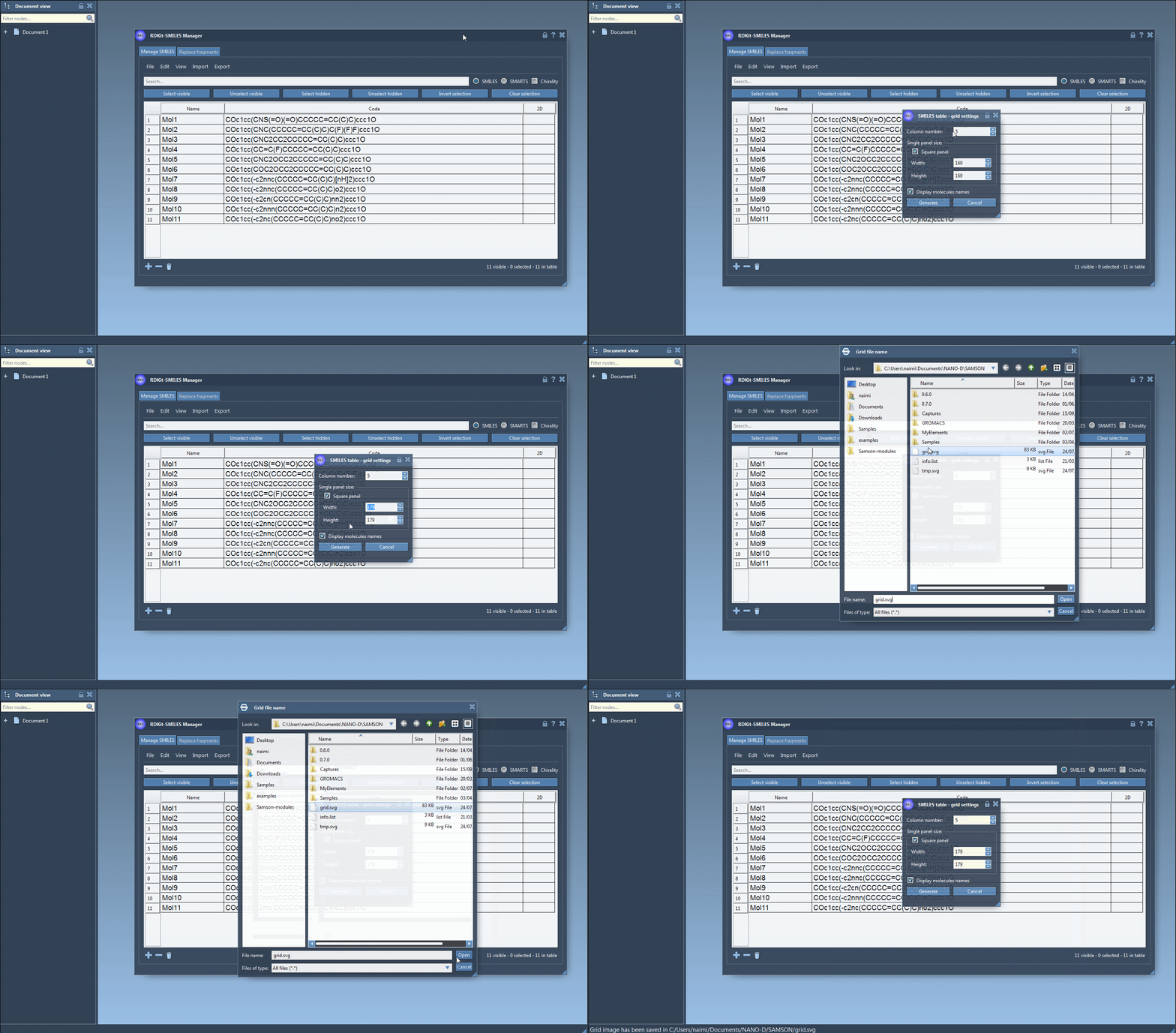
SAMSON offers flexibility for managing the generated images. You can save individual depictions as PNG or SVG files, either from the context menu or within the large-view window. Additionally, for those working with molecular datasets, the SMILES Manager enables you to save multiple depictions in a grid layout through the Save as grid image action in the File menu. You can even customize parameters like grid size, molecule labels, and more.
This feature is invaluable for researchers who need to document or share poses and arrangements in publications, reports, or collaborative projects.
Instant Visual Feedback for Better Modeling
One of the standout features of this tool is the instant feedback it provides. As you make changes to a molecule’s SMILES string, every related property, including the 2D depiction, updates in real time. This ensures fewer errors and accelerates iterative processes while preparing molecular datasets for analysis.
A Seamless Addition to Your Workflow
If you’re transitioning from lists of SMILES strings to actionable molecular models, the ability to create, refine, and export 2D depictions through SAMSON’s SMILES Manager removes unnecessary barriers. Whether for error-checking, presentation, or analysis, the tool eases the visualization burden while integrating well into broader workflows. You can now ensure that your molecular datasets not only function as starting points for 3D modeling but are also accessible for discussions and documentation along the way.
Explore these features and more in the original documentation page.
Note: SAMSON and all SAMSON Extensions are free for non-commercial use. You can get SAMSON here.