



Flexible molecular docking simulations introduce complexity and advanced realism by allowing parts of the receptor and ligand to adapt dynamically during the docking process. However, these setups can be confusing for beginners. In this guide, we will explore how to efficiently set flexible side chains in protein receptors and adjust rotatable bonds in ligands using AutoDock Vina Extended in SAMSON.
Why Allow Flexibility?
In molecular docking, rigid receptors often fail to accommodate ligands fitting snugly into binding pockets, resulting in unrealistic docking poses. Allowing certain side chains in the receptor to rotate, or enabling key bonds in the ligand to be flexible, addresses this limitation. While this increases docking time, it can drastically improve the accuracy of predictions, especially for drug discovery applications.
Setting Up Flexible Side Chains for Receptors
To enable flexible side chains:
- Select residues you want to be flexible directly in the Document view.
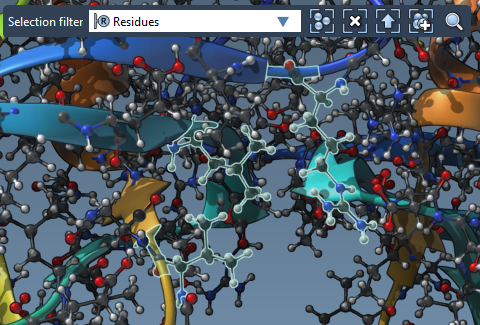
- You can also select residues in the Viewport by switching the Selection filter in the top-left corner to Residues. Use Ctrl and Alt keys to add/remove residues from the selection.
- If you are working with a ligand that binds to the receptor, select this ligand, navigate to Select > Biology > Binding sites, and specify the binding site settings to highlight residues around the ligand.
Once the residues are selected, click on the Set button in the Set receptor part of the AutoDock Vina Extended interface. These residues will now have rotatable side chains. You’ll notice green cylinders displayed in the Viewport, indicating active (rotatable) bonds. These cylinders can be directly toggled between active (green) and locked (red) states by clicking on them.
Customizing Ligand Flexibility
Ligand flexibility is equally essential. AutoDock Vina Extended enables you to define which bonds within a ligand can rotate during docking. After selecting a ligand in the Document view and clicking the Set button in the Set ligand section, the interface displays green cylinders over rotatable bonds in the Viewport. Use these cylinders to enable or disable specific bonds as needed.
Advanced: Locking Specific Bond Types
AutoDock Vina Extended also allows global rules for locking bonds. Go to the Locked bonds settings, select bond types you want to disable globally (e.g., planar bonds), and confirm your choices. Then check the Lock specific ligand bonds option. This ensures that even though bonds are marked as flexible by default, critical bonds remain locked regardless of individual toggled settings.
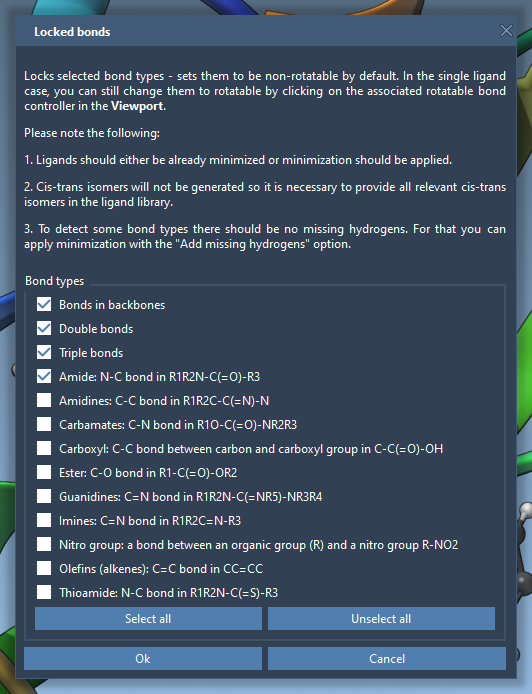
Note: Ensure your ligand is minimized before docking to avoid unnecessary calculations. The Minimize option in the interface makes this easy, even adding hydrogens for calculating H-bonds, which are key in docking simulations.
Visualizing Flexibility
The added flexibility settings are visualized effectively within SAMSON. Green and red markers in the Viewport help identify which receptor side chains or ligand bonds are active during the simulation. This ensures easier troubleshooting and better understanding of how your docking setup aligns with biological scenarios.
Concluding Thoughts
Allowing flexible side chains for receptors and rotatable bonds for ligands can elevate the accuracy of docking simulations significantly. AutoDock Vina Extended in SAMSON provides intuitive tools to implement and visualize these features. For a comprehensive step-by-step instruction guide, visit the original SAMSON documentation.
SAMSON and all SAMSON Extensions are free for non-commercial use. Get SAMSON at https://www.samson-connect.net.