



For molecular modelers, configuring simulations can involve tedious steps. If you’ve been seeking a simpler yet robust approach to simulate molecular systems, SAMSON’s Universal Force Field (UFF) implementation is designed with your needs in mind. This blog post will walk you through the setup process and how UFF saves time by automating key steps such as bond and atom type detection, ensuring a streamlined experience for your simulations.
Why Choose Universal Force Field (UFF) in SAMSON?
UFF is a comprehensive force field proposed by Rappe et al. that applies to a wide variety of molecular systems. What sets this implementation apart in SAMSON is its ability to automatically perceive molecular structures. This means bonds, bond orders, and atom types are computed on the fly, allowing you to initiate simulations with minimal preparation. Whether you are exploring molecular mechanics or optimizing geometries for research, UFF offers a balance between complexity and ease-of-use.
Step-by-Step: Setting Up UFF
Here is a straightforward guide to get you started:
- Open Your Molecular System: Start with a molecular system you wish to simulate. This could be one you’ve built or imported.
- Add a Simulator: Click on
Edit > Simulate > Add simulator, or use the shortcut (Ctrl+Shift+M / Cmd+Shift+M) and select “Universal Force Field” from the list of interaction models. - Choose a State Updater: Pick the mechanism to update states during simulation. One option is the Fast Inertial Relaxation Engine (FIRE) for geometry optimization.
- Configure Bonds: Decide if UFF should use your existing bonds or recompute them from atom types and positions. Configure this in the UFF setup window.
- Finalize Settings: UFF will now initialize your system by calculating covalent bonds (if needed), bond orders, and atom types. The setup is interactive, and any inconsistencies will trigger warnings.
After these steps, you’ll see the UFF Parameter Window, fully prepared to fine-tune your simulation.
Advantages of UFF Automation
Automation can significantly reduce your workload. Without manually specifying bond orders and atom types, you can focus on analyzing results rather than setting up simulations. The real-time feedback during molecular interactions also empowers users to modify systems and observe outcomes dynamically.
Visual Guide to UFF in Action
Here’s what the process might look like:
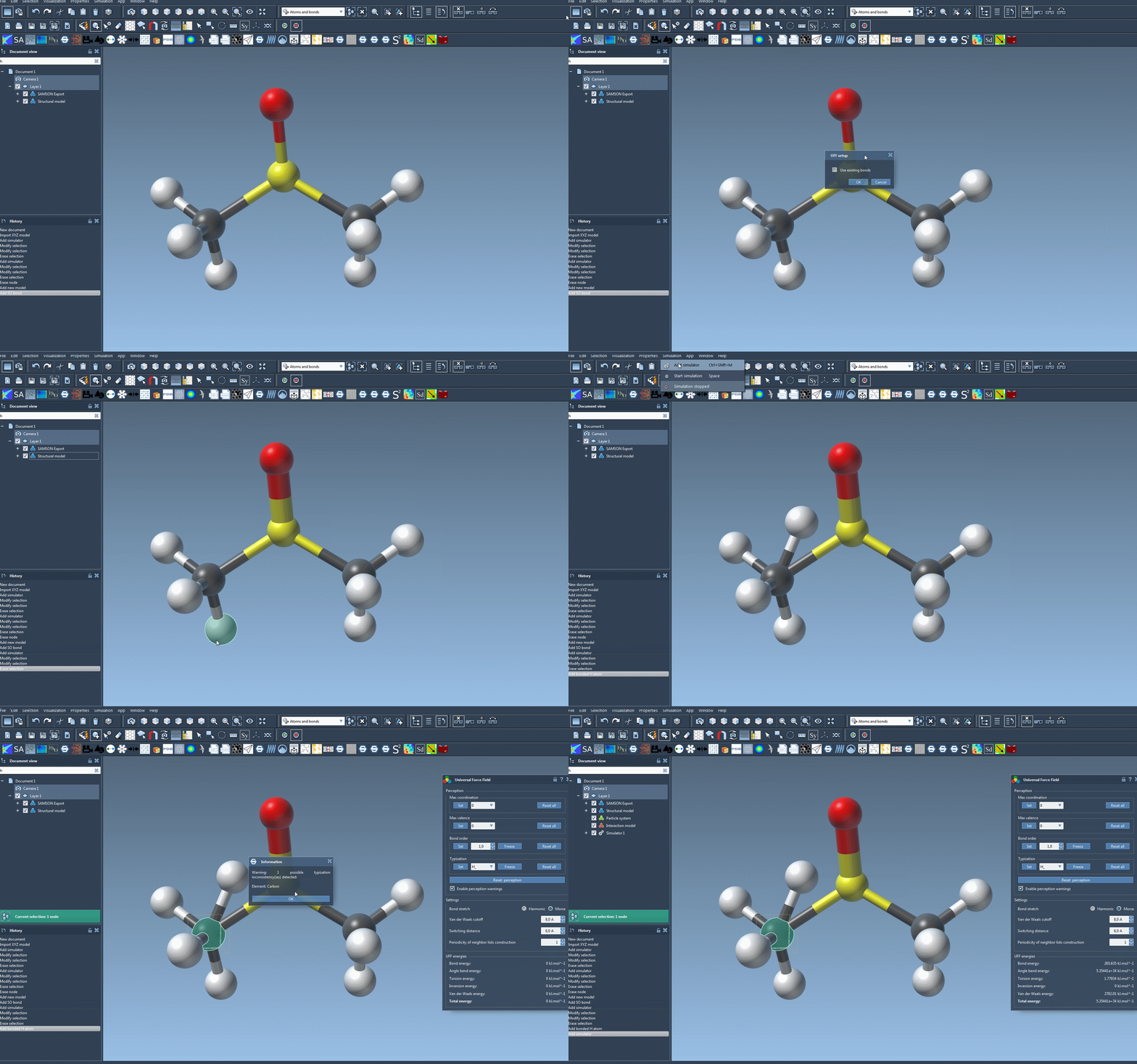
From the setup to observing dynamic behaviors of your molecules under UFF, SAMSON makes the entire process intuitive and interactive.
Want to Learn More?
If this setup process piqued your interest or if you’d like to dive into advanced UFF customization and simulation optimizations, the official documentation provides a wealth of information. You can explore further details and additional functionalities here: UFF Tutorial Documentation.
Note: SAMSON and all SAMSON Extensions are free for non-commercial use. You can get SAMSON at this link.