



Molecular modeling often involves complex queries, especially when trying to understand spatial relationships between atoms, residues, or larger molecular structures. For example, you might need to identify atoms within a specific distance of a ligand or residues far from the active site of a protein. These tasks can become tedious without the right tools. Enter SAMSON’s Node Specification Language (NSL) and its proximity operators, which make specifying spatial relationships both intuitive and efficient.
Why Are Proximity Queries Crucial?
When analyzing molecular systems, proximity queries help you answer questions like:
- Which atoms are within a certain distance of a drug molecule?
- What residues are beyond the interaction range of another group?
- How do spatial relationships evolve during molecular simulations?
Traditionally, gathering such data required intricate scripts or external plugins, but SAMSON’s NSL integrates these capabilities directly into your molecular modeling workflow.
Proximity Operators in NSL: Quick Overview
SAMSON allows you to use two main proximity operators within the NSL syntax:
| Operator | Description | Short Syntax |
|---|---|---|
within {distance} of |
Selects nodes within the specified distance | w {distance} of |
beyond {distance} of |
Selects nodes beyond the specified distance | b {distance} of |
Both operators can be used to precisely refine your molecular selections in a variety of ways.
Real-World Examples: Transform Your Molecular Queries
Let’s explore some use cases to see how proximity operators simplify molecular modeling tasks:
Explore Atoms Near a Specific Residue
To identify all carbon atoms within 5 angstroms of a residue named “GLN 2”, you can use:
C within 5A of "GLN 2"
This query lets you isolate interactions around GLN 2 in no time, offering insights into binding or molecular packing.
Filter Atoms Far from a Chain
Need to focus on atoms beyond a certain range? For instance, to select atoms farther than 5 angstroms from the molecule named “2AZ8-IA”, try:
n.t a beyond 5A of "2AZ8-IA"
This is particularly useful for eliminating noise and focusing only on structurally relevant regions of the molecule.
Avoid Common Pitfalls
Keep in mind that without specifying the type of node explicitly, proximity operators might return unexpected results. For example, * within 5A of "GLN 2" may select the document node itself since components in the document are related to GLN 2. To avoid this, use a query like:
n.t a within 5A of "GLN 2"
Or refine further by excluding atoms that belong to GLN 2:
n.t a within 5A of "GLN 2" out of "GLN 2"
Visualize Proximity Queries
The power of proximity operators isn’t just in their syntax but in their ability to seamlessly integrate with SAMSON. For instance, as shown below, NSL allows you to filter and select nodes interactively in SAMSON’s Document view:
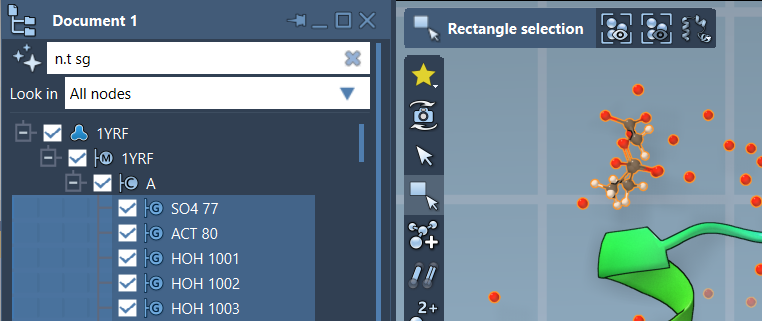
By entering your query, you can dynamically visualize the selected atoms, residues, or structures, ensuring clarity and precision in your molecular analysis.
Conclusion
Proximity operators in SAMSON’s Node Specification Language are indispensable for any molecular modeler tackling spatially-dependent queries. Whether you aim to refine binding site analyses, investigate protein-ligand interactions, or manage structural filtering, these operators empower you to work effectively and intuitively.
To dive deeper into all the capabilities of NSL, visit the official documentation page.
SAMSON and all SAMSON Extensions are free for non-commercial use. You can access these tools by downloading SAMSON at https://www.samson-connect.net.