



For molecular modelers, turning textual molecular representations into ready-to-use 3D models can often feel like a daunting task. Whether you’re working with datasets of SMILES (Simplified Molecular Input Line Entry System) strings or need accurate 3D geometry for further analysis, the conversion process can be tedious, error-prone, and time-consuming. The SMILES Manager Extension in SAMSON is here to change that.
Common Challenges in Building 3D Models
Generating 3D structures from SMILES representations is an essential step in many applications, including docking studies, property predictions, and molecular design. Yet, the process is often hindered by the following challenges:
- Ensuring SMILES datasets are in the correct format.
- Manual corrections for invalid or incomplete entries.
- Time-intensive creation of 3D-ready structures for every molecule in the dataset.
The SMILES Manager, a part of SAMSON that leverages the open-source cheminformatics toolkit RDKit, provides an efficient workflow to simplify these tasks.
How the SMILES Manager Helps
The SMILES Manager Extension simplifies the process of generating 3D structures while helping you organize, validate, and even visualize SMILES data. Below, we’ll walk through the 3D model generation functionality, addressing how molecular modelers can speed up their workflows.
Generating 3D Structures from SMILES
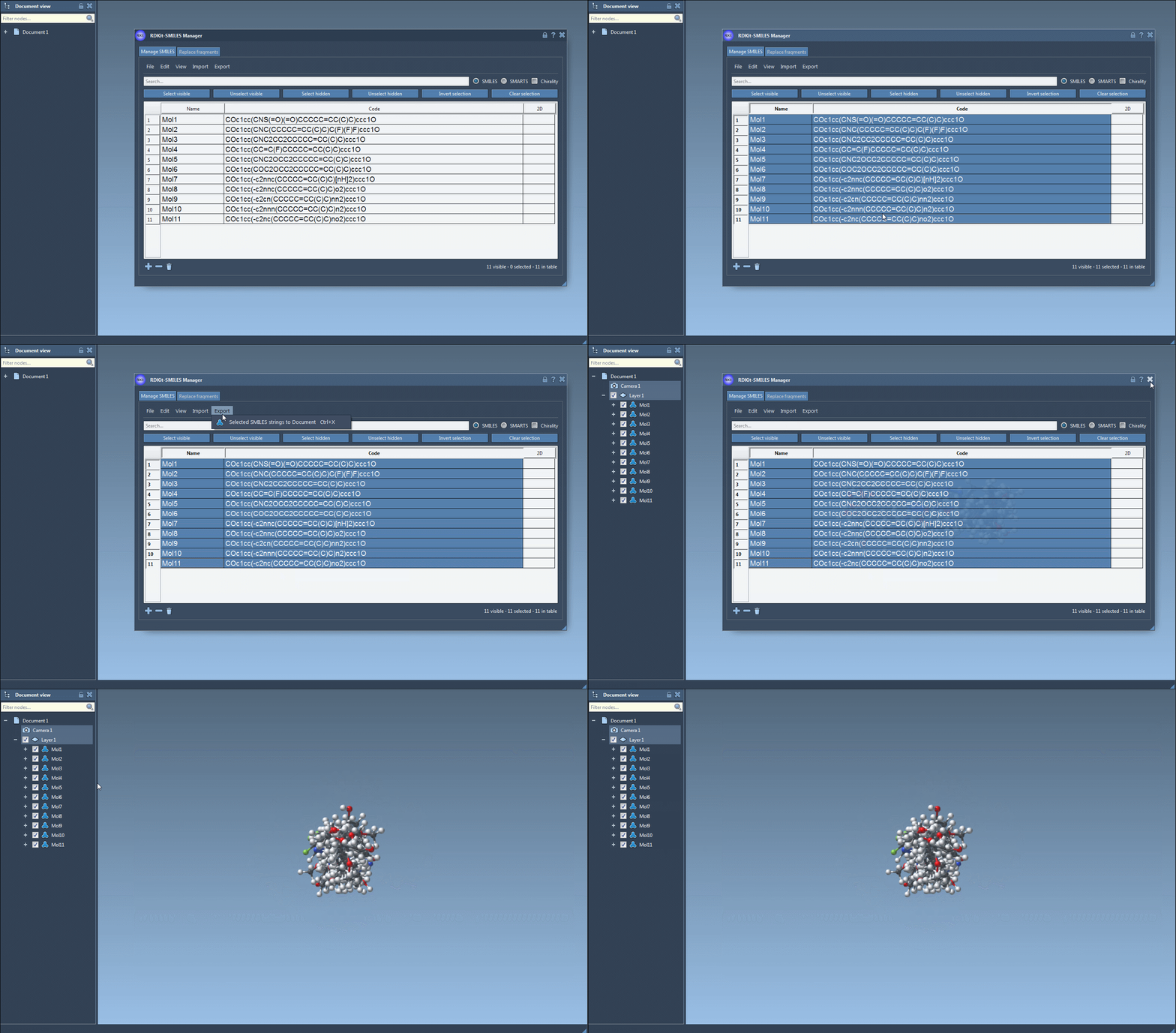
One of the standout features of the SMILES Manager is its ability to convert SMILES into 3D molecular structures with just a few clicks. Here’s how you can do it:
- Select the SMILES strings you need to convert. For example, you can import them from text-based datasets such as
.smior.txtfiles. - Once your molecules are displayed in a convenient list format, review their 2D depictions within the interface to ensure all entries are valid.
- To generate 3D structures, select the molecules of interest and access the Export drop-down menu. Choose the Selected SMILES string to Document action.
With this workflow, the SMILES Manager quickly adds 3D structures for your molecules to the active SAMSON document.
Real-Time Visualization and Updates
One of the extension’s unique aspects is the real-time update of molecular structures. Whenever a SMILES string is edited in the table, its 3D counterpart is automatically updated to reflect those changes. This feature ensures that your generated structures always stay synchronized with your data inputs.
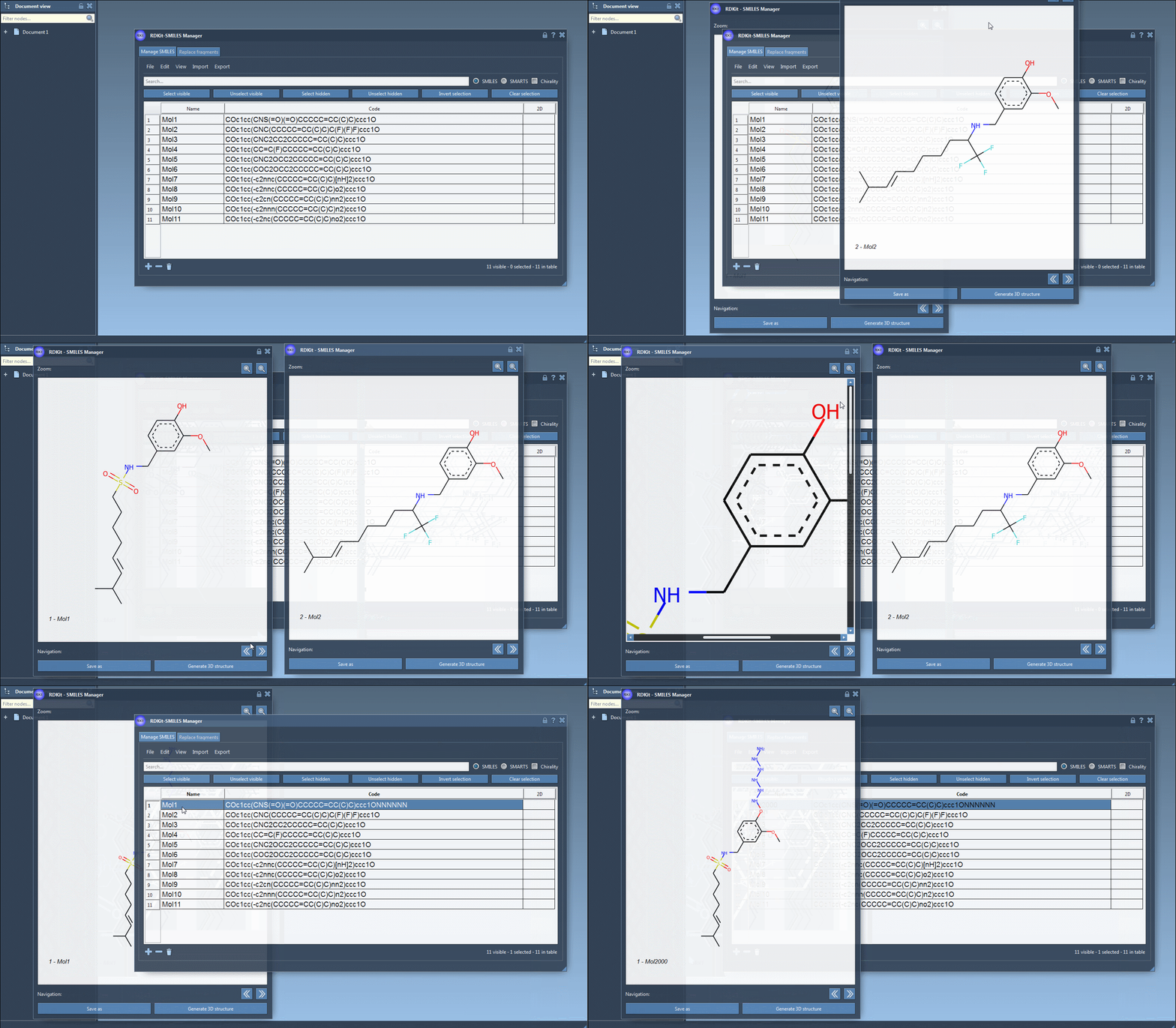
You can also visualize each molecule’s depiction (both 2D and 3D) in separate windows for side-by-side comparison. This flexibility not only enhances your understanding but also helps in validating molecular data for downstream applications.
Convenient Data Management
The extension allows for advanced organization. For example, invalid SMILES entries are automatically flagged, with error images provided for those lines. This feature makes it easier to spot issues and fix problematic entries, saving significant troubleshooting time later in the process.
Additionally, instead of manually naming molecules, the SMILES Manager assigns names based on input codes. When needed, names can also be edited within the streamlined interface.
Exporting for Further Use
After generating 3D structures, the SMILES Manager enables users to export these molecules to various formats compatible with other tools. This compatibility extends its use into multiple areas of computational research, from ligand design to docking studies.
Conclusion
The ability to transform SMILES strings into accurate 3D geometries with ease is invaluable for molecular researchers. SMILES Manager’s intuitive interface and robust workflow reduce manual effort, letting modelers focus on their core objectives. For molecular professionals aiming to streamline their SMILES-to-3D operations, this tool should be a top choice.
To explore more features of the SMILES Manager, visit the full documentation page.
SAMSON and all SAMSON Extensions are free for non-commercial use. You can download SAMSON at this link.