



Molecular modelers often work with intricate structural details that require precision and clarity. One common challenge is tracking torsion angles in molecular systems, especially when studying rotamers, backbone motions, or other collective twisting behaviors. If you’ve struggled with effectively analyzing torsion angles, SAMSON’s Path Analyzer provides a powerful tool: Dihedral Analysis.
What is the Dihedral Analysis?
The Dihedral Analysis in SAMSON measures the torsion angle defined by four selected groups along a molecular path or trajectory. It’s a versatile approach suitable for analyzing changes over time, spotting rotameric transitions, or observing key twisting motions in molecules. By examining these torsional angles, modelers can better understand molecular conformations and dynamics.
How to Use the Dihedral Analysis
Getting started with Dihedral Analysis in the Path Analyzer is straightforward. Here’s how to set it up:
- Open the Path Analyzer environment.
- Select Dihedral as the desired observable type.
- Choose a corresponding molecular path or trajectory for analysis.
- Define four atomic groups: Group A, Group B, Group C, and Group D. These groups establish the geometry for angle measurements, with the torsion centered around the bond defined by Groups B and C.
- Add either a Time Series or a Histogram plot to visualize the results.
When to Use Time Series vs. Histograms
Choosing the right visualization helps you extract meaningful insights:
- Time Series: Use this to follow how torsional transitions change over time (or along path images). It’s ideal for pinpointing exactly when conformational changes occur and for comparing these transitions with other metrics like energy or RMSD.
- Histogram: Use this option for a quick inspection of preferred torsional states. Histograms allow you to spot metastable conformations efficiently, making it easier to identify potential regions of structural stability.
How Groups Are Converted to Positions
To compute the torsion angle, the Path Analyzer first determines a representative position for each group:
- If a group contains one atom, its atomic position is used directly.
- If a group contains multiple atoms, the center of mass of the group is calculated and used instead.
This approach ensures an accurate analysis regardless of group size, making the tool highly flexible.
Practical Applications
Dihedral Analysis is a must-have for anyone studying conformational dynamics. Consider pairing dihedral measurements with tools like RMSD or Energy Analysis to correlate structural changes with energetic landscapes. For example, transitions in dihedral angles might coincide with sudden drops or peaks in energy, highlighting significant conformational events.
Visual Example
Here is an example of what a Dihedral analysis might look like:
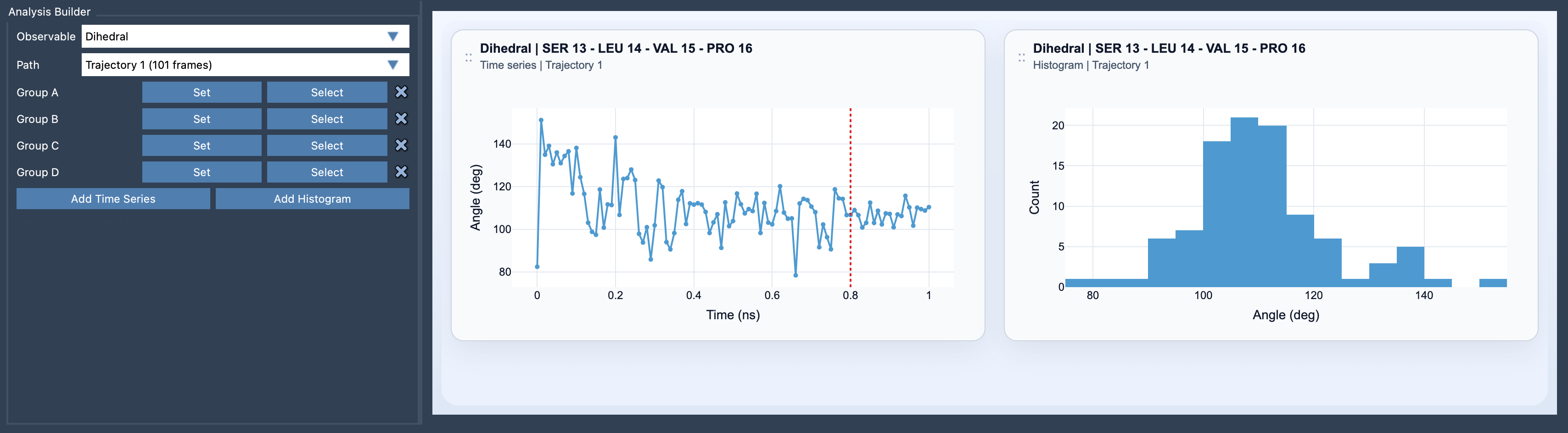
This visual showcases how torsion data is presented, helping users quickly interpret their results.
For more details on this feature, visit the official documentation page.
SAMSON and all SAMSON Extensions are free for non-commercial use. You can download SAMSON here.