



Molecular modelers often face the challenge of understanding how atoms or groups of atoms behave dynamically over time. Identifying areas of rapid motion or stillness within a simulation can be crucial for uncovering intricate molecular mechanisms. The Average Velocity analysis in SAMSON’s Path Analyzer is a practical solution designed to address this need.
The Average Velocity tool calculates the mean velocity magnitude of a selected group of atoms along a predefined path. This approach allows researchers to analyze dynamic trajectories, locate bursts of motion, and identify unusually quiet regions within molecular simulations. It is particularly beneficial when you want to investigate the dynamics of complex systems or evaluate the effect of external parameters on molecular behavior, without getting lost in the vast sea of data.
How to Add an Average Velocity Plot
Leveraging Average Velocity analysis in SAMSON is a straightforward process:
- Open SAMSON’s Path Analyzer.
- Select Average velocity under Observable.
- Choose the path and define the group of atoms to focus on.
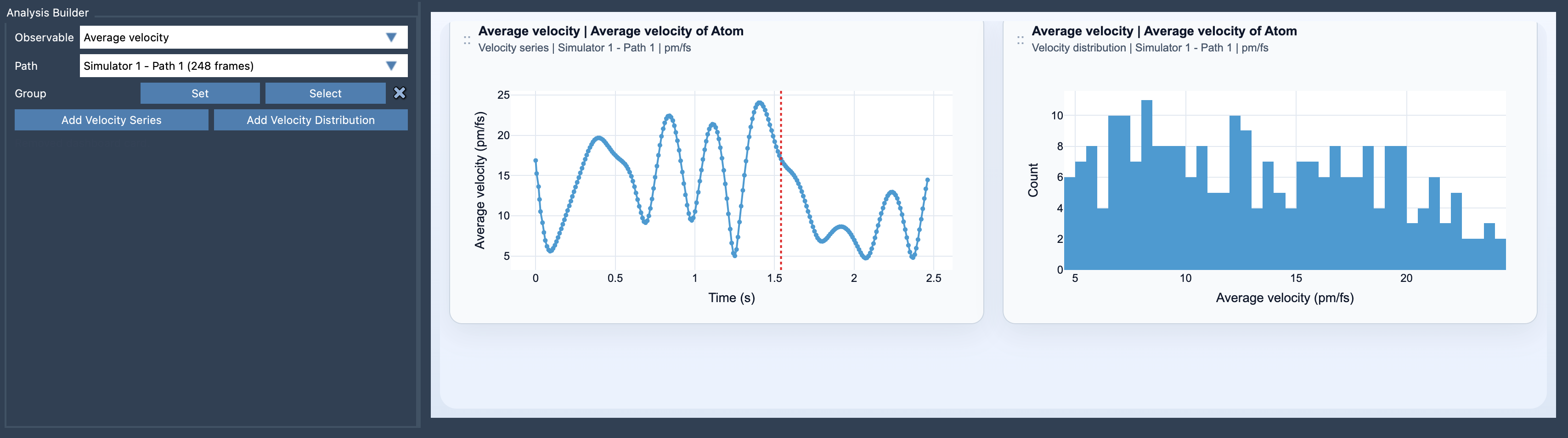
- Click Add Velocity Series to create time-dependent velocity plots or Add Velocity Distribution to inspect distributions.
What Does the Tool Require?
To get started with this feature, you’ll need to meet two requirements:
- A selection of atoms (e.g., individual atoms, residues, or molecule groups).
- The chosen path must feature velocity data for the selected atoms.
Dive into Velocity Insights
Once set up, the Average Velocity analysis offers two primary views:
- Velocity Series: Shows how the mean velocity magnitude changes along the path over time. Great for spotting patterns of rapid or slow motion.
- Velocity Distribution: Provides a distribution histogram of sampled velocities, helping to identify dominant velocity characteristics.
Customize and Optimize
A handy feature of the tool is the ability to switch between different velocity units after creating the plot. Units such as Auto, pm/fs, A/ps, or m/s let users display data in their preferred format easily.
To get the most out of this feature, consider combining Average Velocity analysis with Average Force analysis. It offers a way to link driving forces with the resulting motion, yielding deeper insights into molecular dynamics.
Conclusion
The Average Velocity tool in SAMSON’s Path Analyzer offers an intuitive and insightful way to explore molecular motion within trajectories. This can save time and sharpen analyses by focusing on key dynamic behaviors within complex molecular systems. To learn more about how to use the Average Velocity feature, visit the original documentation page.
SAMSON and all SAMSON Extensions are free for non-commercial use. You can download SAMSON today at SAMSON Connect.