



One of the critical steps in molecular docking is ensuring that your ligands and receptors are properly configured to provide realistic and accurate results. A major aspect of ligand preparation is adjusting rotatable bonds—this can influence both docking efficiency and binding pose predictions. If you’re struggling to manage this in your molecular simulations, the AutoDock Vina Extended SAMSON Extension offers a systematic and user-friendly way to handle rotatable bonds. Let’s explore how this process works and why it matters to your docking experiments.
Understanding Rotatable Bonds
Rotatable bonds in ligands allow for conformational flexibility, which is essential for accurately predicting how the ligand may interact with its receptor. While this flexibility can lead to more realistic docking outcomes, it comes at the cost of increased computational time, especially for large libraries of ligands. Knowing which bonds to allow rotation—and which to lock—can streamline your docking workflows and improve prediction reliability.
How to Set Up Rotatable Bonds with AutoDock Vina Extended
The SAMSON platform, through the AutoDock Vina Extended extension, provides an intuitive way to define and customize the rotatable bonds of your ligands:
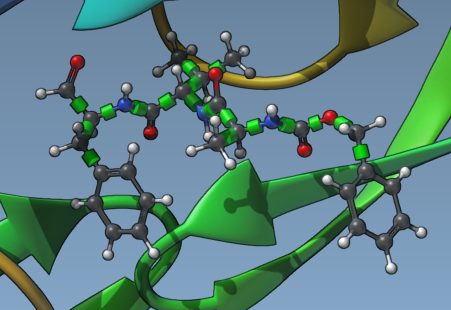
- First, add your ligand to the Document view. Once you’ve selected the ligand, click the Set button in the ligand setup panel. In the Viewport, you’ll see green cylinders over specific bonds of your ligand—these are the bonds identified as rotatable by default.
To refine the bond flexibility:
- Zoom in on the ligand. You can quickly do this by selecting the ligand in the Document view and pressing Shift + Space.
- Click on the green cylinders representing rotatable bonds. Green indicates that the bond can rotate, while red denotes a locked bond. Switch their status by simply clicking on a cylinder.
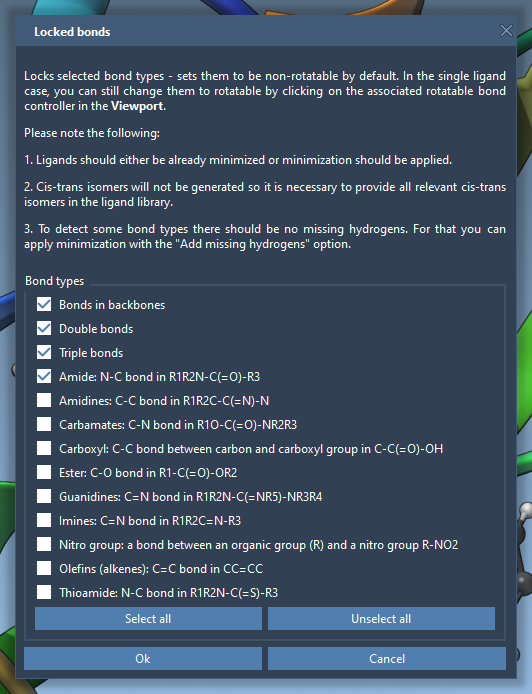
- For a more automated approach, use the Locked bonds settings feature. This lets you specify global rules based on bond types—for instance, locking planar or aromatic bonds across all ligands automatically.
Locking Specific Bonds
If your analysis requires certain bond types to always remain fixed, you can use the Lock specific ligand bonds functionality. Under this option, you can fine-tune settings like:
- Defining locked settings for aromatic rings.
- Restricting double bonds from rotation.
To apply these changes, check the Lock specific ligand bonds option in the interface. Depending on the locked states, your molecule visualization will change, helping you identify fixed and rotatable regions.
Best Practice: Ensure that ligands are energy-minimized before docking, as minimization can influence the starting geometry of rotatable bonds. Note that locked bonds remain adjustable during minimization, and positional isomers (cis-trans configurations) should be included in your ligand library if required.
Why It Matters
Balancing ligand flexibility is crucial, especially for computational projects with large libraries of ligands. Flexible bonds impact the degrees of freedom sampled by the docking algorithm, influencing both search exhaustiveness and accuracy.
By locking unnecessary rotatable bonds, you can focus computational efforts on critical molecular features, improving both speed and result clarity. This becomes particularly important when working with complex receptor-ligand systems or when computing is limited.
Learn More
Explore the full capabilities of AutoDock Vina Extended in SAMSON, including receptor setup, search domain adjustment, and result visualizations, by visiting the official documentation page. Setting rotatable bonds is just the beginning of optimizing your molecular docking!
Note: SAMSON and all SAMSON Extensions are free for non-commercial use. You can download SAMSON at https://www.samson-connect.net.