



Have you ever wondered how to effectively track and visualize the motion of molecules during simulations? For molecular modelers analyzing ligand unbinding, protein domain movements, or diffusion processes, understanding trajectories is crucial. SAMSON’s Pathlines tool makes it easier to display and analyze the motion of atoms, residues, or groups of atoms by focusing on their center of mass.
Why Use Pathlines?
Instead of poring over raw datasets to interpret motion, Pathlines lets you visually track trajectories in real time. For example, you can assess ligand unbinding pathways, explore collective domain movements in a protein complex, or examine diffusion over a specific path. The visual representation allows you to better understand the dynamics of molecular systems while revealing insights that may otherwise remain hidden in numerical simulations.
How Does it Work?
The Pathlines visual model tracks the center-of-mass (COM) motion of selected groups of atoms along predefined paths. This is an intuitive, efficient way to better grasp molecular dynamics without overwhelming you with raw trajectory data.
Getting Started
- Install the Pathlines extension: Visit the Pathlines extension page and add it to SAMSON.
- Load the sample system: A structured Lactose permease (PDB ID: 1PV7) example, along with ligand paths generated using the Ligand Path Finder tool, can be downloaded using this link.
- Select your target group: Go to the Document view in SAMSON and choose the atoms, residues, or paths of interest. If nothing is selected, Pathlines will use the entire system by default.
Customizing and Exploring Pathlines
Once the Pathline visual model is created, you can explore and tailor it to your needs:
- Double-click a path in Document view to start or stop it.
- Access context options by right-clicking a path and selecting Path > ….
- Use the Inspector tool (Ctrl/Cmd + 2) to adjust attributes such as color or thickness of the pathlines.
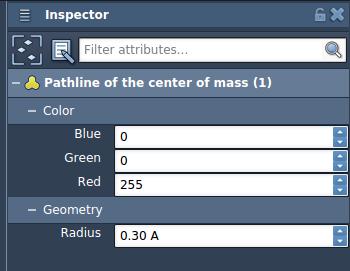
Remember, removing paths or atoms associated with a Pathline affects the visualization.
Applications in Molecular Design
Pathlines is incredibly versatile and can assist you in numerous scenarios:
- Visualize ligand unbinding or rebinding routes in receptor-ligand systems.
- Analyze collective domain motions within protein complexes to study structural flexibility.
- Highlight movement patterns in reaction coordinate workflows.
By integrating Pathlines into your molecular modeling workflow, you can more easily interpret complex motions and discern relevant trends from your simulations or experimental setups.
What’s Next?
Once you’re comfortable visualizing paths with Pathlines, you might want to take it a step further. Explore how to refine transition paths using the Parallel Nudged Elastic Band (P-NEB) approach in SAMSON and discover even more details about molecular transformations.
To get started or learn about additional uses, visit the Pathlines documentation.
Note: SAMSON and all SAMSON Extensions are free for non-commercial use. You can download SAMSON via this link.