



As a molecular modeler, one of the challenges you might face is tracking structural changes in a protein through time. Whether you’re studying the dynamics of a protein under certain conditions, analyzing molecular pathways, or comparing the behavior of different protein regions, understanding the secondary structure is essential. This is where the Secondary Structure Content feature of the SAMSON Path Analyzer can offer crucial insights.
Why Analyze Secondary Structure Content?
The Secondary Structure Content tool provides a high-level summary of protein dynamics, showing how much of the selected residues are in alpha-helices, beta-sheets, or unstructured throughout the trajectory. This enables you to:
- Quickly spot significant backbone conformation changes over time.
- Focus on specific regions of interest (domains, loop regions, or helix bundles).
- Obtain quantitative data for alpha, beta, and unstructured structures at every frame.
For anyone working with proteins, this becomes a powerful way to visualize the stability or flexibility of protein regions under specific conditions.
How to Use It Effectively
Getting started with the tool in SAMSON is quite straightforward and customizable to your needs. Here’s a step-by-step guide:
- Open the Path Analyzer in the SAMSON interface.
- Select “Secondary Structure Content” under the Observable options.
- Choose the Path you wish to analyze.
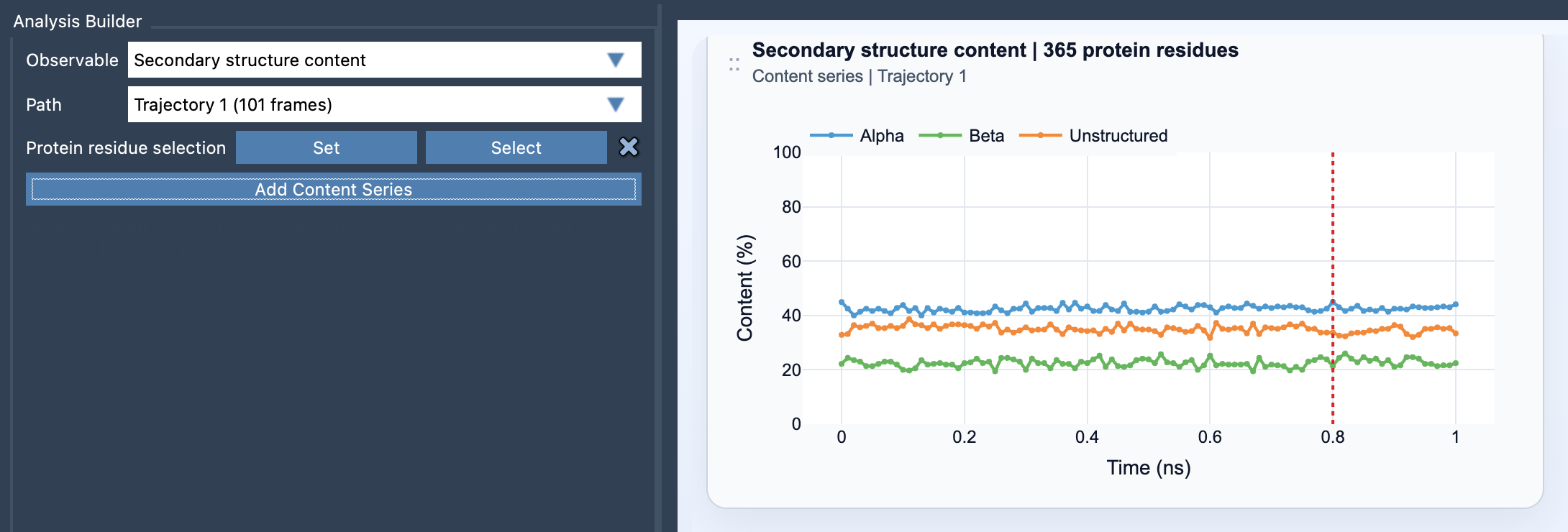
- Define your Protein residue selection. This step allows you to focus on the protein as a whole or specific areas, depending on your objective.
- Click on the Add Content Series button to create the plot.
What Do You Get?
Once set up, the tool generates a multi-series time plot displaying the percentages for alpha, beta, and unstructured states across the trajectory. These percentages range between 0 and 100%, giving you clear, quantitative insights into the backbone conformation dynamics. The visualization helps pinpoint when your protein regions undergo structural transitions, such as helix-to-coil transitions or sheet disruptions, which are often critical in many biological processes.
Tips for Best Practices
To maximize the value of the Secondary Structure Content tool, consider these practical tips:
- Use broader protein selections when you’re investigating protein-wide trends or seeking a global understanding of structural changes.
- For more specific studies, narrow your selection to focus on a particular domain, helix bundle, or even loop-rich regions.
- Pair this analysis with the Ramachandran plot to complement high-level patterns with residue-specific backbone detail.
Conclusion
The Secondary Structure Content tool in SAMSON is a robust way to monitor and quantify structural protein dynamics over time, offering both clarity and customization. Whether you are studying a protein-wide behavior or focusing on specific substructures, the insights it generates can fuel better scientific conclusions.
To dive deeper into the Secondary Structure Content feature, check the official documentation.
SAMSON and all SAMSON Extensions are free for non-commercial use. Get SAMSON at https://www.samson-connect.net.