



For anyone diving into molecular modeling, one of the key challenges is efficiently selecting and modifying atoms in your structure. Whether you’re creating custom nanoscale designs or performing detailed molecular analysis, having a streamlined way to script your work can be transformative. Enter the Simple Script Extension in SAMSON—a practical tool to customize atomic properties using mathematical expressions and scripting.
Streamlining Atom Selection and Modification
The Simple Script Extension allows you to use tailored scripts to manipulate atomic properties such as positions, visibility, element types, charges, and more. Beyond merely adjusting existing structures, Simple Script empowers users to define how molecule components behave through C-like statements, operators, and functions. From basic coordinates to complex modifications, the possibilities are extensive.
Key Features of the Simple Script Extension
- Variables: Predefined variables allow you to access specific attributes of atoms. For example,
a.x,a.y, anda.zrefer to atomic coordinates, whilea.elementIDora.symboldenote the chemical element. - Editable Properties: Selected atomic attributes, such as position, visibility, or charge, can be directly modified through your scripts, giving granular control over molecular structures.
- Mathematical Logic: Employ operators (e.g.,
+,-,*), functions (e.g.,sin,cos,sqrt), and control structures likeifandforloops to execute your ideas dynamically.
Examples of What You Can Achieve
Let’s explore some practical examples to show the capabilities of the Simple Script Extension:
-
Create Sinusoidal Patterns: By scripting atomic positions with functions like sine, you can generate intricate conformations. For instance, here’s how to adjust the
z-coordinate of atoms into a sinusoidal wave:1a.z := sin(a.x * π / 12);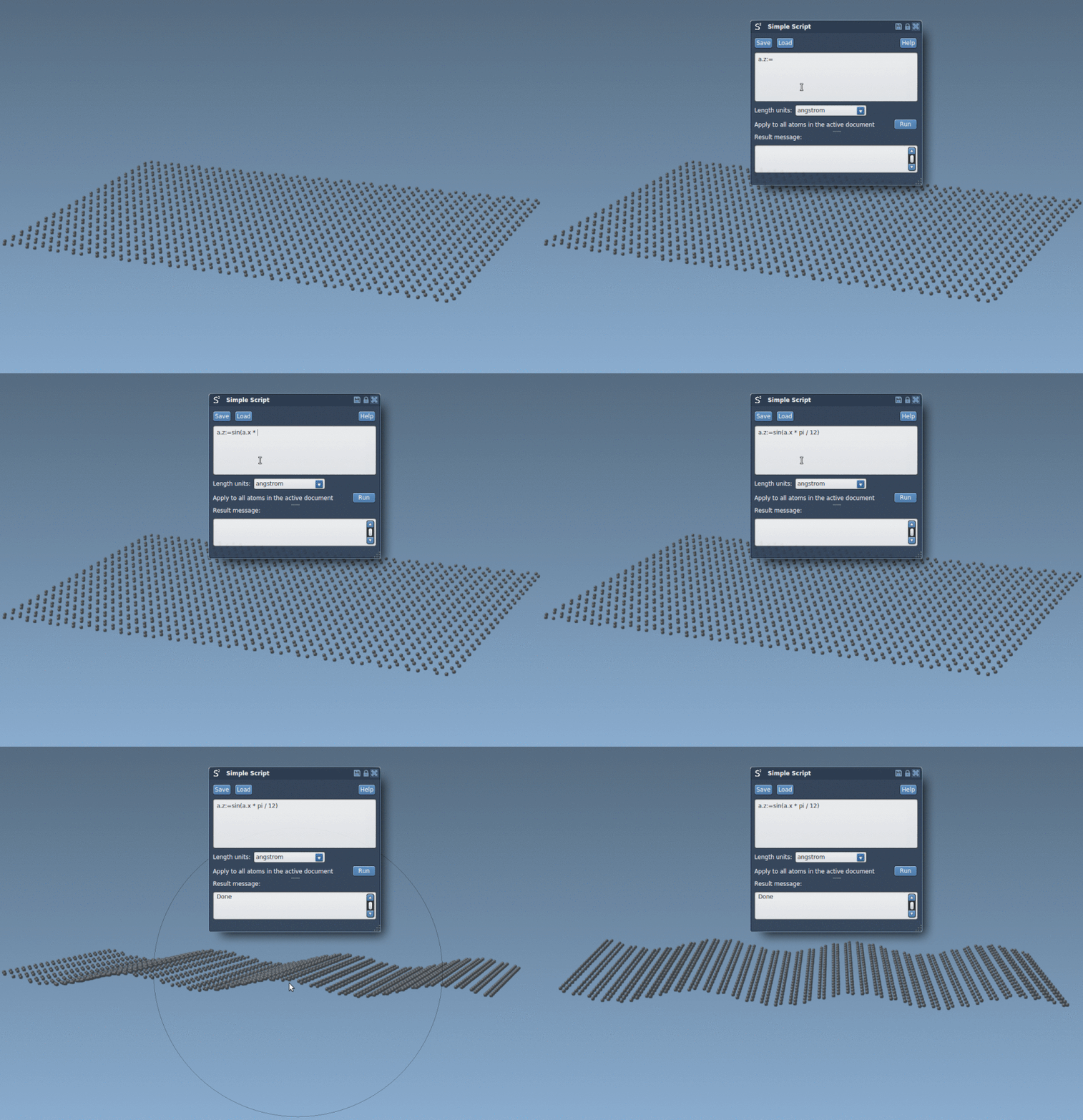
-
Shift Selective Atom Groups: If you wish to shift only hydrogen atoms by a fixed distance, you can filter for the
elementID(1 for Hydrogen) and modify itsy-coordinate:1if (a.elementID == 1) a.y += 5.25; -
Show Atoms Inside a Defined Space: Limit the visibility of your structure to atoms within a spherical boundary with a mathematical condition.
1if ((a.x^2 + a.y^2 + (a.z - 2)^2) < 100) a.visibilityFlag := 1; else a.visibilityFlag := 0;
-
Custom Nanoscale Shapes: Script your way into crafting shapes like Batman’s iconic nano-batarang out of a graphene sheet by programming the spatial selection of atoms. The result is not just functional but also visually captivating.

Getting Started
To begin using Simple Script:
- Install the Simple Script Extension.
- Follow the examples in the documentation, focusing on building expertise one step at a time.
- Experiment with your own structures for a hands-on understanding of script-driven molecular modeling.
For a complete guide to the capabilities of Simple Script and more examples, visit the original documentation page.
Note: SAMSON and all SAMSON Extensions are free for non-commercial use. You can download SAMSON at SAMSON Connect.