



Docking a ligand library can quickly create a practical problem: you have many compounds and poses, but limited time to inspect them one by one. A useful workflow is not just to run docking. It is to make the search focused, keep the calculation traceable, and use the results table to decide what deserves a closer look.
Start with a prepared, consistent system
Before docking, check that the receptor is suitable for the calculation. Remove alternate-location atoms and unnecessary small molecules, and make sure the protein has the hydrogens needed for AutoDock Vina to identify hydrogen bonds. Water and monatomic ions are not considered by AutoDock Vina Extended, though removing them can help keep the working structure tidy. If residues or heavy atoms are missing, the SAMSON documentation points to the PDBFixer extension for protein repair.
For a ligand library, check whether its molecules need hydrogens or minimization. This is particularly relevant when ligands are supplied in 2D. AutoDock Vina Extended can minimize ligands before docking, and can add missing hydrogens as part of that preparation. If you choose to lock bond types, remember that the documentation notes that locked bonds remain rotatable during minimization. Also, cis-trans isomers are not generated by docking, so include the relevant isomers in the library if they matter to your study.
Make the search domain fit the question
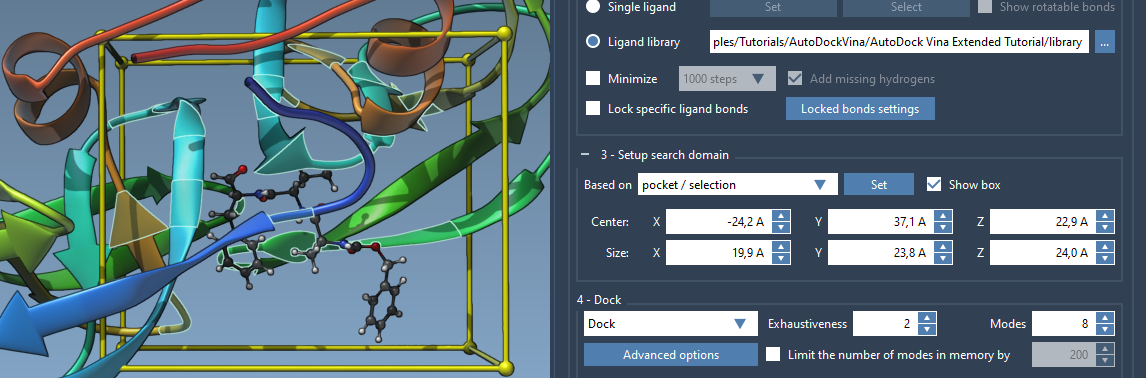
By default, the search domain is based on the whole receptor. If you know the binding site, setting the box around that pocket can reduce the search space and the amount of computation. In SAMSON, you can define the domain from a selected pocket or binding-site residues, edit its center and size in the interface, or adjust the yellow box directly in the Viewport.
One detail worth checking is that the search domain is defined in global XYZ coordinates. If the system has been rotated or aligned, confirm that the box still covers the intended site. The search box and the selected binding-site residues are shown in the Viewport, making it possible to visually verify the setup before starting a library run.
Choose a run that is manageable and reusable
For a library screen, select Ligand library, choose the directory containing the ligand files, and decide whether the ligands should be minimized or whether particular bond types should be locked. The tutorial uses an exhaustiveness of 8 and a maximum of 20 generated binding modes; these are example settings, not universal answers. Higher exhaustiveness means a longer search, so choose settings with your system size and available time in mind.
Before launching the calculation, enable Save results and choose an output directory. AutoDock Vina Extended saves the configuration, receptor and ligand files, generated and docked PDBQT files, and MOL2 files for individual modes. Keep the project directory structure intact if you expect to load those results again. Saving is more than housekeeping: it gives you a record of the settings and files associated with the run.
Use scores to prioritize inspection—not to skip it
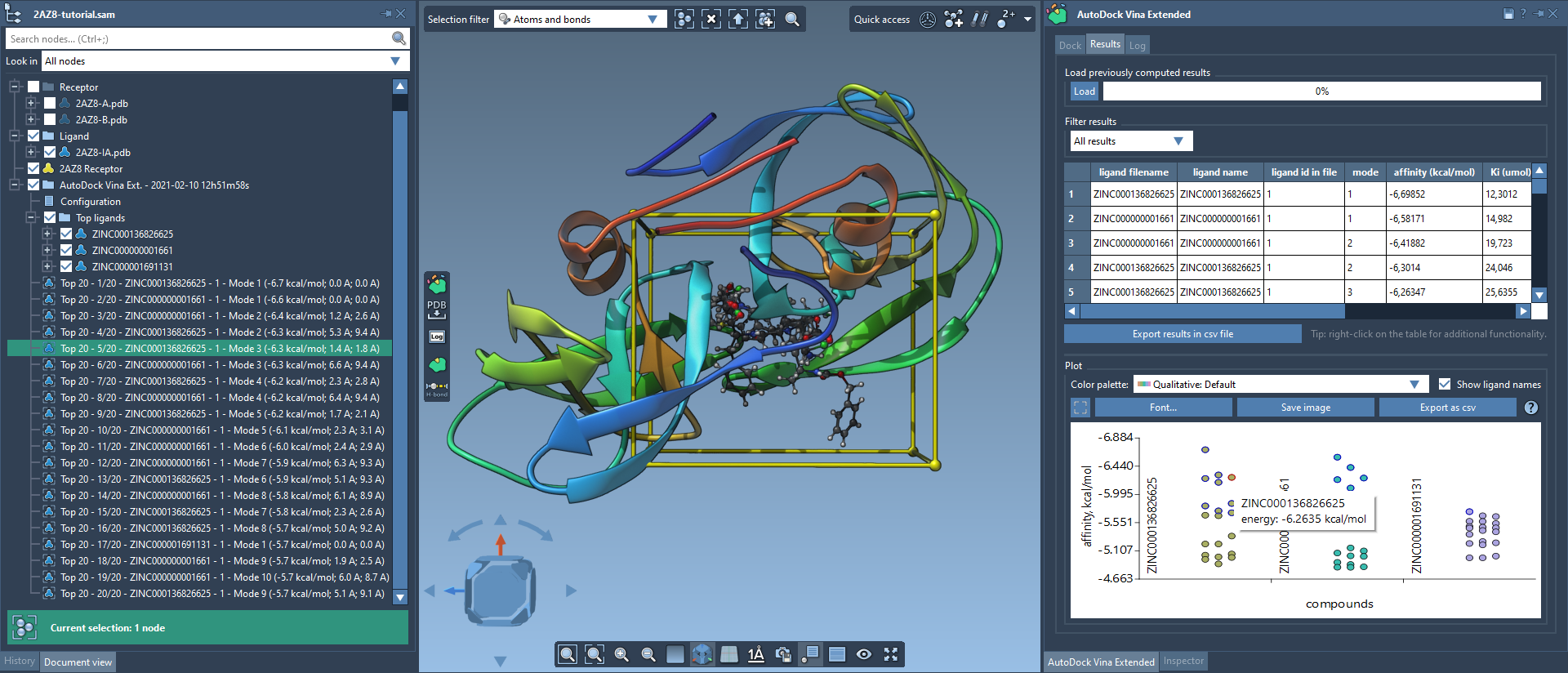
When docking finishes, the results tab provides a table and plot that you can filter, sort, and export. Use these views to narrow the list, then inspect selected poses in the molecular workspace. You can restore a conformation from the document view or results plot, and create structural models from multiple conformations to compare their positions. The plot can help connect a data point to its corresponding conformation, while the table supports filtering by fields such as name, affinity, and RMSD.
A docking score is a way to organize candidates for follow-up, not a substitute for examining the pose and its interactions. For promising candidates, inspect the ligand in the binding site and consider follow-up analysis such as hydrogen-bond visualization or protein-ligand interaction analysis. The results can also be exported for further review, and non-top ligands can be loaded later from the results table when needed.
The complete workflow and interface details are available in the AutoDock Vina Extended docking tutorial.
Note: SAMSON and all SAMSON Extensions are free for non-commercial use. Get SAMSON.