



A protein can move substantially along a structural pathway without the change being obvious from a single snapshot. A helix may lose residues, a beta-rich region may emerge, or part of the chain may shift into the unstructured category. Looking at structures one by one makes these changes easy to miss—and focusing only on one residue can hide the broader pattern.
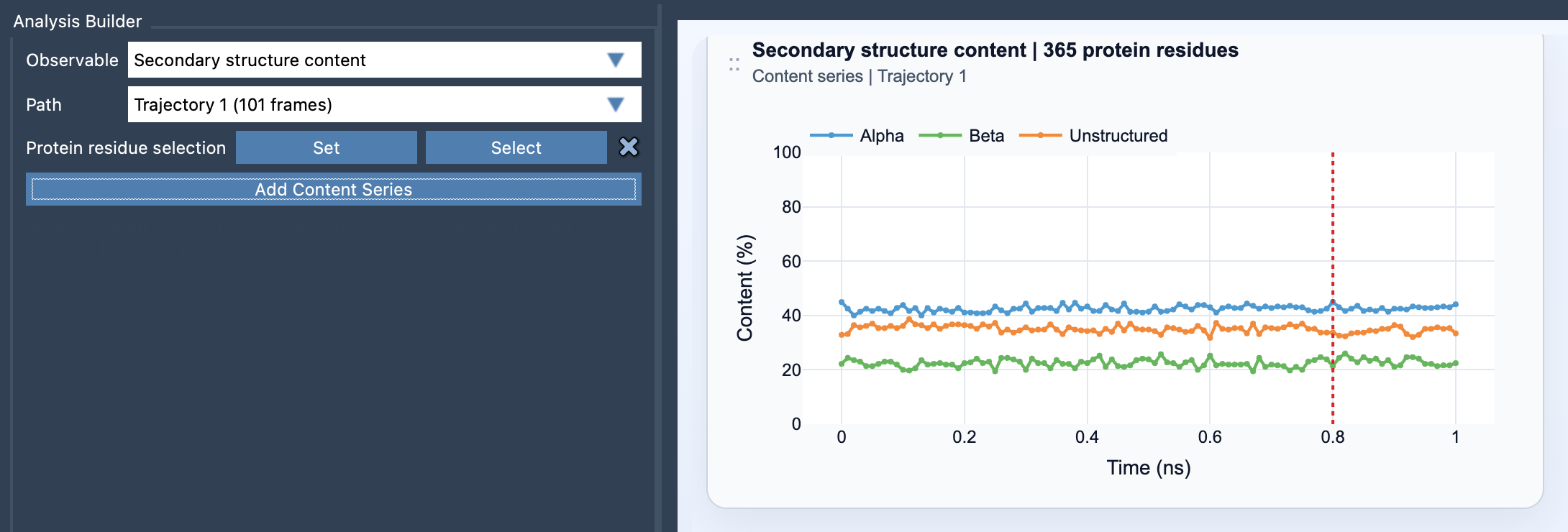
The Secondary structure content analysis in Path Analyzer gives you a compact way to follow that pattern. For each frame along a path, it reports the percentage of selected protein residues classified as Alpha, Beta, or Unstructured. The result is a multi-series plot, with values from 0 to 100%, that summarizes how the selected protein region’s backbone-state composition changes along the path.
Why the summary is useful
When reviewing a conformational change, it is tempting to rely on visual inspection alone. But a molecular view is spatial: a shift in a small region may be hard to compare across many frames, particularly when the protein rotates or changes overall shape. A content plot provides a complementary, quantitative view. It helps answer questions such as: does the selected region retain a similar mix of secondary structures, or does that mix change as the path progresses?
This is a summary, not a residue-by-residue explanation. If the alpha percentage falls, the plot tells you that the share of selected residues assigned to alpha structure has decreased; it does not, by itself, identify which residues changed or explain why. Use the plot to spot frames or intervals worth inspecting in the molecular view, then investigate the relevant region in more detail.
Make the selection match the question
A protein-wide selection is useful when you want an overview of the whole structure. However, a local change can be diluted when combined with a much larger selection. For example, if your question concerns one domain, helix bundle, or loop-rich region, select that region rather than the entire protein. The resulting percentages will describe the selected residues, making the plot more relevant to the question you are asking.
The selection must contain atoms belonging to protein residues. Path Analyzer uses the selected protein residues to calculate the reported percentages. In simplified form, each value is the count of residues in one category at frame t, divided by the total number of selected protein residues, multiplied by 100:
%Alpha(t) = 100 × Nα(t) / Nres, with equivalent calculations for %Beta(t) and %Unstructured(t).
Because the calculation is normalized to the selected residue count, changing the selection changes what the percentages mean. Keep the selection consistent when comparing plots or interpreting a trend.
Reading the plot without overinterpreting it
First, look for broad changes across frames: a rising or falling series, a sudden shift, or a period where the composition appears relatively stable. Then return to the corresponding structures and inspect the residues or region that may explain the pattern. Treat “unstructured” as the name of a reported category, not as a standalone conclusion about biological disorder or function. The content plot describes secondary-structure composition; it does not establish the cause or significance of a change.
For a useful next step, pair this overview with a residue-level backbone analysis. The Ramachandran analysis can provide complementary detail when you want to examine backbone behavior beyond the three-category summary.
To add the analysis, open Path Analyzer, choose Secondary structure content under Observable, select a path, define a protein residue selection, and click Add Content Series. For details on inputs and equations, see the Secondary Structure Content documentation.
Note: SAMSON and all SAMSON Extensions are free for non-commercial use. Get SAMSON.