



A molecular model can look ready for evaluation while a small setup choice quietly changes what you are asking it to do. The task may not match the system, a molecular charge may be wrong, or a periodic cell may need checking. These details are easy to miss when your main goal is simply to get an energy and forces on screen.
UMA in SAMSON is designed for interactive energy and force evaluation, including rapid geometry refinement, exploratory relaxation, and qualitative force analysis. A useful way to approach it is to treat setup as part of the modeling question: first identify the kind of system, then select the matching task, and finally check the inputs that define that system.
Start with the system, not the model size
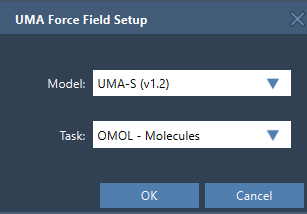
When you add a simulator through Edit > Simulate > Add simulator, choose UMA Force Field as the interaction model. The setup window asks for a model and a task. The task should reflect the system you are evaluating:
- OMOL – Molecules for molecular systems
- OMAT – Inorganic materials for bulk inorganic materials workflows
- ODAC – MOFs for MOF and direct-air-capture-style adsorption workflows
- OC20 – Catalysis for catalytic surfaces and adsorbates
- OMC – Molecular crystals for molecular-crystal systems
This distinction matters because the task is not just a label in a menu: it identifies the application domain for the evaluation. For molecular systems, OMOL is also the only task in this interface that uses total charge and spin multiplicity. If your system is not a molecule, do not assume those molecular controls are relevant to its task.
Choose a model for the first pass
The extension offers UMA-S (2.3 GB, v1.2), UMA-S (1.1 GB, v1.1), and UMA-M (11.7 GB, v1.1). The practical starting point recommended in the documentation is UMA-S. It is the default fast-workflow choice; UMA-M is the larger option when you specifically want more model capacity. Beginning with the smaller default can make an initial exploratory workflow more straightforward, while still leaving room to choose the larger model when your needs call for it.
Before setup, check that the UMA Force Field and Python Scripting extensions are installed and up to date, and that the machine can install Python packages on first use. The first launch may take time: UMA prepares a dedicated Python environment and may request access to its models. Follow the prompts in SAMSON. If the environment finishes setting up but the interaction model does not start, the documented guidance is to create the model again once setup is complete.
Check the inputs that change the interpretation
For OMOL, set the total charge and spin multiplicity to values consistent with the molecular system you intend to model. These values are part of the request sent to UMA, so they are not cosmetic display settings. If you are unsure, verify them against the chemical state you mean to study before interpreting the result.
For periodic workflows, inspect the periodic-boundary-conditions setting and the 3 × 3 cell matrix in angstroms. A cell that does not represent the intended structure can make the result difficult to interpret. The useful habit is simple: check the cell before drawing conclusions, rather than treating periodic settings as an afterthought.
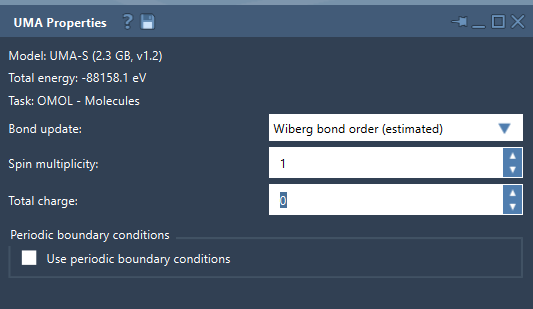
The bond-update menu also affects what you see during a run. Covalent recomputes covalent bonds from the current structure; Off leaves the existing bond graph unchanged. Wiberg and Mayer bond-order modes provide estimates from a deep-learning model. They can help with interactive exploration, but the documentation cautions that these are estimated visualizations: use a reference method to confirm important conclusions.
Read the first evaluation patiently
Once the environment is ready and the model is accessible, start the simulation using Edit > Simulate > Start. The properties window may initially report that energy is not available. Wait for the first UMA evaluation to complete; the total energy appears after a successful evaluation. Then you can move atoms or refine the structure while the model updates energies and forces.
A sensible workflow is to begin with a small representative system, select its matching task, and use UMA-S for rapid feedback. Check molecular charge and spin when using OMOL, and verify the unit cell for periodic systems. Use the results to screen, refine, and explore; when a conclusion needs higher accuracy, confirm it with an appropriate reference method.
For the full setup instructions and interface details, read the UMA Force Field tutorial.
Note: SAMSON and all SAMSON Extensions are free for non-commercial use. Get SAMSON.