



A molecular system can look ready for simulation while still hiding setup problems: a box that is too tight, ligand parameters that do not match the chosen force field, or hydrogens named in a way the force field does not expect. Catching these issues during preparation is easier than troubleshooting them after a run has started.
This guide focuses on a few decisions that have an outsized effect on a GROMACS system: selecting compatible model components, leaving enough room around the solute, and understanding what ion options actually do. It is useful whether you are preparing a protein alone or a system that includes non-standard molecules.
1. Treat the force field and topology files as a matched set
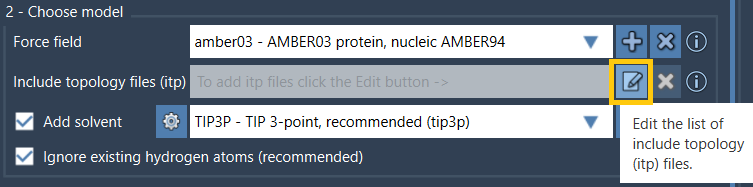
The force field is not just a menu choice: its parameters influence the simulation, so choose one that is appropriate for your system and scientific question. If your structure contains a ligand or another molecule for which GROMACS cannot generate a topology, you will need an include topology file, such as an .itp file.
Check that the force field used to create those topology files is also available to GROMACS Wizard. For example, the documentation notes that an ITP generated with the ATB Server should be used with its corresponding force field. A topology and force field from incompatible parameter sets are not interchangeable. For more detail on complexes, see the protein–ligand systems tutorial.
2. Give periodic images room to stay apart
Periodic boundary conditions make a simulation box repeat in space. That means the molecule in your box has neighboring copies. If the box is too small, the solute may interact with its periodic image, which can make calculated forces unreliable. This is why box size is a modeling decision, not merely a visual preference.
GROMACS Wizard offers two useful ways to fit a box. Solute-box distance specifies the clearance between the system and the box; at least 1 nm is recommended in the documentation. Box lengths lets you specify the box dimensions directly, but you need to make sure the resulting clearance is sufficient. For a batch of conformations, the choice matters: box lengths are fitted using the full set or path, helping keep one box size across the batch, while solute-box distance can result in different box sizes for different conformations.
Whichever method you use, the box must contain all structures selected for preparation. For the tutorial’s example, an orthorhombic box is fitted using the solute-box distance option:

Use the [periodic boundary conditions guide](https://documentation.samson-connect.net/tutorials/gromacs-wizard/periodic-boundary-conditions/) to review box types and the minimum image convention.
3. Make solvent and ion choices together
Ions are added by replacing water molecules, so adding solvent is required if you want to add ions. Choose a water model supported by the selected force field, then enable Add solvent if explicit solvent is needed. Choosing “none” as the water model means solvent and ions cannot be added.
Neutralization and salt concentration are related but distinct. With Neutralize system selected, GROMACS adds counterions to balance the system’s total charge. You can use the Update button to calculate that charge before preparation. Additional ions can then be specified by number or by salt concentration. A specified concentration, such as 0.15 M NaCl, is added on top of neutralizing counterions; existing ions are not counted toward that concentration. Keeping this distinction in mind helps avoid confusing charge-balancing ions with the salt you intend to add.

4. Check hydrogens before generating the model
If your input structure already contains hydrogens, their names must match the conventions of the chosen force field if you keep them. The preparation workflow also lets you ignore existing hydrogens so GROMACS can add them using the selected force field’s naming conventions. This can be especially useful for NMR structures. The important point is to make a deliberate choice rather than assume the input hydrogens are automatically compatible.
A quick pre-run checklist
- Confirm that you selected the intended model or models in the document.
- Match any supplied topology files to the force field used to parameterize them.
- Choose a compatible solvent model if adding explicit water or ions.
- Check that the box includes every selected structure and leaves adequate solute-to-box distance.
- Decide whether to retain or regenerate existing hydrogens.
- Distinguish neutralizing counterions from additional salt concentration.
Once preparation finishes, inspect the generated system and its output before moving on to energy minimization. The prepared system can be imported into SAMSON for inspection, and the generated index groups are available in the document.
For the complete workflow and interface details, learn more in the GROMACS Wizard preparation tutorial.
Note: SAMSON and all SAMSON Extensions are free for non-commercial use. Get SAMSON at samson-connect.net.