



Two proteins can share a recognizable fold and still look poorly matched when you superimpose them as a whole. Flexible regions, different conformations, or structural variation can pull the overall fit away from the part you actually care about. If your question concerns a particular helix, binding-site region, or conserved segment, a global overlay may not be the most useful comparison.
A practical approach is to first inspect the sequence alignment, then superimpose the structures using only the residues relevant to your question. This separates two tasks that are easy to conflate: finding corresponding residues and deciding which part of the structures should determine the spatial fit.
Start with the sequence correspondence
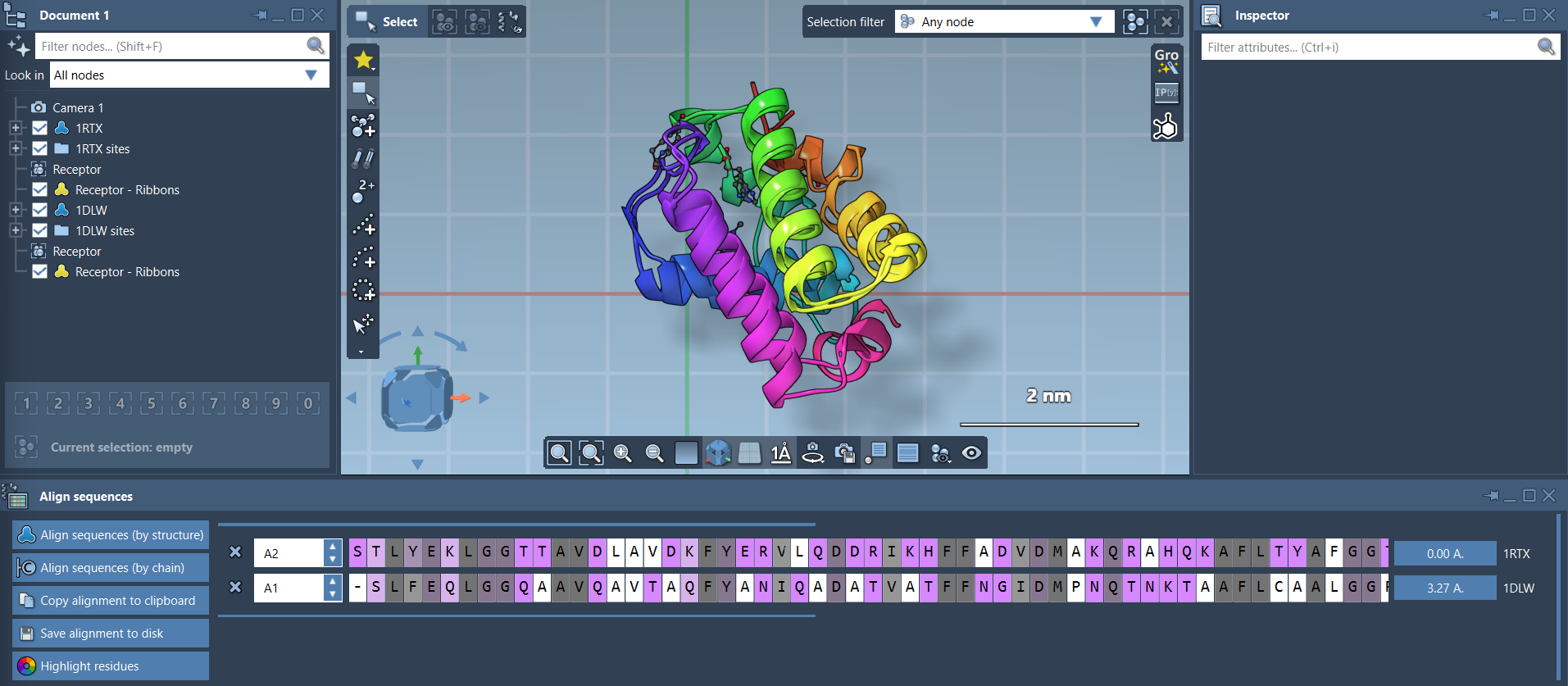
In SAMSON, open the Protein Aligner from Home > Align. You can align sequences by structural model or by chain. The chain-based option is useful when a model contains multiple chains, such as in an oligomer. For a simple example, fetch PDB entries 1DLW and 1RTX using Home > Fetch, then generate the sequence alignment.
The alignment helps identify which residues correspond across the proteins. You can also highlight residue properties, including similarity and polarity, to inspect patterns in the aligned sequences. Hovering over a residue shows its name and ID and highlights it in the viewport. Selecting a residue also selects its aligned partners, making it easier to connect sequence-level correspondence with the 3D structures.

Use a global fit as a reference
With no residues selected, choose Align to this on the row for the model you want to use as the reference. The other model’s button reports the RMSD for the resulting superposition. In the tutorial example, the displayed value is about 3.27 Å. Treat this as a measure of the fit produced by the selected alignment—not as a complete description of biological similarity. A single whole-structure value can conceal how well a particular region matches.
Fit the region that answers your question
If a specific segment is your focus, select the corresponding residues in both sequences before aligning. In the hemoglobin example, the first 20 residues are selected because the two N-terminal alpha-helices appear similar but are not well aligned in the whole-protein superposition. Click the alignment button next to the selection to superimpose the structures based only on those selected residues.

This local fit is useful when you want to compare a structural motif or a region associated with a specific design question. It does not replace the global view: the two fits answer different questions. The global fit describes the relationship across the models, while a region-specific fit shows how well the chosen residues can be superimposed. Keep track of which residues defined the fit when interpreting the resulting overlay.
For clearer visual inspection, display ribbons using Visualization > Visual model > Ribbons. Applying separate ribbon models to each protein lets you color them differently. If the structures include solvent, ligands, or alternate locations that distract from the comparison, prepare the structures first using Home > Prepare.
For the complete workflow and additional examples, see the Protein Aligner tutorial.
Note: SAMSON and all SAMSON Extensions are free for non-commercial use. Get SAMSON at samson-connect.net.