



A molecular structure can look nearly unchanged while a bond rotates enough to alter a side-chain rotamer or another important conformation. The challenge is not just spotting that motion happened—it is figuring out when it happened and which torsional states the molecule visited.
A dihedral analysis in SAMSON’s Path Analyzer gives you a focused way to follow that motion across a trajectory or a series of path images. It measures the torsion defined by four selected groups and reports the angle in degrees. The result can be viewed as a time series, a histogram, or both, depending on the question you are trying to answer.
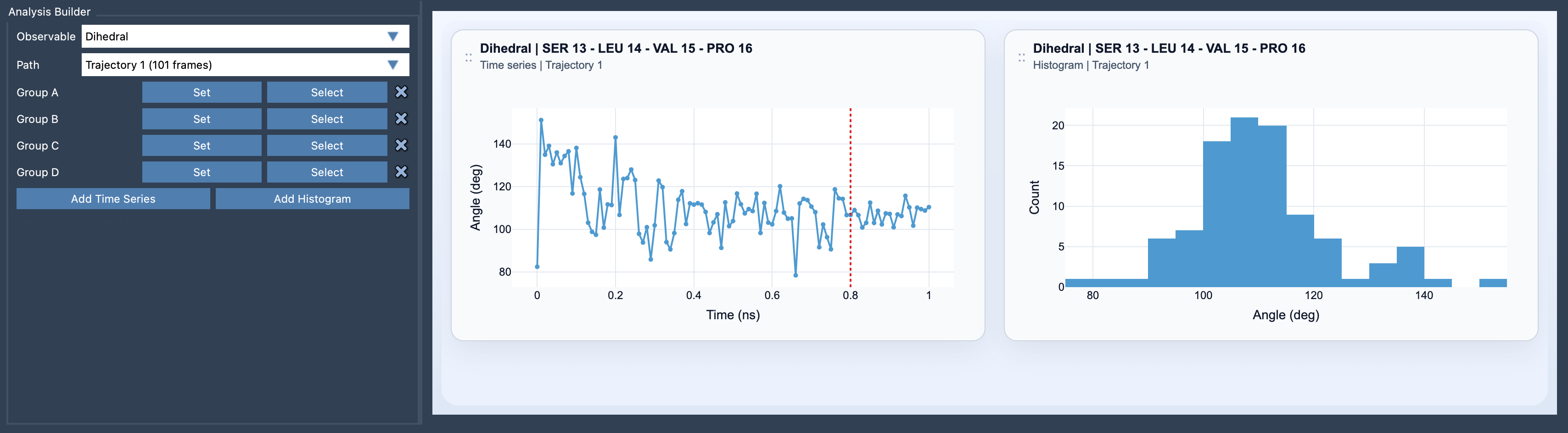
Start with the four groups
Open Path Analyzer, choose Dihedral as the observable, and select the path you want to analyze. Then define Group A, Group B, Group C, and Group D. All four selections must contain atoms. In the order A–B–C–D, the second and third groups establish the central bond or geometric axis of the torsion; the outer groups provide the references on either side.
This ordering matters. If you are investigating a particular rotation, choose groups that represent the structural features on either side of the axis you care about. Keep the selections consistent with the motion you want to interpret. A plot is only useful if its four groups describe the same meaningful torsion across the path.
Know what a group represents
Path Analyzer reduces each selected group to one representative position before calculating the dihedral. A group containing a single atom uses that atom’s position. A group containing multiple atoms uses its center of mass:
pgroup(t) = Σi mi ri(t) / Σi mi
In plain language, each atom’s position contributes according to its mass. This makes a multi-atom selection usable as one point in the calculation, but it also means the reported angle is based on the group’s center of mass—not on every atom separately. If a group spans a large or flexible part of a molecule, its representative point may not track the local motion you intended to measure. When that is a concern, consider whether a smaller, more local atom selection better describes the torsion.
Choose the view for the question
Use Add Time Series when you want to locate torsional changes along the trajectory or path. A time series helps answer questions such as: At which point does the angle change? Does it stay in one range before shifting? Does the path show more than one transition?
Use Add Histogram when you want a compact view of the angles visited. It helps reveal preferred torsional states and can make metastable conformations easier to spot. A histogram summarizes how often angles occur, but it does not show the order in which the molecule visited them. For that reason, the two views answer different questions: the time series shows sequence; the histogram summarizes distribution.
Put a torsion change in context
A changing dihedral is a useful clue, but it is not a complete description of a structural transition. To see whether the torsional motion accompanies a broader change in structure or energy, compare the dihedral with an RMSD or Energy analysis. These observables provide complementary views: the dihedral tracks a selected twist, while RMSD or energy can help relate that motion to overall structural or energetic changes.
A practical workflow is to begin with one torsion tied to a specific modeling question, inspect its time series to find changes, and then use the histogram to summarize the states visited. If the angle changes where you expect, compare it with RMSD or Energy before drawing conclusions about the wider molecular behavior. This keeps the analysis focused and makes it easier to explain what the plot does—and does not—show.
For setup details and the equation used to calculate the torsion, see the Dihedral analysis documentation.
Note: SAMSON and all SAMSON Extensions are free for non-commercial use. Get SAMSON.