



A ligand library can turn a docking task into a small project of its own. Before the search begins, you need to prepare the receptor, decide which parts of each ligand can move, define a useful search region, and choose how to save results. Skipping these decisions can mean spending computation on a poorly defined search—or finishing with poses that are difficult to revisit.
This workflow focuses on a practical goal: make a library docking run easier to set up, interpret, and reproduce in SAMSON with AutoDock Vina Extended.
1. Prepare the receptor before setting up the run
Start with a protein structure you can reasonably use for docking. The preparation steps in the tutorial include removing atoms with alternate locations, removing unnecessary ligands and small molecules, and adding hydrogens if they are missing. Water and monatomic ions can also be removed; AutoDock Vina Extended does not consider them. If hydrogens have already been added for a particular protonation state, avoid changing them without a reason.
Use Home > Prepare to apply the relevant preparation options. If the structure has missing residues or heavy atoms, the PDBFixer extension can be used to fix the protein. The point is not to apply every cleanup option automatically: check what is present in your structure and choose preparation steps that fit it.

2. Treat ligand flexibility as a choice
For a single ligand, set it in the Single ligand section and inspect its rotatable-bond controllers. Green indicates a rotatable bond; red indicates a bond that is locked. You can click a controller to switch its state, or use Locked bonds settings to lock selected bond types.
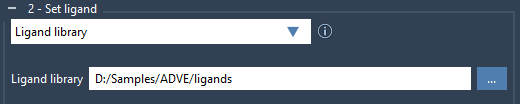
For a library, select Ligand library and browse to the directory containing the ligand files. The library can contain supported formats such as MOL2 and SDF, including multiple ligands per file. By default, ligands are treated as fully flexible. If you choose to lock particular bond types, check the settings first and enable Lock specific ligand bonds.
Flexibility is a trade-off: rotatable bonds can allow more ligand conformations to be explored, but they increase docking time. Also remember that locking bonds does not constrain them during minimization. If ligands need minimization—for example, if they are in 2D—enable Minimize and select a preset. Add missing hydrogens if the ligands do not already have them; hydrogens are needed for bond-type detection during minimization, and polar hydrogens are needed for docking.
3. Make the search box match the question
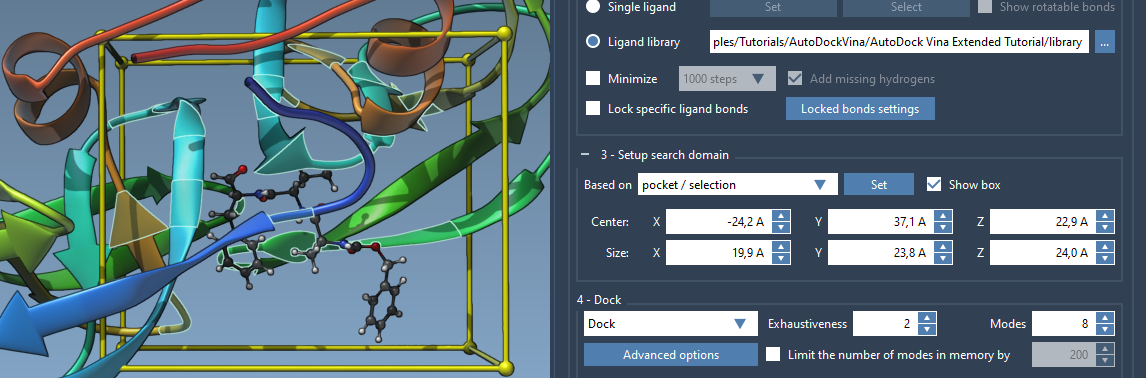
When a receptor is set, the search domain defaults to one based on the whole receptor. If you know the binding site, define a smaller domain around it instead. A smaller search region limits the area being searched and can reduce computation time.
You can adjust the box numerically in the interface, drag its corner controllers in the Viewport, or set it based on a selection. To select residues around a known bound ligand, select that ligand and use Select > Biology > Binding sites. Then choose Based on pocket/selection for the search domain and click Set. The domain is defined in global XYZ coordinates, so the orientation of the system matters when positioning it.
4. Save the run so you can return to it
Choose Dock for a docking run. The options also include scoring ligands in their current positions, local optimization only, and generating PDBQT files for running Vina computations on a cluster. For the tutorial’s example, exhaustiveness is set to 8 and the maximum number of generated binding modes to 20; these are example settings, not universal recommendations.
Enable Save results and select a directory if you want to load the run later. The project directory stores the receptor and ligand files, generated and docked PDBQT files, and MOL2 files for individual modes. Keep its folder hierarchy intact and do not remove files if you want SAMSON to reload the results.
After docking, use the results table and plot to sort, filter, and inspect ligands and conformations. You can restore a pose, export the results table as CSV, or load only selected ligands’ poses when working with a large library. This makes it easier to focus follow-up analysis on a manageable set of candidates rather than loading every pose at once.
Docking scores and poses are useful for prioritizing what to inspect next; they are not a substitute for validating interactions and evaluating candidates in the context of your research question. For the full workflow and additional analysis options, see the AutoDock Vina Extended tutorial.
Note: SAMSON and all SAMSON Extensions are free for non-commercial use. Get SAMSON.