



Two molecular groups can look close in a structure, but a single snapshot rarely tells you whether that proximity is typical. Are solvent atoms consistently gathering around a ligand? Does a residue tend to sit at a preferred distance from another group along a molecular path? The radial distribution function (RDF) helps answer these questions by summarizing pair distances across sampled structures.
That summary is useful, but it is easy to misread if you focus only on the curve. The selections, distance range, bin width, and availability of periodic cell information all affect what the plot means. Here is a practical way to think about those choices and avoid common interpretation traps.
What the curve is counting
An RDF describes how frequently pairs from two groups occur at different separations. Imagine dividing the space around atoms in Group A into thin spherical shells. For each distance, the analysis counts sampled Group A–Group B pairs that fall within the corresponding shell. The shell gets larger as the distance increases, so a raw count alone is not a fair comparison between near and far distances. In simplified form, the count is considered relative to the shell volume, which grows approximately as 4πr²Δr.
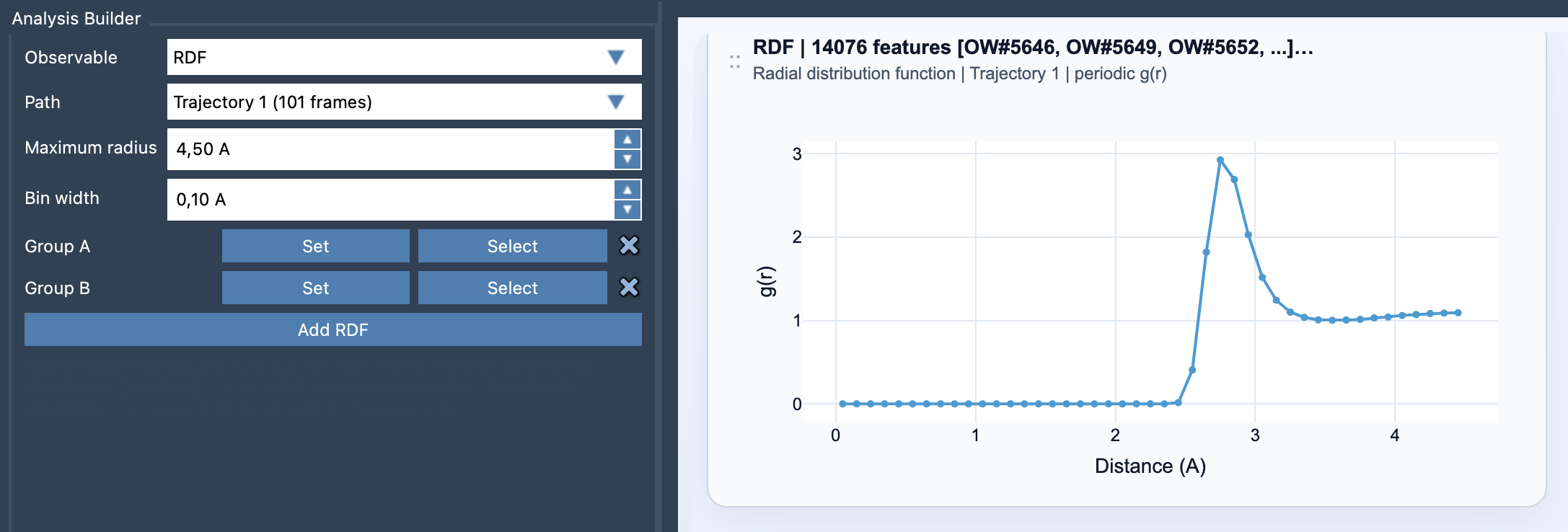
When suitable periodic unit-cell information is available, Path Analyzer can normalize the result and report a g(r) curve. When periodic normalization is unavailable, the result is an RDF-like curve in arbitrary units instead. That distinction matters: don’t interpret an unnormalized curve as though it were a properly normalized g(r).
Choose groups that answer one question
Before opening the analysis, decide what relationship you want to test. A ligand-versus-pocket selection asks a different question from solvent-versus-solute or one residue-versus-another. Both selections must contain atoms. Keeping the groups chemically meaningful makes the plot easier to explain and helps prevent a broad selection from mixing several different interactions into one curve.
In Path Analyzer, choose RDF as the observable, select a path, define Group A and Group B, set the maximum radius and bin width, then click Add RDF. The maximum radius sets the outer distance included in the analysis; it should be large enough to cover the distances relevant to your question. The bin width determines how finely those distances are divided.
Balance detail against noise
A very wide bin can smooth away narrow features. A very narrow bin can make a curve look jagged, especially when the sampled data are limited. There is no universally correct setting: use a width that makes meaningful features visible without turning small fluctuations into apparent structure. If the curve changes dramatically when you adjust the bin width slightly, treat fine details cautiously.
Likewise, a peak indicates that sampled pair distances are more common around that range than nearby distances; it does not, by itself, identify a bond or prove a particular mechanism. Interpret it in the context of your selections and molecular system. Compare like with like: changing the groups, path, distance range, or bin width can change the shape and scale of the plot.
Remember what the plot summarizes
RDF cards summarize the path globally rather than linking to an individual frame. That makes them useful for seeing overall distance patterns, but they do not show when along the path a particular feature occurs. If timing or frame-by-frame changes matter to your question, treat the RDF as a broad summary—not as a substitute for inspecting the underlying structures.
A reliable reading starts with three checks: are the groups the ones you intended, is the curve normalized or in arbitrary units, and are the settings suitable for the distances you want to resolve? Those checks turn an attractive curve into a more defensible analysis.
For setup details, see the RDF documentation.
Note: SAMSON and all SAMSON Extensions are free for non-commercial use. Get SAMSON.