



Two protein structures can look different overall even when the part you care about is strikingly similar. The reverse can also happen: a whole-protein superposition may look reasonable while an important helix or binding-site region remains poorly aligned. This makes structural comparison tricky if you treat one RMSD value as the whole story.
A more useful approach is to decide what you are comparing before interpreting the alignment. With SAMSON’s Protein Aligner, you can first compare sequences, inspect corresponding residues, and then superimpose either entire structures or a selected region. The distinction matters: the RMSD reported after superposition reflects the atoms used for that particular alignment.
Start with the sequence relationship
Load the proteins you want to compare, then open Home > Align to launch Protein Aligner. The tutorial demonstrates the workflow with hemoglobins 1DLW and 1RTX, which can be fetched through Home > Fetch. If your structures contain water, ligands, or alternate locations that you do not want included in the comparison, prepare them first.
Protein Aligner offers two sequence-alignment modes: align by structural model, or align by chain. The chain-based option is useful when a model contains multiple chains, as can occur in oligomeric proteins. Once aligned, the sequence view helps you see how residues correspond. Highlighting options can show properties such as similarity and polarity, making conserved positions easier to spot.

This sequence view is more than a compact summary. Hovering over a residue shows its name and ID and highlights it in the 3D viewport. Clicking a residue selects it and its aligned partners. You can also select multiple residues with Shift, select non-consecutive residues with Ctrl or Cmd, and remove residues from a selection with Alt. Selections made in the document view or viewport are reflected in the alignment as well.
Use whole-protein alignment as a starting point
To superimpose the full structures, make sure no residues are selected, then click Align to this on the row of the model you want to use as the reference. The other model’s button reports the RMSD; the example in the tutorial shows a value of about 3.27 Å. The structures are then superimposed in the viewport.
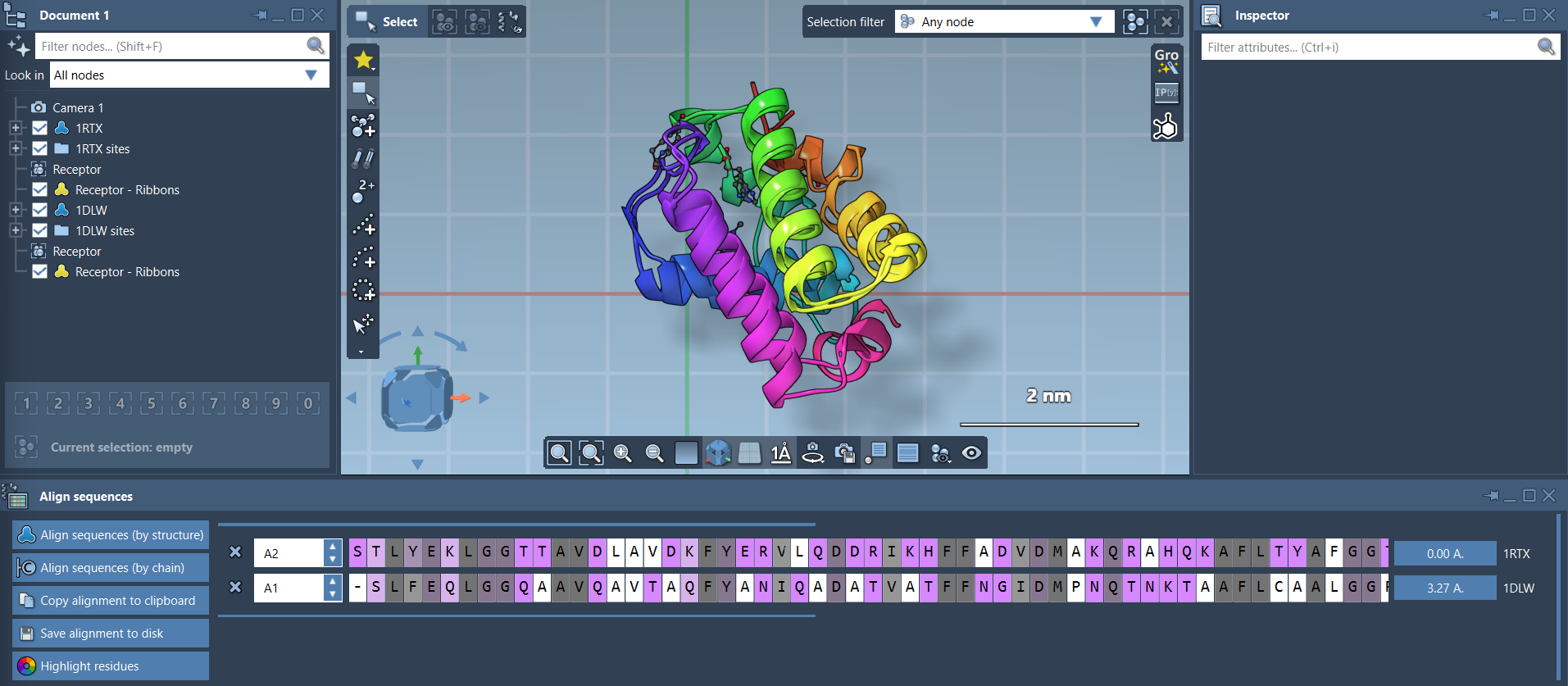
Think of that RMSD as a result tied to the selected alignment—not as a universal verdict on whether two proteins are “similar.” If your scientific question concerns a particular region, a whole-structure fit may give that region less emphasis than you want. The tutorial’s hemoglobin example shows two N-terminal helices that appear similar but are not well aligned after the whole-protein superposition.
Fit the region relevant to your question
For a region-specific comparison, select the corresponding residues in both sequences. In the example, the first 20 residues are selected in each sequence. Then click the alignment button next to that selection to superimpose based only on those residues. The rest of the structures move with the fitted region, so you can inspect how the local match relates to the proteins as a whole.


This is especially useful when you are comparing a conserved domain, a helix, or another selected structural segment rather than asking whether two complete proteins adopt the same overall conformation. Keep track of which residues were used for the fit, and interpret the resulting RMSD in that context. For clearer inspection, ribbon representations can help distinguish the structures; separate ribbon models can be colored differently.
For the complete workflow and additional examples, see the Protein Aligner tutorial.
Note: SAMSON and all SAMSON Extensions are free for non-commercial use. Get SAMSON.