



A molecular model can look ready to simulate and still leave important questions unanswered: Are its bonds correct? Should the force field use the existing connectivity, or infer it from the atoms? What should you do if the setup reports an inconsistency? These choices matter because UFF needs a molecular description—not just a collection of atom positions—to calculate interactions.
This guide walks through a practical UFF setup in SAMSON, with an emphasis on making those early decisions deliberately. It is useful when you want to start a simulation or edit a structure interactively without treating the first available settings as automatically correct.
Start with the structure you intend to model
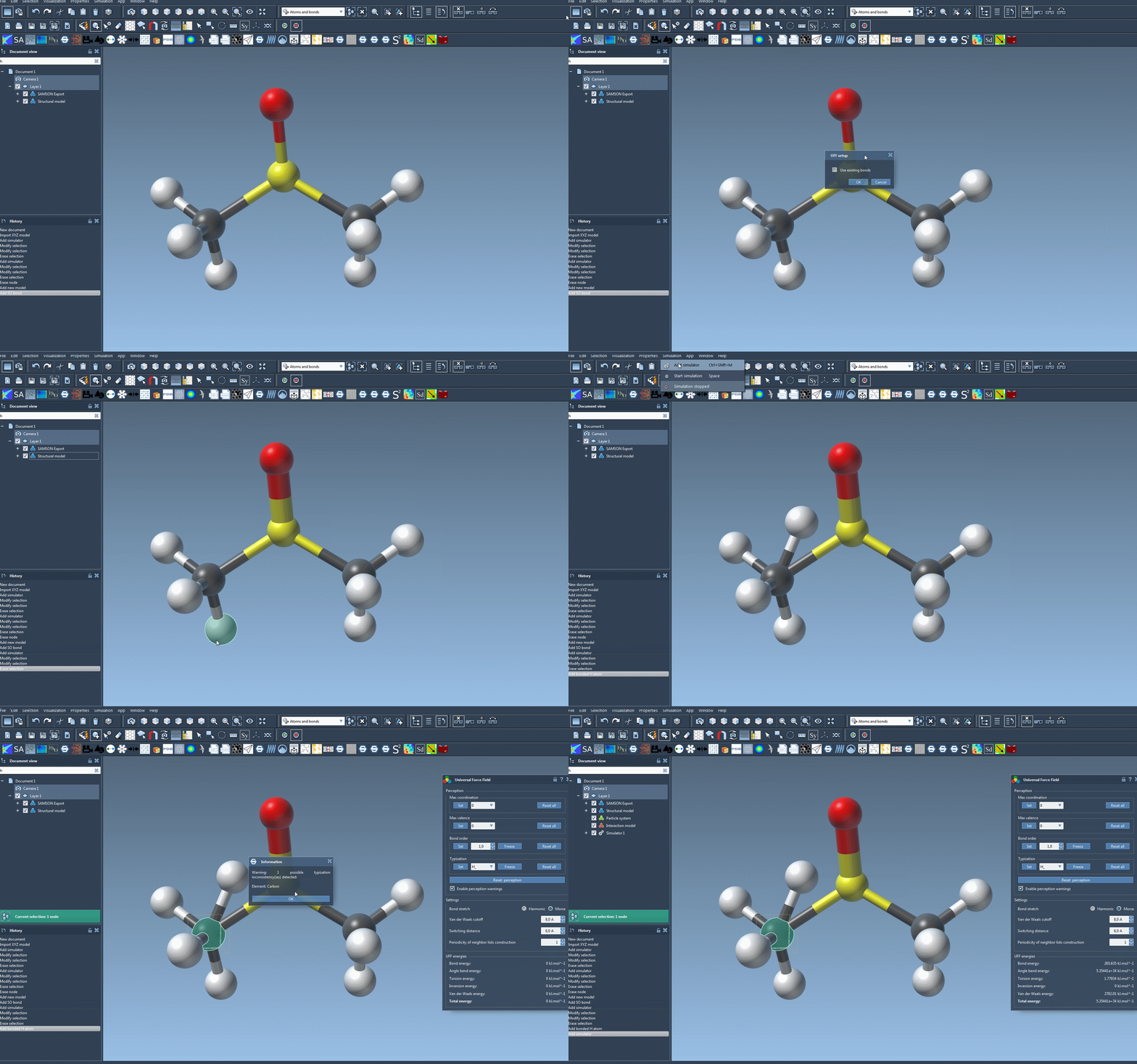
Open the molecular system you want to simulate or edit. Before adding the simulator, decide whether its existing bonds are trustworthy for your task. If they are, the UFF setup window offers Use existing bonds. If you leave that option unchecked, UFF recomputes bonds from atom types and positions. The choice is consequential: the resulting connectivity informs the later bond-order and atom-typing steps.
In SAMSON, add a simulator from Edit > Simulate > Add simulator, or use Ctrl+Shift+M on Windows/Linux or Cmd+Shift+M on macOS. Select Universal Force Field, choose a state updater—FIRE is one example—and confirm. In the UFF setup window, choose whether to use the existing bonds, then confirm again.
Understand what initialization does
When UFF initializes the system, it may compute covalent bonds, then computes bond orders and atom types. If it detects inconsistencies, it may show a warning describing them. Treat that message as a reason to inspect the structure and its assigned representation rather than as something to dismiss automatically. The setup process can perceive a structure, but its results still depend on the supplied atoms, positions, and any bonds you chose to retain.
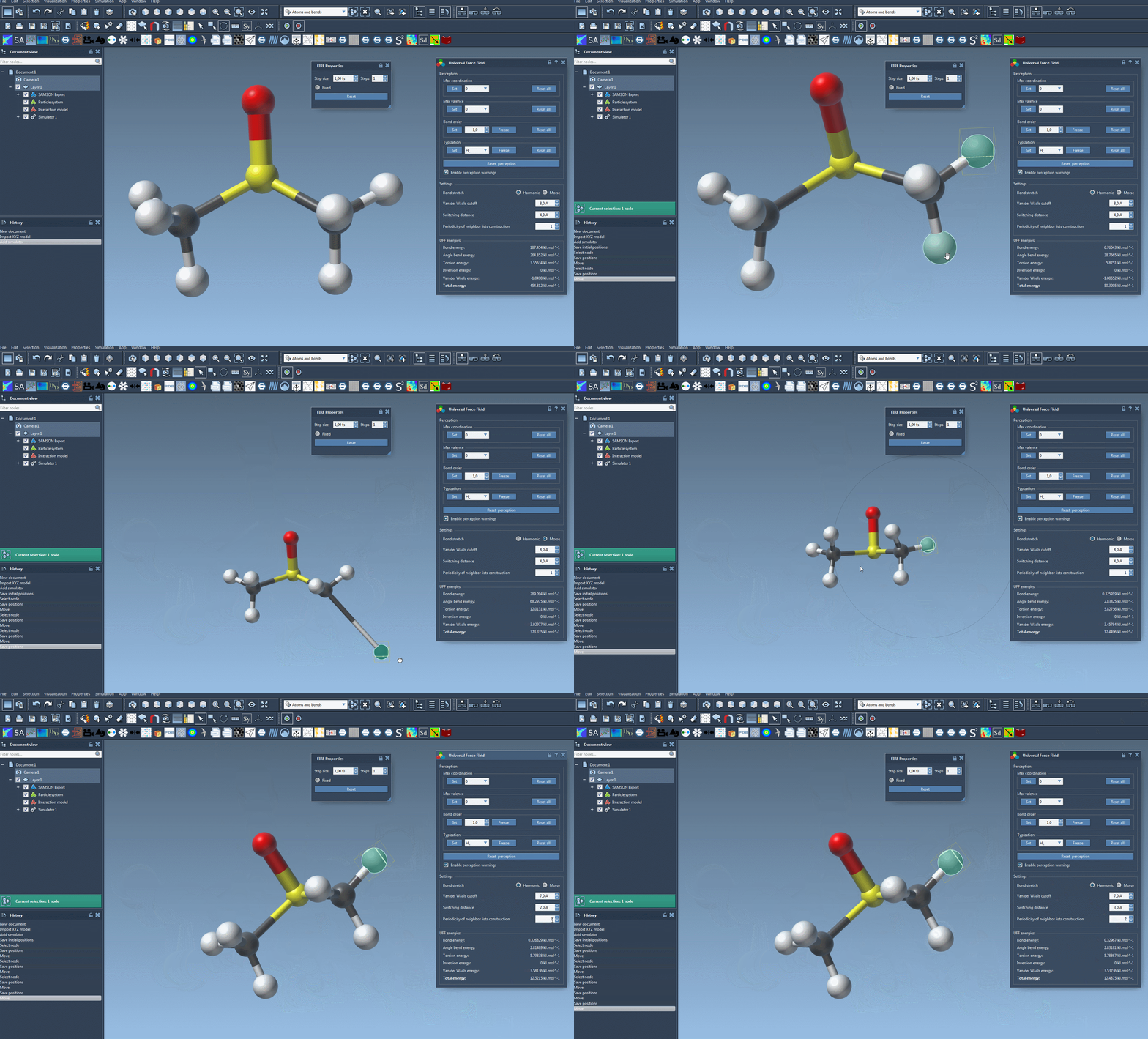
A useful first-run approach is to keep the workflow simple and use the default settings. Once the parameter window appears, start the simulation with Edit > Simulate > Start. The interface displays the energy of each UFF term and the total UFF energy. You can also move atoms interactively and observe how the model updates the positions of other atoms in response. This is a way to explore the model’s response; it should not be confused with independent confirmation that the starting structure or its chemistry is correct.
Know which settings change the calculation
The UFF interface allows you to select either Harmonic or Morse for the bond-stretch interaction. It also exposes the van der Waals cutoff, the switching distance at which the van der Waals term is smoothly reduced toward zero at the cutoff, and the periodicity of neighbor-list construction. By default, neighbor lists are recomputed at each time step. These options control aspects of the interaction calculation, so change them when you have a specific reason, rather than adjusting several at once and losing track of what changed.
Reserve typization overrides for specific problems
For advanced users, SAMSON provides controls to customize atom perception. Maximum coordination and maximum valence values can be changed for individual atoms; the new limits take effect in a new round of automatic perception when they are lower than the defaults. Bond orders can be forced to values from 0.1 to 3.9, including non-integer values, and can be frozen so they do not change during a subsequent perception. Atom types can likewise be assigned and frozen.
These controls are powerful, but the documentation cautions that misuse can lead to incorrect structures. A careful pattern is to select only the atom or bond in question, apply the intended override, and use Reset perception when you want to recompute perception from the current settings and atom positions. The corresponding Reset all buttons clear customizations. This makes it easier to distinguish a targeted correction from a collection of unexplained overrides.
Atoms can also be removed with the eraser editor or added by creating them bonded to an existing atom. Typization is recomputed automatically when the model changes. For help building molecules, see the SAMSON guide to building molecules.
For the full walkthrough and references behind the implementation, read the UFF tutorial.
Note: SAMSON and all SAMSON Extensions are free for non-commercial use. Get SAMSON.