



A molecular path can contain many frames, but a long trajectory is hard to interpret by looking at structures one at a time. A useful first question is often simpler: which combinations of two observables occur most often along the path? For example, does a structure’s distance from a reference tend to increase as its RMSD increases, or does the path repeatedly visit a particular combination of radius of gyration and energy?
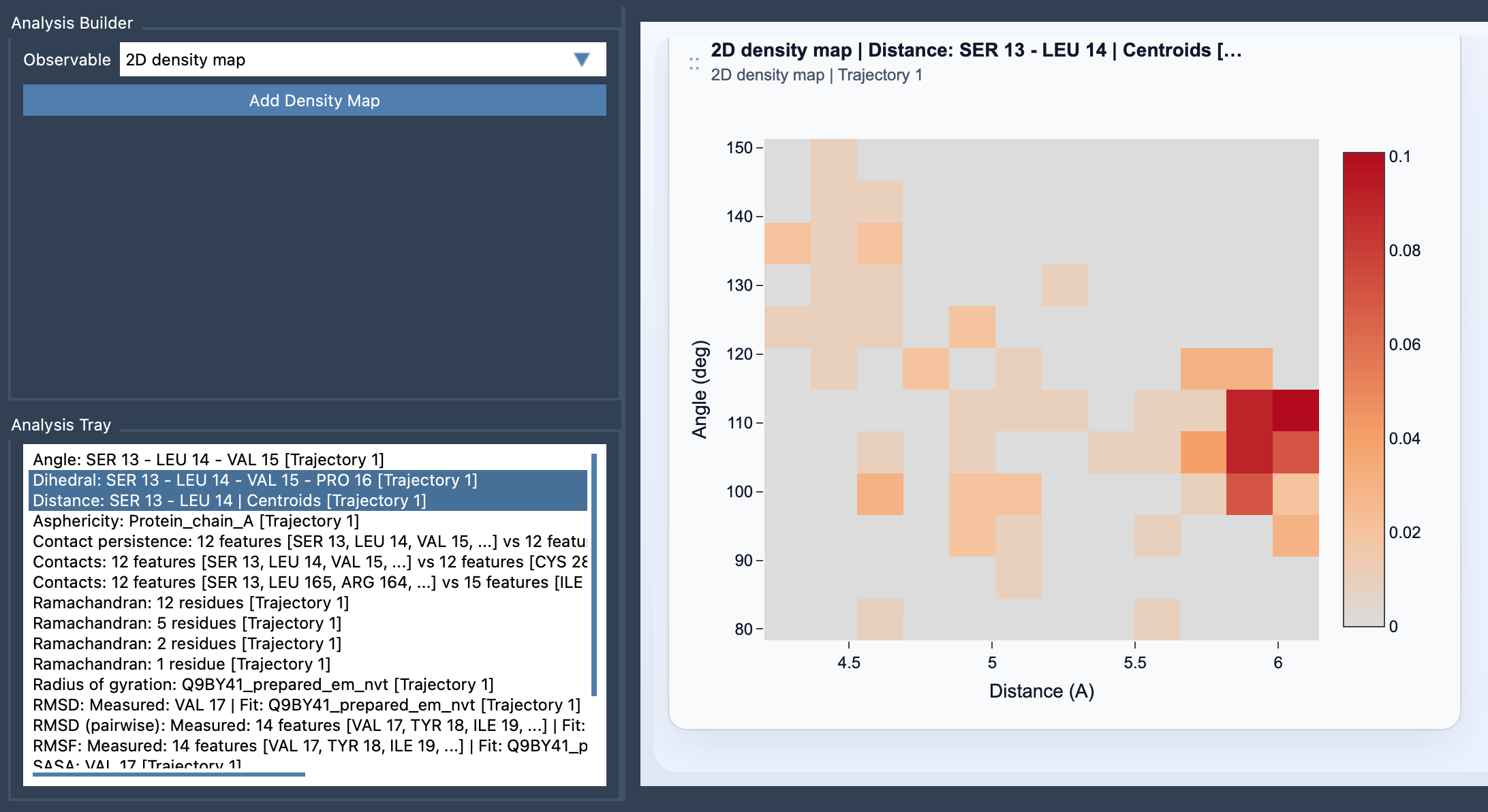
SAMSON’s Path Analyzer 2D density map brings two saved scalar analyses together in one view. It maps the path into a two-observable coordinate space and displays a heatmap of sampling density. This can help reveal commonly visited regions, sparse regions, and patterns that may be difficult to notice when inspecting each observable separately.
What the map tells you—and what it doesn’t
The key to reading this plot is to distinguish where the path samples from how energetically favorable a point is. A density map summarizes how frequently frame-wise points fall into bins in the selected two-dimensional space. Regions with more sampled points have higher density in the map. That is a statement about the observed path, not a direct measurement of energy.
In the documented normalization, the density in bin (m, n) is the number of points in that bin divided by the total number of sampled points and the bin’s area, N × Δx × Δy. In other words, the map accounts for both the overall number of points and the widths of the bins along the two axes. The density is useful for comparing occupancy across the plotted space, but it should not be read as an energy landscape.
This distinction matters in practice. A frequently visited region is a feature of the sampling represented by the path; it does not, by itself, establish why the system visited that region or whether it is energetically preferred. If the scientific question is specifically how energy varies across the same two-observable projection, use the Path Analyzer’s Energy landscape instead.
Build a useful two-observable view
Start with two frame-wise scalar analyses that were computed on the same path. In Path Analyzer, create or reuse them in the Analysis Tray, choose 2D density map as the observable, select exactly two saved scalar analyses, and click Add Density Map. This is a derived analysis: the inputs come from the tray rather than from a new direct atom selection.
For interpretation, choose observables that describe complementary aspects of the motion. The documentation suggests combinations such as Distance vs RMSD or Radius of gyration vs Energy. If both axes largely describe the same change, the second axis may add little context. A pair that captures distinct properties can make clusters or trends easier to interpret.
A practical reading checklist
- Check the inputs: are both saved analyses scalar, frame-wise, and computed on the same path?
- Read the axes as observables: each location represents a combination of values, not a molecular structure by itself.
- Look for occupancy patterns: identify regions where the path places many points and regions with fewer points.
- Keep the conclusion precise: describe the map as sampling density, not as energy or proof of a physical cause.
Thinking in terms of two observables is a compact way to turn a sequence of frames into a view of the path’s sampling behavior. To see the full workflow and equation, learn more in the 2D Density Map documentation.
Note: SAMSON and all SAMSON Extensions are free for non-commercial use. Get SAMSON.