



A molecular trajectory can be hard to read at a glance. A structure may translate or rotate as a whole, while a loop, domain, or binding-site region also changes shape. If you measure every coordinate difference without accounting for the overall movement, those two effects can be mixed together. RMSD in SAMSON’s Path Analyzer helps separate them by aligning each frame to a reference before measuring the selected atoms.
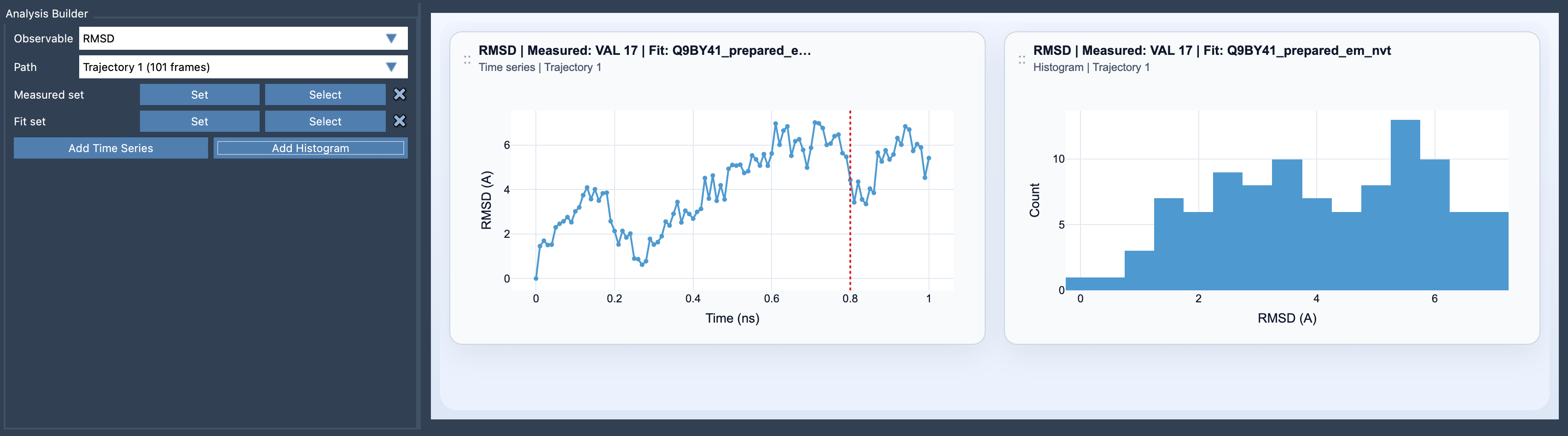
Two selections answer two different questions
The key to a useful RMSD plot is choosing both a Fit set and a Measured set. The Fit set determines how each frame is aligned to the first frame. The Measured set is then compared with its positions in that first frame, after the alignment.
Think of the Fit set as the reference used to remove overall motion, and the Measured set as the region whose structural deviation you want to inspect. For example, a stable protein core can be the Fit set while a flexible loop is measured. The resulting plot asks: How much does this loop move relative to the aligned core? If you instead measure the core itself, you ask whether that core changes after the fit.
This distinction matters: RMSD is not just a property of a trajectory. Its meaning depends on the atoms you fit and the atoms you measure. A large value for one measured region does not, by itself, tell you whether the whole molecule moved or that region rearranged. The alignment and selection choices provide that context.
A practical setup
- Open Path Analyzer and choose RMSD as the observable.
- Select the path you want to examine.
- Define two atom-containing selections: the Fit set and the Measured set.
- Add a Time Series to follow deviation frame by frame, or a Histogram to inspect the distribution of sampled RMSD values.
Before interpreting the graph, state your question in plain language. “How much does this region change relative to the scaffold?” suggests fitting the scaffold and measuring the region. “How much does the structure change after fitting the backbone?” suggests using the backbone as the fit reference and selecting the atoms you want to compare. Making this choice explicit prevents a plot from being treated as a generic score detached from its setup.
Reading the plot without over-reading it
A time series is useful for locating when deviations rise or fall along the path. A histogram answers a different question: how the RMSD values are distributed across the sampled frames. Neither view alone explains the structural cause of a change. A rise in RMSD identifies greater deviation in the measured set relative to the first frame after fitting; it does not name the motion or establish why it happened.
When a time-series excursion catches your eye, click its point to move the path to the corresponding frame. Double-clicking a point selects the measured features in SAMSON, making it easier to inspect the structure associated with that value. You can then compare the apparent change with other observables, such as radius of gyration, distance, or energy. These views can add context, but the structural interpretation still comes from examining the relevant frames.
A useful rule of thumb is to fit on a stable core, backbone, or binding-site scaffold when you want to focus on a more flexible region. Then keep the fit and measured selections in mind whenever you share or compare RMSD plots: they define what the result means.
For the equation, setup details, and interaction notes, see the RMSD reference documentation.
Note: SAMSON and all SAMSON Extensions are free for non-commercial use. Get SAMSON.