



Two protein structures can show different conformations, but comparing the endpoints alone does not reveal how one might transition into the other. A straight, atom-by-atom interpolation can also produce a path that is difficult to interpret: atoms move, but the structural relationships that help preserve local shape may not be represented. For molecular modelers preparing conformational analyses or simulation workflows, the practical challenge is to generate an intermediate path that can be inspected, adjusted through its settings, and exported for further work.
SAMSON’s ARAP Interpolator offers one way to build such a path. As-Rigid-As-Possible (ARAP) interpolation uses a geometric model to generate intermediate conformations between a start and goal structure. The resulting path is useful as a structural starting point; it should not be treated as proof that the protein follows this route energetically or biologically. The tutorial below uses diphtheria toxin structures as a concrete example.
Start with comparable, clean structures
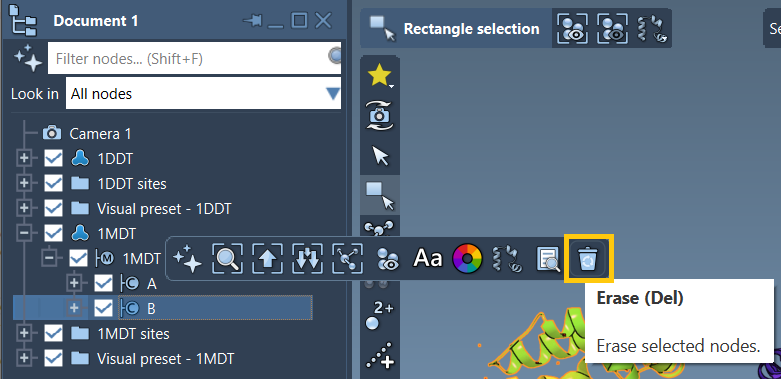
Fetch 1DDT and 1MDT in SAMSON using Home > Fetch. The example focuses on chain A. In the Document view, expand 1MDT and delete chain B so the structures you intend to compare are consistent. Then run Home > Prepare on both structures to remove alternate locations, water, ligands, and ions.
This preparation matters for more than tidiness. The interpolation app expects a connected structure; extra disconnected components can prevent the calculation from running. If you encounter the error “Cannot proceed because the structure does not make one connected component,” check for unremoved water, ions, ligands, or other disconnected pieces and prepare the structures again.
Turn the endpoints into conformations
With the structures cleaned, select each structure in the Document view and choose Edit > Conformation. Name the conformations clearly—for example, 1DDT A and 1MDT A. These names make it easier to confirm which structure is being used as the start and which as the goal when you open the interpolation app.
Choose what the path should preserve
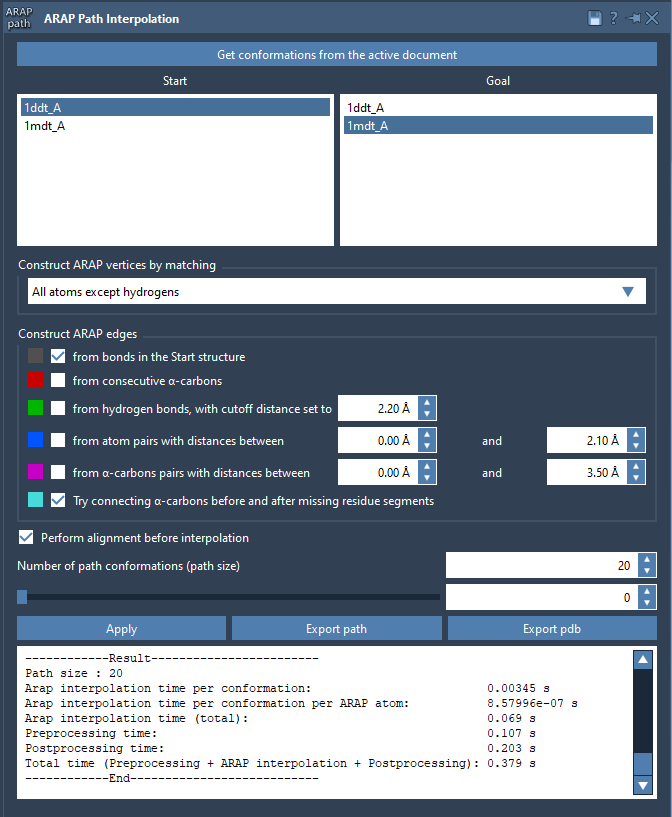
Open Home > Apps > Biology > ARAP Path Interpolation, retrieve the conformations from the active document, and set 1DDT A as Start and 1MDT A as Goal. For the example, select All except hydrogens for matching atoms. This uses non-hydrogen atoms to match the structures and define ARAP vertices. Other choices include all atoms, α-carbons only, or backbone atoms; the right choice depends on the level of detail you want to use for matching.
Edge construction determines which structural relationships inform the interpolation. For this example, enable from bonds in the Start structure and Try connecting α-carbons before and after missing residue segments. The first uses covalent bonds in the start structure; the second adds connections across gaps caused by missing residue segments. If several edge-building options are selected, the app adds them in the displayed top-to-bottom order.
Also enable Perform alignment before interpolation so the start conformation is aligned with the goal before the path is computed. Set Number of path conformations to 20; this count includes both endpoints. These choices are a reproducible starting configuration, not a universal setting for every protein pair.
Inspect before exporting
After clicking Run, use the app’s slider to move through the intermediate conformations. Scrubbing the path is a useful first quality check: look for abrupt changes or regions that merit closer inspection, rather than assuming that a smooth-looking animation establishes physical plausibility.
The app also creates a visual model of the ARAP edges. Toggle its visibility in the Document view to see how the selected edge-building options contributed to the construction. This can help explain what information shaped the path and make settings easier to review with collaborators.
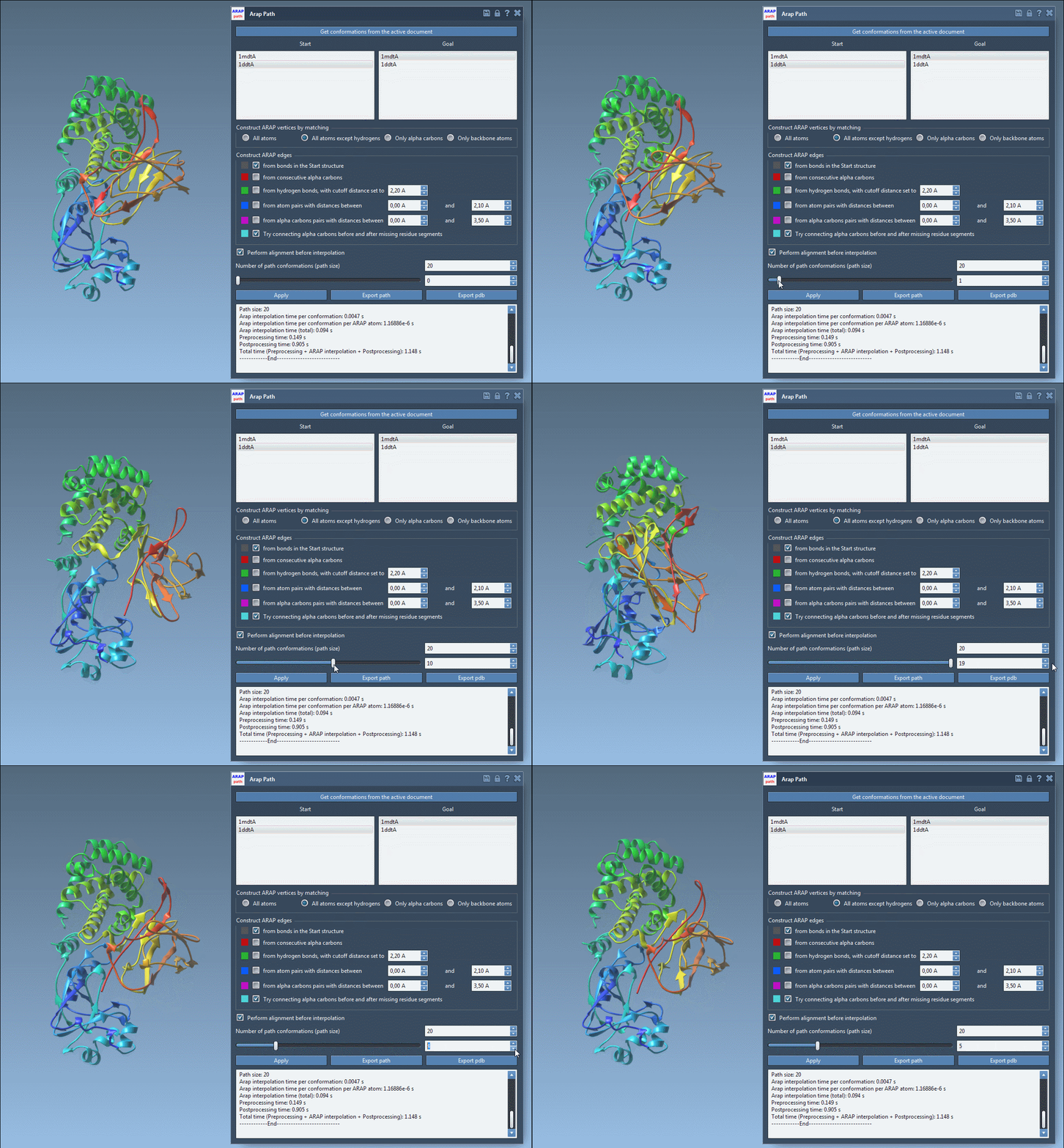
When the path is ready for the next stage, choose Export path to save a trajectory object in the current SAMSON document, or Export PDB to write the whole path and its conformations as sequential PDB files. The path can then serve as input for further work, such as umbrella-sampling setup or refinement with steered molecular dynamics or P-NEB. Those methods are separate steps: ARAP interpolation generates a geometric transition path, not an energy-optimized or experimentally validated mechanism.
For the complete walkthrough and additional options, learn more in the original ARAP interpolation tutorial.
Note: SAMSON and all SAMSON Extensions are free for non-commercial use. Get SAMSON.