



A molecular transition path can look reasonable and still contain awkward intermediate structures: atoms may take an unnecessarily indirect route, or neighboring frames may be unevenly spaced. That makes the path harder to inspect and may make it a poor starting point for later analysis. The Parallel Nudged Elastic Band method (P-NEB) in SAMSON addresses a specific part of this problem: it refines an existing candidate path by optimizing its intermediate images while spring forces keep neighboring states distributed along the route.
The distinction matters. P-NEB is for improving a path you already have, not for inventing one from just two endpoint structures. First generate intermediate conformations—for example, by interpolation or with a path-finding extension—then use P-NEB to relax the candidate. NEB is commonly used to find transition paths between structures corresponding to local energy minima.
Start with a path, not a collection of disconnected guesses
SAMSON represents a trajectory as a path node. A conformation stores the positions of a selected group of atoms at one state. P-NEB can work with either, but for the same system and number of steps, the documentation recommends using a path because optimizing a set of conformations takes longer. If you already have conformations, select them and use Conformation > Create path from conformations in the context menu to combine them.
This is a practical way to separate two jobs: a path-generation method proposes a route; P-NEB then improves that route. For ligand motion, a path-finding tool such as Ligand Path Finder can provide a starting trajectory.
A compact P-NEB setup
Open P-NEB from Home > Apps > All > P-NEB, or find it using SAMSON’s search box. For the tutorial example, the settings are: spring constant 1.00, 100 optimization loops, Universal Force Field as the interaction model, and FIRE as the optimizer. Enable parallel execution to run one thread per conformation. Leave the climbing image option unchecked for the initial run; it can be tested afterward when locating a saddle point is relevant. Name the output with a suffix such as NEB.
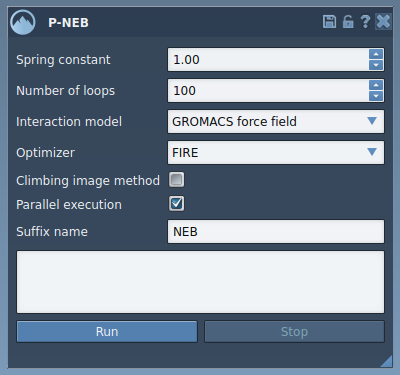
In the Document view, select the path and click Run. When the Universal Force Field setup asks whether to use existing bonds, choose to use them and confirm. The app initializes the calculation and reports progress in the status bar.

Inspect the result, not just the completion message
When optimization finishes, SAMSON adds a new path to the Document view. Select it and inspect the trajectory; double-clicking a path starts or stops its animation. Reviewing the sequence helps you understand how the modeled atoms move between states and whether the refined route is useful for your next step. The app also provides a computation summary.

A refined path is still a result of the chosen interaction model and setup, not an automatic guarantee that the modeled mechanism is experimentally correct. Treat it as a computationally optimized candidate: inspect the conformations and decide whether it is suitable for the simulation or analysis you plan to perform. If the route is not useful, revisit the initial path as well as the calculation settings.
For the complete walkthrough and sample structures, see the P-NEB tutorial.
Note: SAMSON and all SAMSON Extensions are free for non-commercial use. Get SAMSON.